
Automated appointment reminders are scheduled, multi-channel messages sent to clients before their booking without any manual effort from your team. For beauty professionals, this single change can cut no-shows by up to 80%, turning a chronic revenue drain into a predictable, full diary. Tools like DaySmart Salon, Remindlo, and SchedulingKit make it straightforward to automate beauty appointment reminders across SMS, email, and WhatsApp. The result is fewer empty chairs, less time chasing clients, and a more profitable salon. This guide covers everything you need to set it up correctly, stay compliant, and keep clients engaged.
What do you need to automate beauty appointment reminders?
Before you send a single automated message, three things must be in place: accurate client contact data, legal consent, and the right software.
Client data collection is the foundation. Every booking form, whether online or at the front desk, must capture a verified mobile number and email address. A surprising number of salons collect phone numbers but never confirm they are correct. Build a quick verification step into your onboarding process, asking clients to confirm their number at their first visit or via a booking confirmation email.
Legal consent under UK GDPR is non-negotiable. Appointment reminders fall under the legitimate interest lawful basis, which means you do not need explicit marketing opt-in for transactional reminders. You do, however, need to record that consent was obtained and honour opt-out requests without delay. Tag each client record as "consent granted" at the point of booking. Platforms like Remindlo include built-in consent capture tools to make this part of your standard onboarding flow.
Choosing your software is the third prerequisite. Here is a quick comparison of the most widely used options for beauty businesses:
| Platform | Best for | Key reminder features |
|---|---|---|
| DaySmart Salon | Full-service salons | Configurable reminders 1–7 days ahead, two-way SMS, confirmation sync |
| SchedulingKit | Independent stylists | Email and SMS sequences, reschedule links, confirmation tracking |
| Remindlo | Google Calendar users | Auto-sync with Google Calendar, SMS reminders, opt-out management |
Beyond these dedicated tools, you can also layer reminder automation on top of existing booking software using Zapier workflows or native integrations. The multi-channel approach matters too. SMS reaches 90% of recipients within three minutes, making it the right channel for short, timely nudges. Email suits longer, detail-rich messages sent 24 hours ahead. WhatsApp sits in the middle, offering rich formatting with the open rates of SMS. For guidance on WhatsApp automation compliance, review the relevant checklist before activating that channel.
How to set up a multi-touch reminder sequence that fills your diary
The most effective reminder sequences use three touchpoints, not one. A single reminder the day before is easy to miss. A structured sequence removes almost all ambiguity.
-
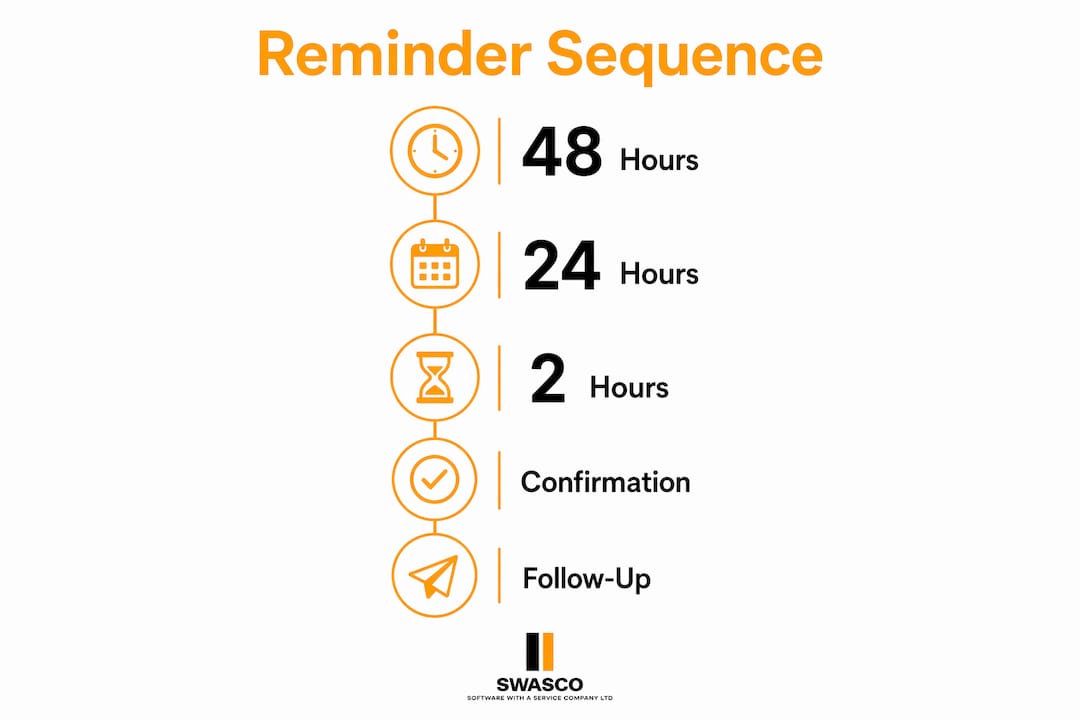
48 hours before the appointment. Send an email with full details: the client's name, the service booked, the stylist's name, the date and time, and your salon's address. Include a clear confirm or reschedule link. This gives clients enough time to rearrange without leaving you with an empty slot at short notice.
-
24 hours before the appointment. Send an SMS. Keep it under 160 characters. Include the appointment time, your salon name, and a single reply option such as "Reply YES to confirm or call us to reschedule." Two-way reminders with confirm and reschedule replies measurably outperform passive notifications. Clients who actively confirm are far less likely to no-show.
-
2 hours before the appointment. Send a brief SMS nudge. Something like: "See you at 2pm today at [Salon Name]. Reply STOP to unsubscribe." This final message catches clients who may have forgotten and gives them a last chance to cancel rather than simply not turning up.
When a client confirms via SMS or a link, that status should update automatically in your appointment book. DaySmart Salon syncs client confirmations directly into the schedule in real time, removing the need for staff to manually chase or update records. This is where beauty service appointment automation pays for itself in saved admin time alone.
Pro Tip: Keep your reminder messages warm but brief. Avoid writing reminders that sound like marketing copy. "We're looking forward to seeing you" performs better than "Don't miss your exclusive appointment." Clients respond to messages that feel personal, not promotional.
One more consideration: message queuing. Some platforms batch-send messages at set intervals rather than at the exact scheduled time. When planning your sequence, check your platform's queuing behaviour and build in a small buffer to account for any delay in delivery.
Which platforms and integrations work best for salon reminder automation?
The right platform depends on how your salon currently manages bookings. Here is a practical breakdown:
Native salon software like DaySmart Salon and SchedulingKit includes reminder automation as a built-in feature. You configure the timing, write your message templates, and the system handles the rest. Confirmation tracking in DaySmart eliminates guesswork and allows quicker rebooking of unconfirmed slots. These platforms are the simplest option if you are starting from scratch or willing to migrate your booking system.
Google Calendar users face a specific limitation. Google Calendar does not send SMS or email reminders to clients natively. You need a third-party tool like Remindlo, which monitors your calendar via auto-sync and sends reminders at configured times. The setup requires mapping each calendar event to a client phone number, which adds a small amount of initial configuration work but runs automatically once live.
Zapier-based workflows connect tools that do not integrate natively. For example, you can link a booking form in Typeform or Google Forms to an SMS platform like Twilio, triggering a reminder sequence whenever a new appointment is created. This approach suits salons with existing tech stacks they do not want to replace.
Key factors to weigh when choosing your setup:
- Scalability. Can the platform handle your booking volume without per-message costs becoming prohibitive?
- Two-way messaging. Does it support client replies that update appointment status automatically?
- Ease of setup. Is the configuration something you or a team member can manage without technical support?
- Compliance tools. Does it include opt-out management and consent recording?
For salons exploring AI-driven client retention, more advanced platforms can trigger follow-up sequences after appointments, not just before them, turning reminder automation into a full client engagement system.
How to stay legally compliant with automated salon reminders
UK GDPR governs every automated message your salon sends. Getting this wrong carries real risk, but the rules are straightforward once you understand them.
Appointment reminders are treated as transactional communications under the legitimate interest basis, not marketing. This distinction matters because it means you do not need a separate marketing opt-in to send a booking reminder. You do need to:
- Record when and how consent was obtained for each client
- Include a clear opt-out instruction in every message (for example, "Reply STOP to unsubscribe")
- Act on opt-out requests promptly, removing the client from your reminder list within a reasonable timeframe
- Keep your contact data accurate and up to date, deleting records for clients who have not visited in a defined period
A note on shared responsibility: Legal compliance is a shared duty between your business and your automation platform. The platform provides the tools for consent capture and opt-out management. Your business is responsible for using those tools correctly and maintaining accurate records. Automation aids compliance but does not replace your obligations.
Frequency and tone also affect how clients perceive your messages. Three reminders per appointment is the accepted standard. More than that risks clients opting out entirely, which costs you the ability to reach them for future bookings. Keep messages professional, concise, and clearly identifiable as coming from your salon.
Common challenges when automating beauty appointment reminders
Even well-configured reminder systems run into problems. Here are the most common issues and how to resolve them.
Incomplete contact data is the most frequent cause of failed reminders. If a client's mobile number is missing or incorrect, no reminder reaches them. Audit your client database before going live. Flag any records with missing phone numbers and contact those clients at their next visit to update their details.
Unconfirmed appointments require a clear protocol. If a client has not confirmed 24 hours before their slot, your system should flag that booking for manual review or automatically offer the slot to a waitlist. Real-time confirmation tracking allows salons to manage unconfirmed slots and fill cancellations without staff having to check manually.
Clients ignoring reminders usually signals a message tone or timing problem. If your no-show rate is not improving, test different message formats. Move from passive ("Your appointment is tomorrow") to active ("Please confirm your appointment for tomorrow by replying YES"). Changing reminder wording to active confirmation requests has a measurable impact on response rates.
Pro Tip: Track your no-show rate and confirmation percentage weekly for the first month after going live. These two numbers tell you whether your sequence is working. If confirmation rates are below 60%, adjust your message copy before changing the timing.
Technical sync errors between your booking software and reminder platform are less common but worth monitoring. Check your integration logs weekly during the first month. Most errors stem from mismatched client identifiers or calendar event formatting rather than platform faults.
For a broader view of how follow-up automation works in salons, including post-appointment sequences, the principles are the same: accurate data, clear triggers, and consistent monitoring.
Key takeaways
Automated multi-touch reminder sequences are the single most effective way to reduce no-shows and protect salon revenue without adding to your team's workload.
| Point | Details |
|---|---|
| Three-touch sequences work best | Send reminders at 48 hours, 24 hours, and 2 hours before each appointment. |
| SMS outperforms single-channel reminders | SMS reaches 90% of recipients within 3 minutes, making it ideal for timely nudges. |
| Compliance is straightforward | Appointment reminders use legitimate interest basis; record consent and honour opt-outs promptly. |
| Platform choice depends on your setup | DaySmart Salon suits full-service salons; Remindlo suits Google Calendar users. |
| Track confirmation rates weekly | Monitor no-show and confirmation percentages to identify and fix sequence problems early. |
Why I think most salons are still leaving money on the table
I have worked with enough service businesses to know that the gap between knowing something works and actually implementing it is where most revenue gets lost. Automated reminders are not new. The research is clear. A well-structured sequence can take your no-show rate from 20% down to around 4%. Yet the majority of independent salons I speak to are still sending one manual text the morning of the appointment, if they send anything at all.
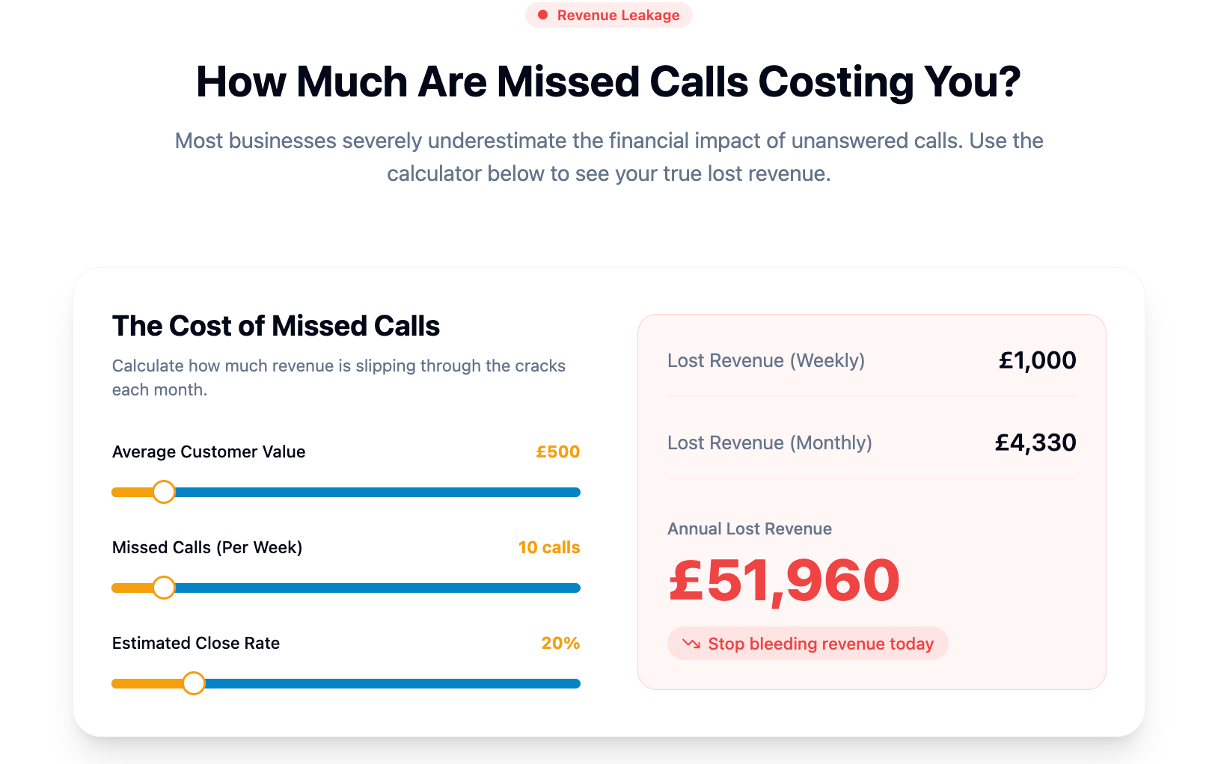
The reason is usually not cost or complexity. It is inertia. The current system, however imperfect, feels familiar. Setting up a new platform feels like a project. But the maths are hard to argue with. If your average service is worth £60 and you have five no-shows a week, that is £1,500 a month in lost revenue. A reminder platform costs a fraction of that.
What I find most underused is the two-way confirmation feature. Most salons that do use automated reminders send one-way messages. They notify but do not ask. The moment you add a confirm or reschedule link, you transform a passive notification into an active client commitment. That shift alone changes client behaviour.
The other thing worth saying is that automation does not make your salon feel impersonal. Done well, it does the opposite. Clients notice when a business communicates clearly and consistently. A well-timed, well-worded reminder signals that you value their time. That is a competitive advantage, not a compromise on personal service.
— James Paul
Ready to stop losing revenue to missed appointments?
If you are serious about cutting no-shows and want a system that handles reminders, follow-ups, and client engagement without adding to your workload, Talk2Aiva by SWASCO is built for exactly that. Talk2Aiva connects with your existing booking channels and automates client communication across SMS, email, and web chat, with full setup support included so you are not left to figure it out alone.
Whether you are running a busy nail salon, a lash studio, or a full-service hair salon, Talk2Aiva gives you the tools to automate your client communications and focus on the work that actually grows your business. Setup is guided, support is ongoing, and the results speak for themselves.
FAQ
How much can automated reminders reduce no-shows?
A three-touch automated reminder sequence can reduce no-shows by up to 80%, bringing rates down from 20 to 25% to around 4 to 5%. The impact is strongest when reminders include two-way confirmation options.
Do I need client consent to send appointment reminders in the UK?
Appointment reminders are covered under the legitimate interest lawful basis under UK GDPR, so you do not need a separate marketing opt-in. You must record consent at booking and include a clear opt-out option in every message.
What is the best timing for beauty appointment notifications?
Send the first reminder 48 hours before via email, a second 24 hours before via SMS, and a final nudge 2 hours before via SMS. This three-touch sequence gives clients enough time to reschedule while keeping your diary as full as possible.
Can I automate reminders if I use Google Calendar?
Google Calendar does not send SMS or email reminders to clients natively. You need a third-party tool such as Remindlo, which auto-syncs with Google Calendar and sends reminders at your configured times.
What should I include in a salon appointment reminder message?
Every reminder should include the client's name, the service booked, the stylist's name, the date and time, your salon's location, and a confirm or reschedule option. Keep SMS messages under 160 characters and always include an opt-out instruction.