
Every empty chair in your salon represents money that is already gone. Missed appointments and clients who never rebook are two of the most consistent revenue drains salon owners face, yet most still rely on manual phone calls and memory to fix them. Understanding how follow-up automation works in salons, the practice properly known as automated client engagement, gives you a clear picture of why this technology outperforms any manual system. This article walks through the mechanics: how reminders fire, how rebooking prompts are calculated, how your systems need to connect, and how to keep the personal touch intact while automation handles the heavy lifting.
Table of Contents
- Key takeaways
- How follow-up automation works in salon scheduling
- Rebooking automation: turning one visit into many
- The tech stack that makes it all work
- Timing, personalisation, and the human element
- My honest perspective on salon automation
- How Talk2Aiva helps salons automate follow-ups
- FAQ
Key takeaways
| Point | Details |
|---|---|
| The 3-touch reminder sequence | Automated reminders follow a confirmation, pre-appointment, and day-of sequence that consistently reduces no-shows. |
| Rebooking timing is service-specific | Effective rebooking automation calculates return windows per service type, not generic fixed intervals. |
| Integration accuracy is critical | Real-time data sync between your booking and CRM tools prevents wrong reminders and missed cancellations. |
| Personalisation drives response rates | Messages using client names, stylist details, and specific services achieve significantly higher confirmation rates. |
| Automation supports, not replaces, people | Technology handles consistency; your team still delivers the client experience that builds lasting loyalty. |
How follow-up automation works in salon scheduling
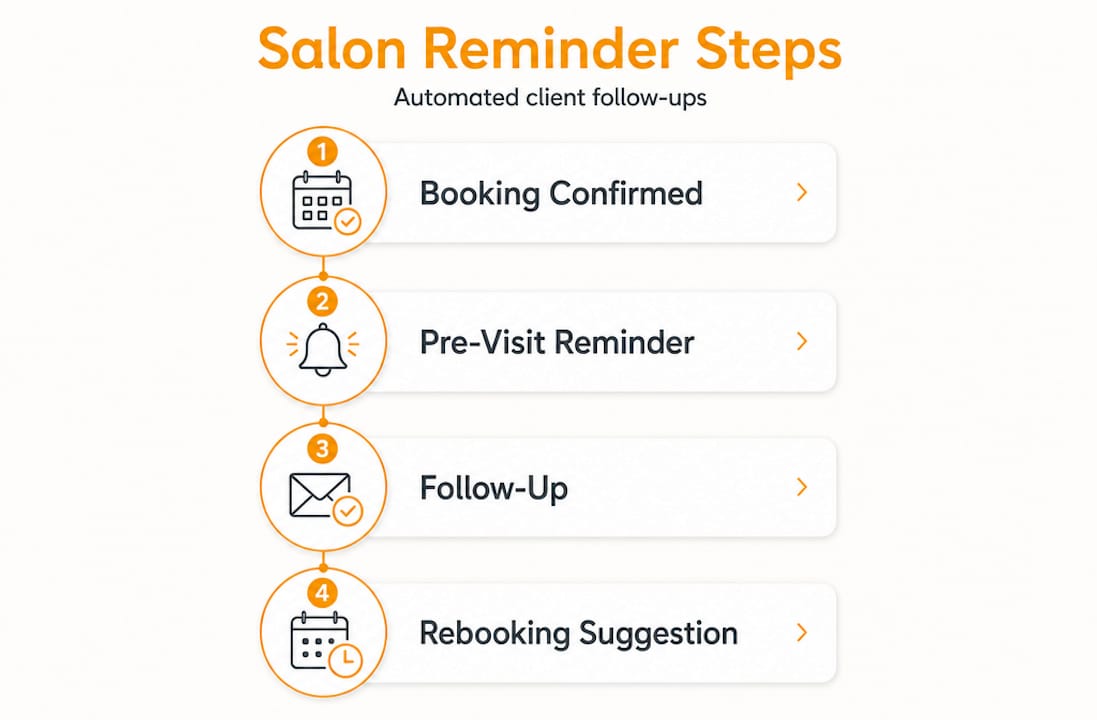
The foundation of automated client communication sits on a well-structured reminder sequence. Most effective systems follow a 3-touch framework that moves a client from booking confirmation through to their appointment day without your front desk lifting a finger.
Here is how that sequence typically runs:
- Immediate booking confirmation. The moment an appointment is booked, the client receives a confirmation via SMS, email, or both. This message locks in the date, time, stylist name, and service. It also sets expectations and reduces the anxiety that can lead to forgotten bookings.
- 24 to 48 hour pre-appointment reminder. This is where SMS reminders show their value, with two-way reply options built in. The client can reply YES to confirm, NO to cancel, or R to request a reschedule. The system updates your calendar automatically on reply, with no manual input needed.
- Day-of final reminder. A short, friendly message on the morning of the appointment reduces last-minute no-shows. It serves as a practical nudge rather than a chaser, and most clients appreciate it.
The multi-channel approach matters here. Text messages carry a 98% open rate, making SMS the primary channel. Email adds detail and works for clients who prefer it. Voice calls work well as a final confirmation channel for high-value appointments. Covering more than one channel widens your reach without creating extra work.
Pro Tip: Set your pre-appointment reminder to send between 9am and 11am. Messages that arrive during a commute or mid-evening tend to get ignored or forgotten by the time the client checks their diary.
The two-way sync is where automated scheduling genuinely earns its keep. When a client cancels via text reply, that slot can open on your waitlist automatically and notify the next waiting client in seconds. No staff member needs to spot the reply, log it, and ring down the waitlist. The system handles the entire chain.
Rebooking automation: turning one visit into many
This is where the real financial impact of automated client engagement becomes visible. A reminder prevents a no-show. Rebooking automation actively grows your revenue by bringing clients back on the right schedule.
Here is how it works in practice:
- After a service is marked as complete in your system, the software logs the service type and the date.
- It then calculates the appropriate return window based on that service. Haircuts typically prompt a return message at four weeks. Colour treatments target six to eight weeks. Lash fills are set at two to three weeks.
- At the calculated point, the client receives a personalised SMS that references their specific service and includes a direct booking link showing their usual stylist's availability.
- Once the client books, the automation stops. No follow-up message fires after a booking is in place.
That last point is worth emphasising. Good rebooking systems do not keep sending messages once the job is done. This prevents clients feeling pestered and protects the positive relationship you have built.
The difference between this and a generic "We miss you" email blast is enormous. Generic campaigns treat all clients the same. Rebooking automation understands that a client who had a balayage eight weeks ago needs a different message at a different time than a client who had a blow-dry last week. This precision is what converts casual visitors into regulars.
Pro Tip: Avoid using fixed intervals for all services. Rebooking reminders fail when they ignore actual service cycles. A four-week message sent to a colour client at six weeks lands at the right moment. The same message sent at four weeks feels premature and trains clients to ignore your texts.
The client retention numbers behind this approach are compelling. Salons that cut no-shows from 15 to 20% down to 6 to 9% through automated sequences also report a measurable lift in rebooking rates, because the two systems work together. Fewer gaps in the diary mean more consistent revenue, and consistent revenue lets you plan staffing and product ordering with confidence.
The tech stack that makes it all work
Understanding what is automated salon rebooking at a mechanics level also means understanding the systems underneath it. Automated follow-ups do not run on a single piece of software. They require your booking tool, your client management records, and your messaging platform to talk to each other in real time.
Here is a comparison of the two main approaches salons use:
| Approach | How it works | Key advantage | Common problem |
|---|---|---|---|
| Native all-in-one platform | Scheduling, CRM, and messaging sit inside one system | Real-time sync, no data gaps | Monthly cost can be higher |
| Connected third-party tools | Separate booking, CRM, and messaging apps linked via integrations | More flexibility per tool | Risk of sync delays and errors |
Integrated salon management platforms connect scheduling, client records, messaging, and payment data in one place. When a booking changes, every part of the system knows about it instantly. This eliminates the most common failure point in automated reminders: the wrong message going to the wrong client because data was out of date.
Disconnected platforms underperform precisely because unsynchronised appointment data creates errors. A client who cancels at 10am might still receive a confirmation reminder at noon if the messaging tool has not received the update. That kind of mistake erodes trust quickly.
The most reliable setups use webhook triggers. Rather than syncing on a schedule, a webhook fires an update the instant a booking event occurs. A cancellation triggers the slot to open. A reschedule updates the reminder. A new booking pauses the rebooking sequence. Webhooks eliminate manual imports and keep every message your clients receive accurate and relevant.
Timing, personalisation, and the human element
Getting the mechanics right is only half the job. How you set up salon rebooking reminders in terms of content and timing determines whether clients engage or switch off.
The core personalisation elements every message should include are:
- The client's first name, not a generic greeting
- The specific service they booked or most recently had
- The stylist's name, since many clients book loyalty to a particular person
- A direct link to book, confirm, or respond without having to call
Studies show a 40% improvement in response rates when messages are personalised and sent within optimal time windows. A message that reads "Hi Sarah, just a reminder your cut and colour with Jade is tomorrow at 2pm. Reply YES to confirm" outperforms "Appointment reminder: tomorrow 2pm" in every measurable way.
The more nuanced element is knowing when automation should step back. Client retention depends not just on consistent communication but on the experience clients receive when they are in your chair. Automation handles the touchpoints before and after the visit. Your team handles the middle part, and that middle part is irreplaceable.
There is also a reputation management angle worth building into your follow-up strategy. After a visit, your post-appointment sequence can ask clients how their experience was. Satisfied clients get directed to leave a public review. Dissatisfied clients are routed to a private feedback form where you can address the issue before it reaches a public platform. This is one of the best review follow-up automation approaches available to beauty salons because it protects your public rating while giving unhappy clients a proper channel to be heard.
"Consistency in follow-ups through automation can stabilise bookings, but salons must still deliver outstanding client experiences."
Think of automated client reminders as the infrastructure that keeps clients informed and returning. The relationship itself is still built by the people in your salon.
My honest perspective on salon automation
I have seen salon owners implement the right tools and still struggle because they treated automation as a set-and-forget solution. The honest reality is that the technology works exceptionally well when the data behind it is clean and the service intervals are configured correctly. When they are not, you get reminders that feel irrelevant, rebooking messages that arrive too early or too late, and clients who quietly disengage.
What I have found is that most salon owners underestimate how much revenue they recover in the first three months of proper automation. Not from getting new clients, but from recapturing existing ones who simply slipped through because no one followed up consistently. That is a significant insight. The gap between what your salon earns and what it could earn is often not a marketing problem. It is a retention problem.
The other thing I have learned is that AI-driven personalisation is the direction this technology is moving. Systems that learn individual client behaviour, preferred timing, and channel preference will outperform any static reminder schedule. Salons that build good data habits now, by keeping service records accurate and integrating their tools properly, will be well positioned to use those advanced features when they arrive.
The human element is not threatened by any of this. It is amplified. When automation handles the reminders, confirmations, rebooking prompts, and review requests, your team has more headspace to focus on the client standing in front of them.
— James Paul
How Talk2Aiva helps salons automate follow-ups
If you have been managing reminders manually or using disconnected tools that do not talk to each other, Talk2Aiva by SWASCO is built to solve exactly that.
Talk2Aiva integrates with your booking and client management systems to automate the full client communication cycle: confirmations, pre-appointment reminders, rebooking nudges, and post-visit review requests. Everything runs in real time, across SMS, email, and voice, with two-way replies syncing back to your calendar automatically. There is no patching together separate tools and no manual chasing. The setup is fully guided, with ongoing technical support included so you can focus on your clients rather than your software. Explore what Talk2Aiva can do for your salon's retention and revenue today.
FAQ
What is automated salon rebooking?
Automated salon rebooking is a feature within salon management software that calculates when a client is due to return based on their last service and sends a personalised message with a booking link at that specific time, without any manual action from your team.
How does the reminder sequence reduce no-shows?
A 3-touch reminder sequence covering booking confirmation, a 24 to 48 hour pre-appointment message with confirm or cancel options, and a day-of reminder consistently reduces no-show rates from the typical 15 to 20% down to around 6 to 9%.
What tools do I need to set up salon rebooking reminders?
You need a booking system, a client management record, and a messaging platform that share data in real time. An all-in-one salon management platform is the most reliable option. Connected third-party tools can work but require native integrations rather than manual data exports to stay accurate.
How do I protect my salon's reputation through follow-up automation?
Post-visit follow-up sequences can route satisfied clients to leave a public review while directing dissatisfied clients to a private feedback form. This approach addresses issues before they appear on public review platforms and helps maintain your salon's rating over time.
Can automated reminders work across multiple channels?
Yes. Effective reminder systems use SMS as the primary channel, email as a secondary, and voice calls for final confirmations. Multi-channel coverage maximises client reach because different clients have different communication preferences.