

Real-time lead alerting is defined as the automatic, near-instant notification sent to a sales or marketing team the moment a prospect takes a qualifying action, such as submitting a form, visiting a pricing page, or requesting a callback. Businesses using real-time alerts see conversion rates between 35% and 50%, compared to just 5–12% from traditional batch systems. That gap is not marginal. It represents the difference between a business that captures revenue and one that loses it to a faster competitor. For service industry businesses, where every enquiry counts, understanding how a lead alerting system works is the first step to closing more of the leads you already generate.
What is real time lead alerting and how does it differ from batch notifications?
Real-time lead alerting is the process by which a notification system fires an alert to a sales rep or team within seconds of a prospect completing a defined action. The industry term for this mechanism is event-driven notification, and it sits at the heart of modern lead management. Batch notification, by contrast, collects lead data over a period and delivers it in grouped reports, often hours later.
The technical difference comes down to architecture. Webhook-based systems trigger instant API calls upon form submission, sending data directly to your chosen notification platform without any polling delay. Polling systems, used in older batch setups, check for new data at set intervals, which introduces latency. High-performing alert systems deliver notifications in under 10 seconds, while batch processing can take 15 minutes to several hours.

Technologies like 5G connectivity and edge computing have made sub-second alerting practical at scale. These infrastructure improvements mean that a prospect who fills in your contact form at 9:47 AM can receive a call or message by 9:47 AM and 30 seconds. That speed is not a luxury. It is a structural advantage.
Pro Tip: Set up your webhook to fire on high-intent actions specifically, such as pricing page visits or quote requests, rather than every page view. This keeps your alerts meaningful from day one.
| Feature | Real-time alerting | Batch notification |
|---|---|---|
| Delivery speed | Under 10 seconds | 15 minutes to several hours |
| Architecture | Webhook, event-driven | Polling, scheduled |
| Lead context | Included at point of alert | Often missing or outdated |
| Conversion impact | 35%–50% conversion rates | 5%–12% conversion rates |
What benefits does real time lead alerting deliver to service businesses?
The benefits of real-time lead alerting go well beyond speed. Speed is the trigger. What follows speed is what drives revenue.
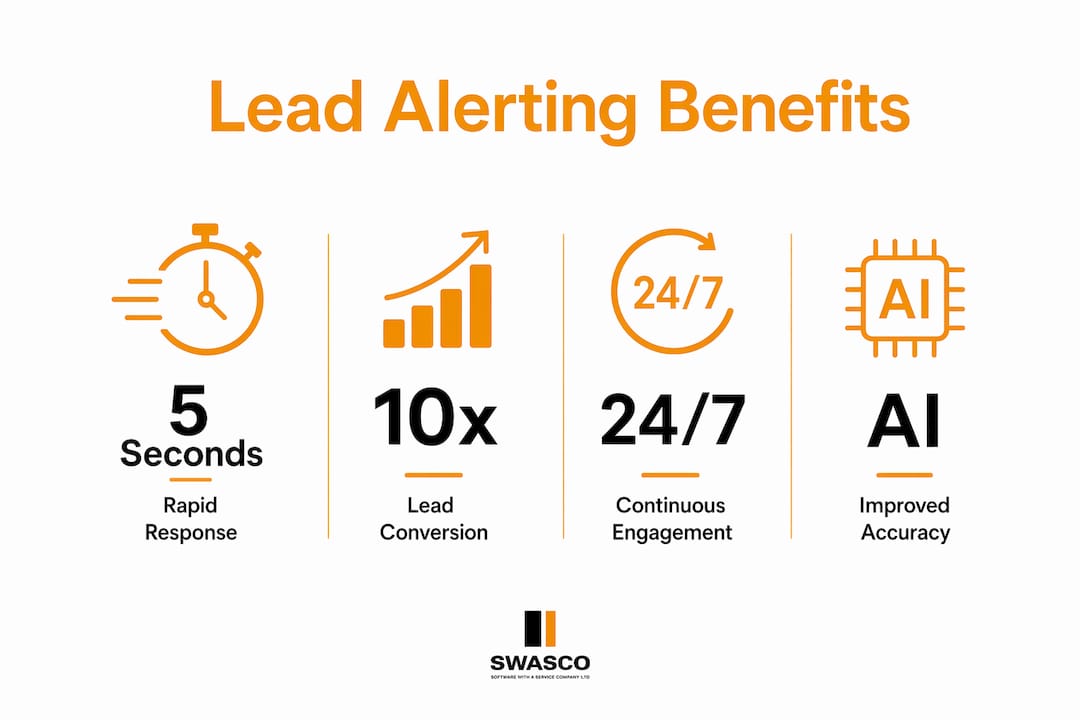
Responding within 5 minutes converts leads at 5 to 10 times the rate of delayed responses. For a plumber, estate agent, or financial adviser, that window is the entire opportunity. A lead who does not hear back within minutes will call the next business on their list.
The core benefits for service industry businesses include:
- Higher conversion rates. Instant lead alerts put your team in front of a prospect while their intent is at its peak. Conversion rates of 35%–50% are achievable with well-configured systems.
- Reduced notification fatigue. Alerts set for every form fill quickly become noise. Qualification thresholds filter alerts to fire only on high-intent behaviour, keeping your team focused on real opportunities.
- Better sales rep adoption. Delivering alerts on platforms where reps already work, such as Slack or SMS, raises response rates and speeds follow-up dramatically.
- Contextual, personalised outreach. Alerts that include the lead's name, the page they visited, and the action they took allow your team to open a conversation that feels relevant, not generic.
- Fewer missed enquiries. Automated lead tracking means no lead sits uncontacted because a team member was busy or away from their desk.
The compounding effect of these benefits is significant. A service business that responds faster, with better context, and to the right leads will consistently outperform one relying on manual checks or daily digest emails. You can read more about common follow-up timing errors that cost businesses revenue every day.
How does AI improve real time lead alerting accuracy?
AI does not replace real-time alerting. It makes alerting far more precise by deciding which leads are worth alerting on in the first place.
By 2026, 75% of B2B sales organisations will have implemented AI-driven lead alerting and routing systems. The reason is clear: AI-tuned lead scoring models achieve up to 85% precision in identifying genuine conversion opportunities, which significantly reduces false positives. Fewer false positives means fewer wasted calls and less team frustration.
AI models assess leads using two categories of signal:
- Behavioural signals. Pages visited, time on site, content downloaded, chat interactions, and repeat visits all indicate intent level.
- Firmographic signals. Business size, industry, location, and job title help determine whether a lead fits your ideal customer profile.
Lead scoring and real-time alerting work best together as a two-stage filter. Scoring prioritises which leads matter. Alerting triggers timely action on those leads. Without scoring, alerting creates noise. Without alerting, scoring creates reports that nobody acts on quickly enough.
Pro Tip: Start with three to five behavioural signals that correlate with your best past customers. Build your scoring model around those signals before adding complexity. A simple, accurate model outperforms a complex, inaccurate one every time.
AI integration also connects naturally with automated lead qualification workflows, allowing businesses to route only the most promising enquiries to human follow-up while handling lower-intent contacts automatically.
How to set up a real time lead alerting system
A working lead alerting system requires four components: a trigger source, a qualification layer, a delivery channel, and a feedback loop.
-
Define your trigger actions. Identify the specific actions that indicate genuine buying intent. For a service business, these typically include quote requests, callback forms, pricing page visits lasting more than 60 seconds, and live chat initiations.
-
Set qualification thresholds. Not every form fill deserves an instant alert. Configure your system to fire only when a lead meets a minimum score or completes a high-intent action. This prevents alert fatigue and keeps your team responsive.
-
Choose your delivery channels. Automated form notifications integrated with Slack, SMS, and CRM reduce lead lag and remove manual bottlenecks. Deliver alerts to wherever your team already works. If your sales team lives in SMS, send alerts there. If they use a shared inbox, route alerts there.
-
Embed context in every alert. Effective alerts provide actionable context within the notification itself, including the lead's name, contact details, the action they took, and a one-click option to call or email. Your team should never need to open a CRM to understand who they are calling.
-
Measure and refine. Track alert response time, conversion rate per alert type, and ignored alert rate. If more than 20% of alerts go unactioned, your qualification thresholds are too low. Tighten them.
| Setup element | What to configure | Why it matters |
|---|---|---|
| Trigger actions | Quote requests, pricing visits, chat starts | Targets genuine buying intent |
| Qualification threshold | Lead score minimum or action type | Prevents alert fatigue |
| Delivery channel | Slack, SMS, CRM, mobile push | Meets reps where they work |
| Alert content | Name, action, contact detail, quick reply | Speeds response without CRM lookup |
| Feedback loop | Response rate, conversion per alert | Identifies what to tighten |
For a broader framework on following up systematically, the guide on systematic lead follow-up covers the workflow structures that complement a live alerting system.
Common pitfalls in real time lead alerting and how to avoid them
The most common reason lead alerting systems fail is not technical. It is behavioural. Teams stop responding to alerts when the alerts stop feeling worth responding to.
The pitfalls to watch for include:
- Over-notification. Alerting on every form submission, regardless of quality, trains your team to ignore alerts. Set thresholds and stick to them.
- Missing context. An alert that says "New lead received" with no name, no action detail, and no contact information forces the rep to go hunting. That friction kills response speed.
- Wrong delivery channel. Sending alerts to an email inbox that a rep checks twice a day defeats the purpose of real-time notification. Match the channel to the rep's actual working habits.
- No follow-up structure. An alert without a clear next step creates hesitation. Build a short response script or template into your workflow so reps know exactly what to say when they pick up the phone.
- Skipping change management. Introducing a new alerting system without training your team on why it matters and how to use it leads to low adoption. Run a short briefing session and share early wins to build momentum.
Real-time alerting implies intelligence-rich, context-aware notifications, not just speed. A fast alert with no context is only marginally better than a slow one. The goal is a notification that gives your rep everything they need to have a confident, relevant conversation within seconds of receiving it.
Key takeaways
Real-time lead alerting is the single most impactful change a service business can make to its lead response process, delivering conversion rates three to four times higher than batch systems when configured correctly.
| Point | Details |
|---|---|
| Speed drives conversion | Responding within 5 minutes converts leads at up to 10 times the rate of delayed follow-up. |
| Webhooks eliminate lag | Event-driven webhook architecture delivers alerts in under 10 seconds, removing batch delays entirely. |
| AI scoring reduces noise | AI-tuned models reach up to 85% precision, ensuring alerts fire only on genuine opportunities. |
| Context is non-negotiable | Alerts must include lead name, action taken, and a one-click response option to be effective. |
| Channel fit drives adoption | Delivering alerts via Slack, SMS, or mobile push to where reps already work raises response rates. |
The part most businesses get wrong about real time alerting
Speed is the headline, but it is not the whole story. I have seen businesses invest in real-time alerting infrastructure and still lose leads because the alert itself was useless. It arrived in seconds and said nothing. No name, no context, no action. The rep opened it, had no idea what to do, and moved on.
The businesses that get the most from real-time lead notifications are the ones that treat the alert as the beginning of a conversation, not just a ping. They build the context into the notification. They put a pre-filled call script one tap away. They route the alert to the person most likely to close that specific type of lead, not just whoever is next in the queue.
The other thing I have noticed is that most teams underestimate how much the delivery channel matters. A sales rep who lives in WhatsApp will not respond quickly to an email alert, no matter how well-written it is. The technology has to meet people where they are. That is not a technical problem. It is a people problem, and it requires a people solution.
The future of this space sits at the intersection of AI scoring and instant delivery. The businesses building that combination now, with AI in their sales pipeline, will have a structural advantage that compounds over time. Speed plus intelligence plus context is the formula. Any one of those three alone is not enough.
— James Paul
How Talk2Aiva handles real time lead alerting for service businesses
Talk2Aiva by SWASCO is built specifically for service businesses that cannot afford to miss an enquiry.

Talk2Aiva engages every inbound lead the moment they make contact, across calls, SMS, website chat, and social media, 24 hours a day. It qualifies leads instantly using AI, routes high-intent prospects to your team with full context, and triggers real-time follow-up before a competitor even picks up the phone. The entire system integrates with your existing CRM and communication tools, with setup, training, and ongoing support included. You focus on running your business. Talk2Aiva handles the lead response. Find out how it works and what it could mean for your conversion rates.
FAQ
What is real time lead alerting in simple terms?
Real-time lead alerting is an automatic notification sent to your sales team within seconds of a prospect taking a qualifying action, such as filling in a contact form or visiting your pricing page. The goal is to enable immediate follow-up while the lead's intent is at its highest.
How quickly should you respond to a real time lead alert?
Responding within 5 minutes converts leads at 5 to 10 times the rate of a delayed response. The faster your team acts on an alert, the higher the probability of converting that enquiry into a sale.
What is the difference between a lead alert and a lead notification?
The terms are often used interchangeably. A lead notification is the broader category covering any message about a new lead. A lead alert specifically implies a time-sensitive, high-intent signal designed to trigger immediate action, often filtered by a qualification threshold or lead score.
How do I avoid alert fatigue in my team?
Set qualification thresholds so alerts fire only on high-intent actions, not every form submission. Deliver alerts on the channel your team already uses, and include enough context in each alert that reps can act without needing to open a CRM.
Can a small service business benefit from real time lead alerting?
Yes. Small service businesses benefit most because every missed enquiry represents a proportionally larger revenue loss. A well-configured alerting system, even a simple one using webhook-triggered SMS notifications, can significantly improve response rates without requiring a large team.