

Most business owners assume customer retention automation means scheduling a few follow-up emails and calling it done. It is far more than that. What is customer retention automation, really? It is a system that uses software, predictive logic, and AI to keep your customers engaged, loyal, and spending, without your team manually managing every touchpoint. This guide covers exactly how it works, the workflows that drive results, the measurable benefits, and how to implement it without making the mistakes that cause most businesses to get it wrong.
Table of Contents
- Key takeaways
- Defining customer retention automation
- Types of automated retention workflows
- Benefits of customer retention automation
- How to implement retention automation effectively
- Emerging trends in retention automation
- My honest take on what actually works
- See how Talk2Aiva handles retention for you
- FAQ
Key takeaways
| Point | Details |
|---|---|
| More than email sequences | Retention automation spans marketing, billing, sales, and customer success working in sync. |
| Data quality comes first | Fragmented customer data produces irrelevant outreach that damages trust rather than building it. |
| AI enables proactive retention | Predictive models act on early behavioural signals before a customer disengages or churns. |
| Human oversight still matters | Automated escalation to human agents is critical for sensitive or high-value retention moments. |
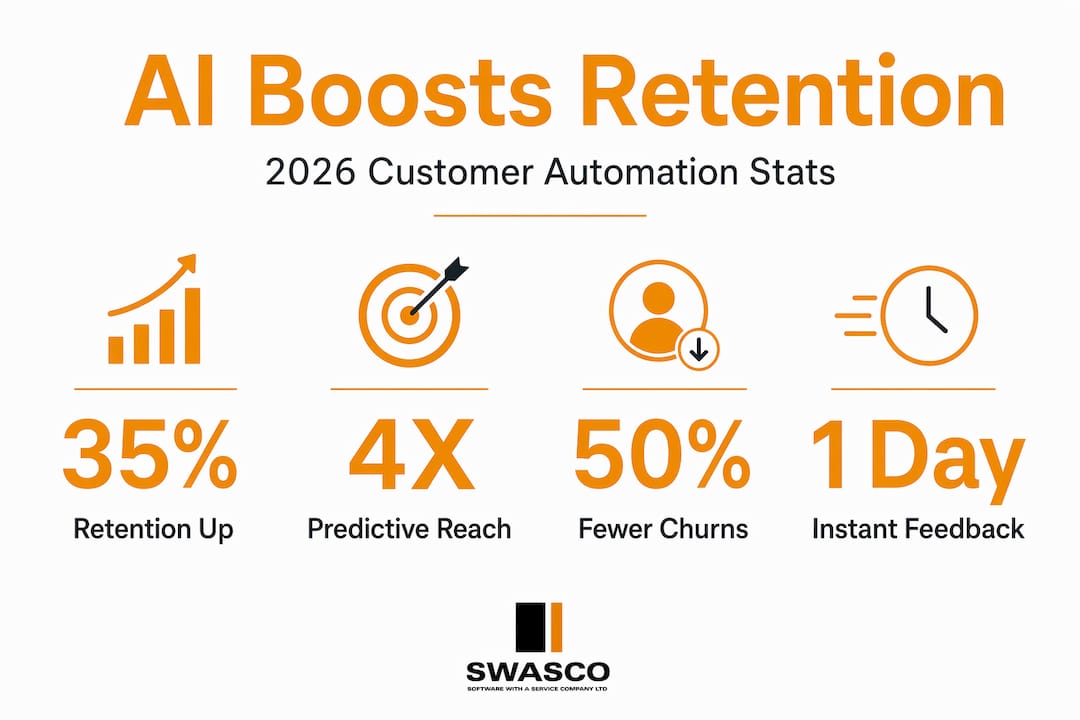
| Measurable results are real | Businesses using AI-driven retention tools report 20 to 35% improvement in retention rates within 12 months. |
Defining customer retention automation
Customer retention automation uses software, rule-based logic, and predictive AI to trigger retention-focused interactions without manual effort from your team. Think of it as a system that watches customer behaviour in real time, identifies risk signals, and responds with the right message, at the right time, through the right channel.
The system works across four key business areas:
- Marketing automation: Personalised campaigns, re-engagement sequences, loyalty rewards, and win-back offers triggered by customer behaviour.
- Billing automation: Payment reminders, failed transaction recovery, subscription renewal alerts, and involuntary churn prevention.
- Sales automation: Upsell and cross-sell triggers based on usage patterns, renewal nudges, and contract expiry alerts.
- Customer success automation: Onboarding sequences, health score monitoring, satisfaction surveys, and proactive outreach when engagement drops.
These four pillars do not operate in isolation. The real power comes from integration. When your CRM, helpdesk, and billing platform share data, the system can coordinate messaging consistently across every touchpoint. A customer who raises a support ticket should not receive an upsell email two hours later. An integrated platform prevents that kind of disconnect.
AI and predictive analytics are rapidly changing what is possible here. Rather than reacting to cancellations, modern AI-driven retention tools score churn risk continuously, identify which intervention is most likely to succeed, and trigger it automatically. That shift from reactive to proactive is what separates basic email automation from genuine retention automation.
Pro Tip: Before you add any automation layer, map out where your customer data currently lives. If your CRM, support desk, and billing system do not talk to each other, your automations will produce irrelevant messages that annoy customers rather than retain them.
Types of automated retention workflows
Understanding the mechanics behind retention automation helps you choose the right approach for each situation. Automated workflows are commonly categorised into four types, each suited to different retention scenarios.
-
Linear workflows follow a fixed sequence regardless of how the customer responds. A renewal reminder series is a classic example: email at 30 days, email at 14 days, final notice at 3 days. Simple, predictable, and easy to build. These work well for time-based triggers like contract renewals or subscription lapses.
-
Non-linear (branching) workflows adapt based on customer behaviour. If a customer opens an email and clicks a link, they move down one path. If they ignore it, a different sequence kicks in, perhaps a text message or a personal call from your account team. This personalisation dramatically improves relevance and response rates.
-
Loop workflows are designed for ongoing engagement cycles, particularly in loyalty programmes. A customer earns points, receives a reward notification, redeems the reward, and re-enters the earning cycle. The loop keeps running indefinitely, reinforcing habitual engagement without any manual input from your team.
-
Parallel workflows run multiple touchpoints simultaneously across different channels. Your CRM might trigger an email, an SMS, and an in-app notification at the same moment, all with consistent messaging. This approach works well for high-stakes retention moments, such as a high-value customer showing early churn signals.
The key distinction between these workflow types is how they handle variation in customer behaviour. A customer who engages frequently needs a very different message cadence to one who has gone quiet for three weeks. Branching and adaptive workflows make that personalisation automatic, so your team does not have to manually segment and re-segment lists every week.
Benefits of customer retention automation
The case for investing in retention automation is straightforward once you look at the numbers.
| Benefit | What the data shows |
|---|---|
| Retention rate improvement | 20 to 35% gains within 12 months using AI-driven tools |
| Churn reduction | Up to 20% annual attrition reduction with AI-powered next best experience |
| Team efficiency | High-value customer moments get human attention; routine touchpoints are handled automatically |
| Customer lifetime value | Timely, personalised communication increases spend and loyalty over time |
Beyond the numbers, automated retention builds what some practitioners call process equity. Your team delivers the right message at the right time based on real data, not manual recall or gut instinct. That consistency compounds over time.
Your customer-facing team is freed from repetitive low-leverage tasks such as chasing overdue renewals or sending standard check-in emails. They can spend that time on conversations that genuinely require human judgement, escalations, complex negotiations, and strategic account reviews.
"The businesses seeing the biggest retention gains are not just automating more. They are automating smarter, with unified data and clear human escalation points built in from day one."
The customer experience improves too. Receiving a relevant message at the precise moment you are considering leaving a service feels very different from getting a generic newsletter three weeks later. That timeliness is what turns automation from a cost-saving tool into a genuine loyalty driver.
How to implement retention automation effectively
Getting automation right requires more preparation than most businesses expect. Rushing straight to workflow building before your data foundation is in place is the single most common reason these systems fail.
Here are the key steps and considerations to get it right:
- Audit your customer data first. Identify where data lives across your CRM, support desk, billing platform, and any other systems. Before you automate, unified customer data is non-negotiable. Fragmented sources produce irrelevant outreach that damages trust.
- Start with a pilot. Choose one high-impact retention scenario, such as renewal reminders or post-onboarding engagement, and build a contained pilot. Measure it carefully before scaling.
- Build intervention playbooks. Define what action the system should take at each risk signal. A customer who has not logged in for 14 days gets a re-engagement email. A customer who contacts support three times in a week gets flagged for a personal call. Document these decisions explicitly.
- Design human escalation points. Automatic escalation to human agents triggered by sentiment analysis or high-value account risk is essential. Not every retention moment should be handled by automation. Complex complaints, high-value renewals, and emotionally charged situations need a person involved.
- Monitor, measure, and iterate. Track open rates, click-through rates, churn rates, and customer satisfaction scores against your baseline. Adjust message timing, content, and triggers based on what the data tells you.
Pro Tip: Set up a feedback loop between your customer success team and your automation system. When a human intervention succeeds or fails, that outcome should inform your automation rules. The system gets smarter over time only if you feed it real-world results.
A phased adoption approach reduces risk significantly. Data audit first, then pilot predictive models, then build out full intervention playbooks. Businesses that try to skip straight to sophisticated AI-driven automation without this foundation consistently underperform those that build methodically.

Emerging trends in retention automation
The next generation of retention automation moves well beyond scheduled messages and basic behavioural triggers. Here is how the landscape is shifting.
| Reactive marketing | Predictive engagement |
|---|---|
| Responds after a customer disengages | Acts on early signals before disengagement |
| Triggered by cancellation or complaint | Triggered by behavioural patterns and risk scores |
| High cost to recover lapsed customers | Lower cost by intervening while intent is still active |
| Generic win-back messaging | Hyper-personalised intervention sequencing |
Predictive engagement triggers retention communications proactively by identifying early behavioural signals before engagement drops. A customer who reduces their login frequency, stops using key features, or begins browsing cancellation pages is showing signals weeks before they formally churn. Predictive models catch that and act.
Next best experience engines take this further. As described by McKinsey's AI research, these systems combine propensity models, channel preference models, and value models with operational logic to determine the optimal next interaction for each individual customer. The content is personalised, the timing is optimised, and the channel is selected based on where that specific customer is most likely to respond.
Generative AI is also changing how retention content is produced at scale. Rather than writing 12 variations of a re-engagement email manually, AI can generate contextually relevant content for hundreds of micro-segments with minimal supervision. The result is personalisation that was previously only achievable by large enterprise teams, now available to businesses of any size. AI strategies for SaaS growth and retention are already demonstrating this at scale.
My honest take on what actually works
I have seen businesses invest heavily in retention automation platforms and walk away with results that barely move the needle. In almost every case, the problem was not the technology. It was the sequence of decisions made before the technology was ever configured.
The most common mistake is treating automation as the first step rather than the final one. Businesses buy a platform, build a few workflows, and then wonder why their messages feel irrelevant or mistimed. The reason is simple: the data feeding those workflows is scattered across three systems that have never been properly integrated. Your automation can only be as precise as the data behind it.
What I have found actually works is treating the data unification project as the real retention initiative. The automation is just how you deliver on it at scale. Businesses that invest serious time in cleaning up their CRM, connecting it to support and billing data, and defining clear customer segments before building a single workflow see dramatically better results.
The human oversight point also matters more than most platforms will tell you. Automation handles volume. Humans handle meaning. The most effective retention systems I have come across are built with clear, documented escalation rules so that a real person steps in exactly when a customer needs to feel heard, not handled.
Retention automation works. But it requires honest groundwork, not a quick platform subscription.
— James
See how Talk2Aiva handles retention for you
If this article has clarified what customer retention automation can do for your business, the next question is how to actually deploy it without spending months configuring platforms yourself.
Talk2Aiva by SWASCO gives service-based businesses a done-for-you approach to sales and marketing automation that covers the full retention cycle. From instant lead engagement and 24/7 follow-up through to booking and customer re-engagement across calls, text, and social media, Talk2Aiva handles the touchpoints that would otherwise fall through the cracks. Setup and ongoing technical support are included, so you spend your time running your business, not troubleshooting workflows.
FAQ
What is customer retention automation?
Customer retention automation uses software, rule-based logic, and AI to trigger retention-focused interactions automatically. It spans marketing, billing, sales, and customer success to keep customers engaged without manual team effort.
How does retention automation differ from basic email marketing?
Basic email marketing sends the same message to a broad list on a fixed schedule. Retention automation responds to individual customer behaviour in real time, adapting messages, timing, and channels based on each customer's specific signals and risk profile.
What are the main benefits of customer retention automation?
Businesses using AI-driven retention tools report 20 to 35% retention rate improvements within 12 months. Additional benefits include reduced churn, higher customer lifetime value, and freed-up team capacity for high-impact customer work.
How do I start implementing retention automation?
Start by auditing and unifying your customer data across CRM, support, and billing systems. Then pilot one focused workflow, such as renewal reminders, before building out more complex branching or predictive sequences.
When should a human step in during automated retention?
Human escalation should be triggered automatically when sentiment analysis detects customer frustration or when a high-value account shows churn risk. Sensitive, complex, or emotionally charged situations should never be handled by automation alone.