
Appointment confirmation automation is a structured, triggered communication process that instantly acknowledges a booking and manages attendance through timed, adaptive reminders sent without manual effort. In practice, it is also called automated booking confirmation or appointment scheduling automation. Service businesses that deploy it save 4–8 billable staff hours per team member each week, while no-show rates drop from over 20% to single digits. Those two outcomes alone make it one of the highest-return operational changes a service business can make in 2026.
What is appointment confirmation automation and how does it work?
Appointment confirmation automation triggers a sequence of messages the moment a booking is created. The first message, usually an email or SMS, goes out within seconds of the booking being made. It confirms the date, time, location, and any preparation instructions the client needs.

After that instant confirmation, the system runs a timed reminder sequence. A typical workflow sends a reminder 48 hours before the appointment, then a second reminder 24 hours before. Each message is sent automatically, with no staff involvement required.
What separates modern confirmation automation from basic email alerts is adaptive messaging. The system reads the client's response and adjusts accordingly. A client who confirms receives a simple "see you tomorrow" message. A client who does not respond receives an escalating follow-up. A client who cancels triggers a rebooking prompt. Adaptive workflows like this prevent message fatigue and keep engagement rates high.
The communication channels matter too. Email, SMS, and AI voice calls each serve a different role:
- Instant confirmation: Email delivers the full booking summary with a calendar invite attached.
- 48-hour reminder: SMS reaches the client directly, with a one-tap confirm or cancel option.
- 24-hour reminder: A second SMS or an AI voice call for high-value appointments.
- Post-appointment follow-up: An automated message requesting a review or booking the next visit.
Automated systems integrate with Google Calendar, Outlook, and booking platforms in real time. Every confirmation, cancellation, or reschedule updates the calendar instantly, eliminating double-booking and keeping your diary accurate without anyone touching it.
Pro Tip: Set your 48-hour reminder to include a direct reply option. Clients who can confirm or cancel in one tap respond at far higher rates than those who must call or log in to a portal.
What are the real benefits of appointment automation?
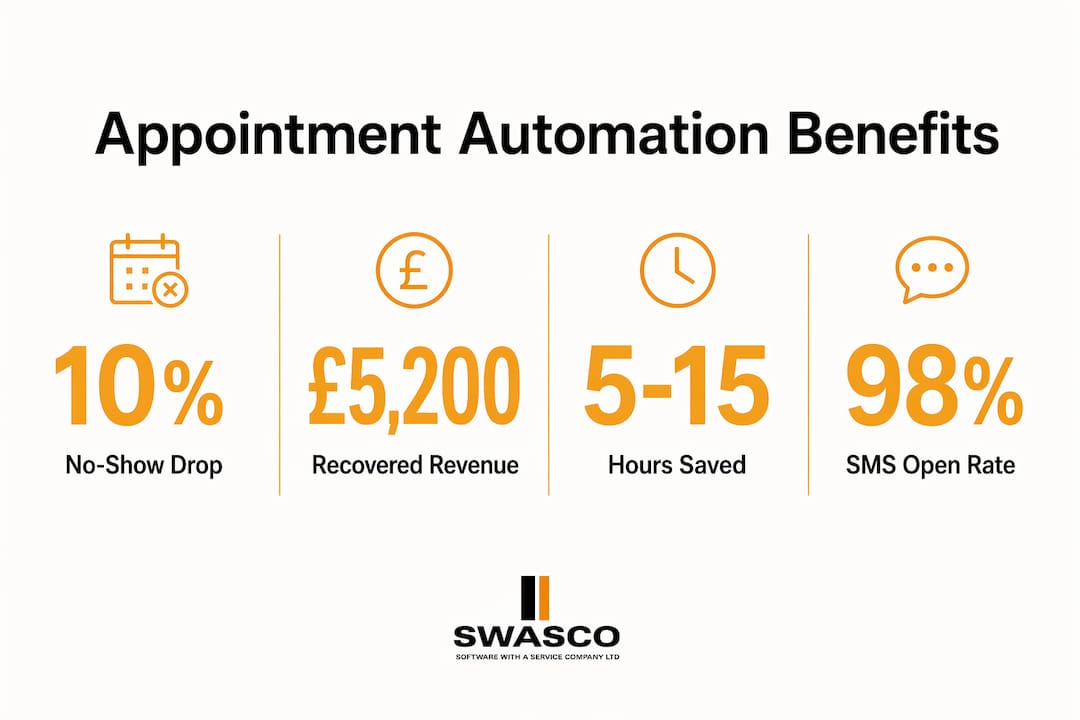
The financial case for automated booking confirmation is straightforward. Reducing no-shows by just 10% recovered £5,200 per month for one service practice. That figure is not unusual. Every missed appointment is a slot that cannot be resold at short notice, so even modest improvements in attendance translate directly into recovered revenue.
Beyond the revenue impact, the operational benefits compound quickly. Staff freed from manual follow-up calls can focus on clients in front of them. Errors caused by transcription mistakes or missed callbacks drop to near zero. Booking capacity grows without adding headcount.
The benefits of appointment automation break down across four areas:
- Time savings: Automation cuts 5–15 hours of administrative work weekly per business, not per person. That time goes back into revenue-generating activity.
- Attendance reliability: Confirmation response rates of 70%–85% give you accurate attendance forecasts days in advance, not hours.
- Client experience: Clients receive timely, professional communication without your team lifting a finger. That consistency builds trust.
- Error reduction: Real-time calendar synchronisation prevents double-booking and removes the risk of a client arriving for an appointment that was never properly logged.
The client experience point deserves more attention. Clients who receive prompt, clear confirmations feel valued. They are less likely to forget, less likely to cancel, and more likely to rebook. Automated appointment reminders are not just an operational tool. They are a client retention mechanism.
For service businesses in sectors like beauty, healthcare, legal, and property, where a single missed appointment can represent hundreds of pounds in lost revenue, the financial argument for automation is not marginal. It is decisive. Talk2Aiva, for example, is built specifically to handle this kind of 24/7 engagement for service businesses, covering confirmations, reminders, and rebooking prompts without any manual input from your team.
Manual vs automated confirmation: what actually changes?
Manual booking confirmation takes approximately 8 minutes per booking. Across 30 bookings a week, that is four hours of staff time spent on a task that delivers no additional value to the client. Automated systems process the same confirmations in seconds, with no errors and no dependency on staff availability.
The comparison goes deeper than raw time, though. Context switching is the hidden cost most businesses underestimate. Every time a staff member stops what they are doing to call a client, confirm a booking, or update a calendar, they lose focus. Research on workplace productivity shows that recovering full concentration after an interruption takes significantly longer than the interruption itself. Manual confirmation processes impose this cost dozens of times a day.
| Criteria | Manual confirmation | Automated confirmation |
|---|---|---|
| Speed | 8 minutes per booking | Seconds |
| Availability | Business hours only | 24/7 |
| Error rate | Prone to transcription and scheduling errors | Near zero |
| Scalability | Degrades as volume increases | Handles volume without additional cost |
| Calendar sync | Manual update required | Real-time, automatic |
| Client experience | Inconsistent | Consistent and professional |
Manual processes are not without merit in very low-volume contexts. A sole trader handling three bookings a week may find a quick phone call sufficient. But for any business managing ten or more appointments daily, manual confirmation creates a bottleneck that limits growth. Booking automation is a growth requirement, not a luxury, for businesses that want to scale.
Pro Tip: If you are still using manual confirmation, track your no-show rate for four weeks before switching to automation. The before-and-after comparison will show you exactly what the change is worth in revenue terms.
How to implement appointment confirmation automation effectively
Getting confirmation automation right requires more than switching on a tool. The setup decisions you make at the start determine whether the system reduces no-shows or simply adds noise to your clients' inboxes.
-
Build your instant confirmation first. The moment a booking is created, the client should receive a message within 60 seconds. Include the date, time, address, practitioner name if relevant, and any preparation instructions. Attach a calendar invite. This single step eliminates the most common reason clients miss appointments: they simply forgot to add it to their diary.
-
Set your reminder timing at 48 and 24 hours. These two intervals are the most effective for service appointments. The 48-hour message gives clients enough time to reschedule if needed. The 24-hour message catches last-minute conflicts. Sending reminders earlier than 48 hours rarely improves attendance and increases unsubscribe rates.
-
Prioritise SMS as your primary reminder channel. SMS open rates exceed 98%. That figure makes SMS the most reliable channel for time-sensitive messages. Email is valuable for the initial confirmation because it carries more information, but SMS drives action on the day.
-
Use adaptive messaging to avoid fatigue. Once a client confirms, stop sending reminders. Sending a second reminder to someone who already confirmed reads as disorganised and erodes trust. Adaptive messaging workflows adjust automatically based on client responses, so confirmed clients get a simple acknowledgement and non-responders get a follow-up.
-
Integrate with your booking and calendar systems from day one. A confirmation system that does not sync with your live calendar creates more problems than it solves. Real-time integration with platforms like Google Calendar or Outlook means every confirmation, cancellation, and reschedule is reflected immediately. For salons and beauty businesses, follow-up automation workflows built on this foundation also drive repeat bookings automatically.
Pro Tip: Add a one-line rebooking prompt to your post-appointment message. Clients who have just had a positive experience are at peak motivation to book again. Capturing that moment automatically is one of the easiest ways to increase lifetime client value.
Key takeaways
Appointment confirmation automation is the single most cost-effective operational change a service business can make, cutting no-shows, recovering revenue, and freeing staff time without adding headcount.
| Point | Details |
|---|---|
| Define the process clearly | Automation confirms bookings instantly and manages attendance through timed, adaptive reminders. |
| Financial impact is immediate | Reducing no-shows by 10% can recover thousands of pounds monthly in previously lost revenue. |
| SMS is the primary channel | SMS open rates exceed 98%, making it the most reliable channel for time-sensitive reminders. |
| Adaptive messaging prevents fatigue | Confirmed clients receive simplified messages; non-responders receive escalating follow-ups. |
| Integration is non-negotiable | Real-time calendar sync eliminates double-booking and keeps your diary accurate automatically. |
Why I think most service businesses are still thinking about this the wrong way
James Paul here. After working with service businesses across a range of sectors, the pattern I see most often is this: business owners treat appointment reminders as a courtesy. A nice thing to do. Something that shows clients you care. That framing undersells what confirmation automation actually is.
Confirmation automation is a revenue protection system. Every no-show is a slot that cannot be resold. Every manual follow-up call is a distraction that pulls your team away from paying clients. The businesses that grasp this shift their thinking from "how do we remind clients" to "how do we protect every slot in our diary."
The second misconception I encounter is that automation feels impersonal. Clients will notice, the thinking goes. They will miss the human touch. The evidence says otherwise. Proactive AI-driven engagement consistently outperforms passive web forms and sporadic manual calls in both response rates and client satisfaction. Clients do not want a phone call at 9am. They want a text they can reply to in two seconds.
The businesses I have seen get the most from confirmation automation are the ones that treat it as the foundation of their client communication, not an add-on. They build adaptive workflows, prioritise SMS, and connect their confirmation system to their booking platform from day one. The results show up in the diary within weeks.
— James Paul
How Talk2Aiva handles appointment confirmation for service businesses
Talk2Aiva by SWASCO is built for service businesses that cannot afford to lose revenue to missed appointments, delayed responses, or unmanaged enquiries. The platform handles instant booking confirmations, timed SMS and email reminders, and adaptive follow-up sequences, all without your team managing a single message manually.

Every workflow is set up and supported by the Talk2Aiva team, from initial configuration through to ongoing adjustments as your business grows. For businesses ready to protect their diary and recover lost revenue, Talk2Aiva's automation platform gives you the tools and the support to make it happen. You can also explore how AI-powered approaches are already working in practice through real-world case studies from businesses that have made the switch.
FAQ
What is appointment confirmation automation?
Appointment confirmation automation is a triggered communication system that instantly acknowledges a booking and sends timed reminders to reduce no-shows. It operates across email, SMS, and AI voice channels without manual input from staff.
How does automated booking confirmation reduce no-shows?
Automated reminders keep appointments front of mind and give clients an easy way to confirm, cancel, or reschedule. No-show rates drop from over 20% to single digits when confirmation automation is in place.
What does booking automation mean for staff workload?
Booking automation removes the need for manual follow-up calls and calendar updates, saving businesses 5–15 hours of administrative work each week. Staff focus on clients rather than admin.
Why is SMS better than email for appointment reminders?
SMS open rates exceed 98%, compared to significantly lower rates for email. That makes SMS the most reliable channel for time-sensitive reminders where a response is needed quickly.
How does appointment automation integrate with existing booking systems?
Automated confirmation systems connect with platforms like Google Calendar and Outlook in real time. Every booking, cancellation, and reschedule updates the calendar instantly, preventing double-booking and keeping records accurate.