
Unifying customer messages means routing every channel, calls, texts, web chat and social messages, into one inbox built on a single customer record. Start with an audit: list every channel you use, who owns each one, and where that data currently lives. Once you know that, pair a customer profile system with a unified inbox and an orchestration layer to route conversations automatically. There are existing solutions built for service businesses that provide that setup.
TL;DR:
- Unifying customer messages requires pairing a customer profile system with a unified inbox and orchestration layer to route conversations automatically across multiple channels.
- Implementing the system involves auditing existing channels, choosing a master customer record, integrating quick-win tools, designing routing rules, and piloting one channel before scaling.
- Essential governance includes maintaining audit trails, role-based permissions, managing consent, and complying with sector-specific regulations to mitigate concentrated risks.
- Measuring success starts with operational metrics like response time and lead recovery within the first month, with broader KPIs evaluated after three months as message volume increases.
- Full onboarding and ongoing support are crucial, with platforms like Talk2Aiva offering guided setup, integration, and continuous technical assistance to ensure effective unification.
Table of Contents
- What does it mean to unify customer messages?
- What are the real benefits of unifying customer messages?
- What technology do you need to unify customer messages?
- How do you implement unified messaging step by step?
- What governance and compliance controls do you need?
- How do you measure whether unification is working?
- How does Talk2Aiva put unified messaging into practice?
- When is centralising customer messages the wrong call?
- Ready to bring your messages into one inbox?
- Sources
- FAQ
What does it mean to unify customer messages?
Unifying customer messages means every conversation, regardless of channel, lands in one place and links to one customer record. It is not the same as unified communications, which usually refers to internal tools like voice, video conferencing and team chat. It is also narrower than omnichannel engagement, which covers the entire customer journey including marketing and commerce, not just messaging.
Unified messaging, as a concept, has existed since early efforts to combine voicemail, email and fax into a single interface. Today it covers a wider set of channels:
- Phone calls and voicemail transcripts
- SMS and MMS
- Website live chat
- Social messaging (Facebook, Instagram, WhatsApp)
- In-app messages and email
The goal stays the same across all of them: one thread, one history, no gaps between channels.
What are the real benefits of unifying customer messages?
The case for unifying customer messages rests on four things: speed, consistency, revenue protection, and fewer internal hand-offs. When a customer messages on Instagram, then calls, then emails, staff without a unified view start every interaction from zero. That wastes time and irritates the customer.
Pro Tip: Ask your team how many times a week they say "let me check another system" mid-conversation. That number is your best argument for centralising.
Consolidating conversations into one thread changes several things at once:
- Fewer hand-offs. Staff see full context without transferring calls or copying notes between tools.
- Faster response times. Nobody hunts across five apps to find the last message.
- Revenue protection. Leads that would otherwise sit unanswered in a forgotten inbox get followed up.
- Brand consistency. Templates and approved language stay the same whether a reply comes via SMS or web chat.
Vendors offering centralised communications platforms report production time reductions of 25 to 50 percent for teams that consolidate customer-facing messaging into one system. That gap comes largely from cutting the time spent switching tools and re-explaining context.
What technology do you need to unify customer messages?
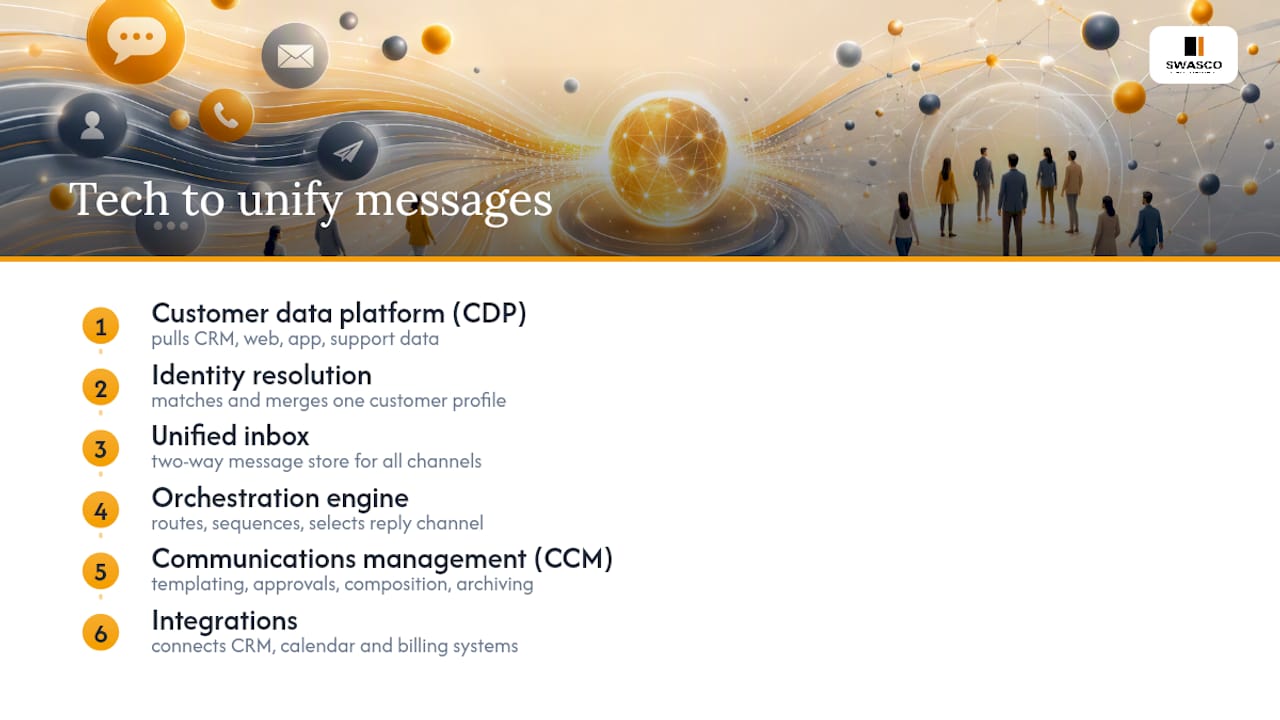
Four components do the real work here, and they need to talk to each other, not just sit side by side.
A customer data platform (CDP) pulls data from your CRM, website, mobile app and support tools to build one profile per customer. Identity resolution, the process of matching records that belong to the same person across systems, is the core function a CDP performs. A CDP does not replace your CRM; it feeds accurate, merged profiles into it and into your marketing and service tools.
A unified inbox is where conversations actually live: the two-way message store that keeps every channel's thread visible in one place.
An orchestration engine routes and sequences messages automatically, deciding who gets a reply, when a follow-up fires, and which channel a response should use.
Customer communications management (CCM) tools handle templating and approvals, so every outbound message uses pre-approved language regardless of who sends it. Modern CCM platforms combine composition, orchestration and archiving in one connected stack, which is what makes governance possible at scale.
Integrations with your CRM, calendar and billing system tie the whole thing together.
How do you implement unified messaging step by step?
Treat this as a sequence, not a single project. Skipping steps to "go faster" is the most common reason unification projects stall halfway through.
- Audit every channel. List where messages currently arrive, who owns each channel, and what message types flow through it (sales enquiries, support tickets, booking requests).
- Choose your single source of truth. Decide whether a CDP or your existing CRM's master record will hold the canonical customer profile. Deterministic matching (login IDs, phone numbers) is fastest to set up; probabilistic matching needs more data hygiene work up front.
- Integrate for quick wins first. Two-way SMS, web chat and calendar sync tend to show value fastest because they touch the highest volume of daily conversations.
- Design orchestration and approval gates. Map out routing rules, sequencing logic and which templates require sign-off before they go live.
- Pilot on one channel, measure, then scale. A pilot-first approach, running one channel end to end before adding the next, is the pragmatic route most organisations take rather than attempting a full rollout in one go.
Pro Tip: Pilot the channel your team complains about most, not the one that looks easiest on paper. That's where the biggest time savings usually hide.
What governance and compliance controls do you need?
Centralising messages concentrates risk as well as efficiency, so governance has to be built in from day one, not bolted on afterwards.
- Audit trails. Every outbound message needs a record of who sent it, when, and which template or approval it used. Regulated sectors in particular treat automated audit trails as a baseline requirement, not a nice-to-have.
- Role-based permissions. Lock template components so junior staff can personalise a message without editing legally reviewed wording.
- Consent and suppression lists. Manage opt-outs centrally so a customer who unsubscribes from SMS doesn't still get emailed the same offer. UK teams handling SMS consent should check their GDPR obligations before scaling outbound messaging.
- Sector-specific rules. A gym's booking reminders carry far less regulatory weight than a legal firm's client correspondence, so calibrate approval gates accordingly.
How do you measure whether unification is working?
Track a small set of numbers from week one rather than waiting for a full quarter of data.
- Operational: first response time, missed leads recovered, average resolution time.
- Marketing: conversion rate lift, click-to-response ratio, suppression list errors.
- Compliance: audit pass rate, percentage of messages using approved templates.
Vendors report the same 25 to 50 percent production time gains showing up in these operational metrics within the first month of a pilot, well before broader marketing KPIs move. Build a lightweight month-one dashboard focused on response time and missed-lead recovery, then layer in conversion and compliance metrics by month three once volume justifies it.
How does Talk2Aiva put unified messaging into practice?
Some platforms centralise calls, SMS, website chat and social messages into one inbox, so a service business owner can see every conversation in one place rather than switching between multiple apps. Onboarding may include guided setup, AI training, workflow building and a live launch as a structured process, rather than a DIY project.
Two integrations tend to show value fastest:
- Two-way SMS, so missed calls convert into a text thread instead of a dead end.
- Calendar sync, so booking requests land directly on your schedule without manual entry.
- CRM syncing, keeping customer records consistent between Talk2Aiva and whichever system you already run.
Ongoing optimisation and technical support continue after launch, which matters most in month two, once the novelty wears off and the real question becomes whether staff still use the system properly.
When is centralising customer messages the wrong call?
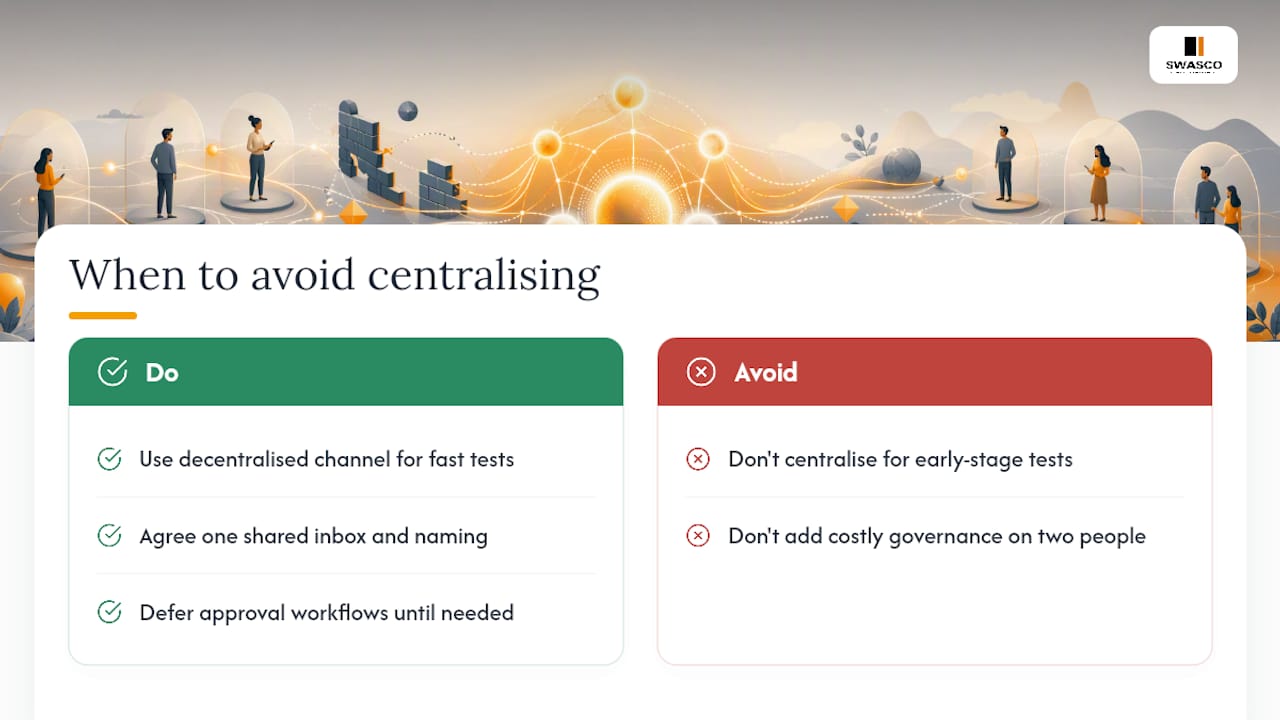
Unification isn't free, and pretending otherwise sets teams up to resent the process. A small team testing a new offer sometimes moves faster with a scrappy, decentralised channel, one person on WhatsApp, no approval gate, because speed matters more than consistency at that stage.
The trade-off is always control versus speed, and cost versus scope. If you're a two-person team, skip heavy governance and just agree on one shared inbox and one naming convention for now. Full audit trails and approval workflows can wait until volume actually justifies them.
— James Paul
Ready to bring your messages into one inbox?
Most unification projects stall because someone has to build the integrations, write the templates, and train the team, on top of their actual job. Talk2Aiva removes that burden: it's a fully guided setup, not a toolkit you assemble yourself, which is the real difference between this and cobbling together separate apps for calls, SMS and chat.

The Software Suite, Ultimate AI Suite and Elite AI Suite plans each bundle onboarding, workflow building and ongoing technical support, so the two-way SMS, calendar sync and CRM integration covered above arrive working, not half-configured. If you want to see how the onboarding and support process actually runs before committing, the how it works page walks through it step by step, and the voice AI page covers the call-answering side specifically. Start by requesting a demo and piloting a single channel, SMS or web chat, before rolling the rest of your messaging into one inbox.
Sources
For deeper technical detail, see how CDPs centralise interaction data, omnichannel CCM solutions, and reusable template structures for consistent messaging.
- How to centralize customer interaction data in one platform
- Personalize customer communications with omnichannel solutions
- Unified messaging — Wikipedia
FAQ
What is a unified message?
A unified message is any customer communication, email, SMS, chat or voicemail, stored in one system and linked to a single customer profile so staff see the full conversation history regardless of channel.
Can you give an example of unified communication?
A common example is a customer texting a business, later calling about the same issue, and a member of staff seeing both the text thread and the call notes in one inbox without switching tools. Talk2Aiva applies this exact model across calls, SMS, web chat and social messages for service businesses.
How does a unified inbox differ from unified communications?
A unified inbox centralises customer-facing conversations across channels, while unified communications usually refers to internal collaboration tools like team voice, video and chat. The two solve different problems even though the terms sound similar.
Does GDPR affect how I unify customer messages?
Yes. Consent and suppression lists must be managed centrally so an opt-out on one channel applies everywhere, and UK businesses handling SMS should review their consent obligations before scaling outbound messaging.
What does Talk2Aiva cost?
Talk2Aiva offers three plans, Software Suite, Ultimate AI Suite and Elite AI Suite, each including guided onboarding and ongoing support; current pricing is listed on the Talk2Aiva site.