
Staff notification escalation is the automated process of notifying a sequence of responders until someone acknowledges an incident, with each step triggered by a configurable timeout. Your immediate next action: create a two-step test policy, fire a single test alert, and confirm acknowledgement stops the chain.
Sample policy you can copy now:
Step 1: Notify primary on-call via push and SMS immediately. Step 2: If unacknowledged after a few minutes, notify secondary on-call via voice call. Step 3: If still unacknowledged, escalate to on-call manager via voice and SMS.
Quick-start checklist:
- Define who is on-call at each step (named person or schedule)
- Set your first-step timeout to a short duration appropriate for the incident severity, such as a few minutes for Critical and longer for lower severities.
- Choose an acknowledgement action (button tap, SMS reply, or phone keypress)
- Run a test alert and verify the chain stops on acknowledgement
Pro Tip: Acknowledgement stops escalation, not resolution. Configure your test to measure time-to-acknowledge (MTTA), not time-to-fix.
Key takeaways
A structured staff notification escalation policy with tested timeouts, clear ownership, and post-mortem-driven updates is the single most reliable way to reduce MTTA and prevent incidents from going unacknowledged.
| Point | Details |
|---|---|
| Acknowledgement stops escalation | Configure tests to measure MTTA, not resolution time; acknowledgement is the signal that halts the chain. |
| Severity-matched timeouts | Use 5-minute timeouts for Critical, 15 minutes for High, and 30 minutes for Medium as your starting defaults. |
| Test before you trust | Run synthetic alerts, timeout tests, and gap tests before any policy goes live in production. |
| Burnout requires active management | Limit repeats for low-severity alerts and use follow-the-sun rotations to distribute on-call load. |
| Talk2Aiva for customer-facing escalation | Talk2Aiva automates 24/7 contact capture and mobile alerts for service businesses, mirroring escalation logic for customer enquiries. |
Table of Contents
- What an escalation policy is and why it matters for incident response
- Core components every escalation policy needs
- Which notification channels actually reach your responders?
- How to design escalation policies that match your service criticality
- Configuring steps, repeats and hand-offs without common pitfalls
- How to test and measure whether your escalation policy works
- Integrations and tooling available to UK teams
- Administration, runbooks and governance: keeping policies accurate
- Balancing on-call coverage with responder burnout
- UK legal and compliance considerations for IT incident response
- Continuous improvement: using post-mortems to sharpen escalation policies
- An editorial perspective on running on-call for UK teams
- 24/7 automated notifications for service businesses: Talk2Aiva
- Sources
What an escalation policy is and why it matters for incident response
An escalation policy is an ordered set of rules that defines who gets notified, by which channel, and when, if the previous responder does not acknowledge. The primary goals are accountability, timeliness, and predictable hand-offs. Without one, incidents can sit unacknowledged for hours because no one is certain who owns the response.
Escalation differs from plain alerting. Alerting fires a notification. Routing sends it to the right queue. Escalation enforces accountability by automatically moving ownership when no one acts, as PagerDuty's on-call management platform describes: automated escalations continue until an incident is acknowledged.
The flow looks like this: trigger → first responder notified → acknowledgement check → escalate if silent → final hand-off to manager or bridge. Every platform, whether PagerDuty, Datadog On-Call, or ServiceNow On-Call, builds on this same spine.
Core goals of a well-designed escalation policy:
- Guarantee no incident goes unacknowledged beyond a defined window
- Distribute ownership clearly so responders know when they are on the hook
- Provide an auditable record of who was notified and when
- Reduce mean time to acknowledge (MTTA) by removing manual escalation steps
Core components every escalation policy needs
Escalation policy basics from PagerDuty define the building blocks clearly: ordered steps, notify targets, timeouts, and acknowledgement semantics. Here is what each component means in practice.
Components:
- Escalation steps: Each step defines one or more targets and the channel to use. Steps fire in sequence.
- Notify targets: A target can be a named user, a team, or an on-call schedule. Schedules are the most maintainable option because they rotate automatically.
- Escalation timeout: The number of minutes the policy waits before moving to the next step if no acknowledgement arrives. A common default is 30 minutes, but Critical incidents warrant 5 minutes or fewer.
- Repeat behaviour: After all steps fire without acknowledgement, the policy can repeat from Step 1. Limit repeats to avoid alert fatigue.
- Maximum steps: Most platforms cap the number of steps. Design within that limit.
- Skip behaviour: If a schedule has no one on-call at the time of escalation, the platform skips that step or falls through to the next. Always check for coverage gaps.
Example step sequence for a Critical incident:
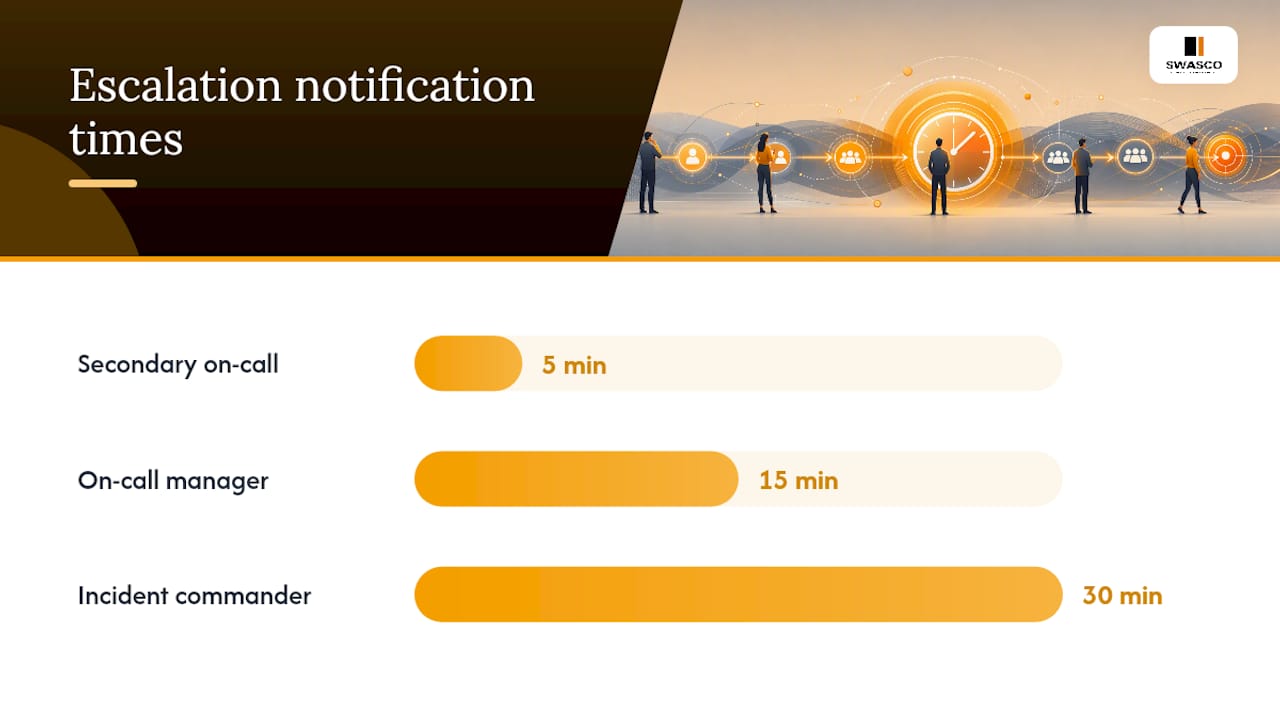
- 0 min: Notify primary on-call (schedule) via push notification and SMS
- 5 min: Notify secondary on-call (named user) via voice call
- 15 min: Notify on-call manager (team) via voice call and SMS
- 30 min: Page the incident commander and open a war-room bridge
On-call schedules interact with escalation steps at the moment of firing. If your primary schedule has a gap (a shift not covered), the step skips and the next step fires immediately. Audit schedule coverage before going live.
Which notification channels actually reach your responders?
Modern on-call notification systems support voice calls, SMS, mobile push, email, and integrations with Slack and Microsoft Teams. The channel you choose for each severity level determines whether your responder wakes up or sleeps through the alert.

Channel behaviour by severity:
| Severity | Primary channel | Secondary channel | DND override |
|---|---|---|---|
| Critical | Voice call | SMS | Yes |
| High | SMS | Push notification | Recommended |
| Medium | Push notification | Slack/Teams | No |
| Low | Slack/Teams | No |
Voice calls are the most reliable for waking a sleeping responder. SMS arrives even when push is blocked. Email is appropriate only for low-urgency notifications where a delay of hours is acceptable.
Grafana OnCall supports DND override for critical incidents alongside chat, push, and telephony integrations. Enable DND bypass only for Critical and High severities. Applying it to every alert trains responders to ignore the override.
Pro Tip: Include a runbook link, the affected service name, and the last deployment timestamp directly in the notification payload. Responders who can triage without opening a second tool acknowledge faster, which shortens MTTA and reduces context switching.
How to design escalation policies that match your service criticality
Good design starts with mapping your services to severity levels before you touch any platform configuration. ServiceNow's escalation process documentation draws a useful distinction: trigger rules define when to start escalation; escalation policies define who gets notified and how. Keep these separate in your design.
Design steps:
- List every monitored service and assign a default severity (Critical, High, Medium, Low)
- Map each severity to an escalation chain and a set of target roles
- Define trigger conditions: alert threshold, business hours vs. out-of-hours, and service owner
- Set timeouts per severity level using the table below
Recommended timing defaults:
Conditional routing adds precision. Route a payment-service alert to the payments team, not the general on-call pool. Route out-of-hours alerts to the on-call schedule rather than a named individual who may be off, using Scalable Automation workflows to manage policies efficiently. Automation in service workflows follows the same logic: the right message to the right person at the right moment.
Configuring steps, repeats and hand-offs without common pitfalls
Datadog On-Call's escalation policy documentation details two notification modes per step: Notify all (every target in the step receives the alert simultaneously) and Round robin (targets rotate, one per firing). Round robin distributes load; Notify all maximises speed. Use Notify all for Critical, Round robin for High and below.
Datadog enforces minimum escalation intervals, requiring at least a short duration before escalating, with longer minimum intervals when multiple targets are notified simultaneously. Design your timeouts above these floors or the platform will reject the configuration.
Configuration checklist before deployment:
- Verify every step has at least one target with active contact methods
- Confirm on-call schedules have no uncovered windows during the policy's active hours
- Set a maximum repeat count (two repeats for Critical, one for High)
- Test the "no one on-call" path: what happens when a schedule is empty?
- Check that acknowledgement actually stops the chain in a sandbox environment
Common pitfalls:
- Notifying an entire team at Step 1 creates diffusion of responsibility. Nobody acts because everyone assumes someone else will.
- Mis-ordered timeouts (Step 2 fires before Step 1 has had time to reach the responder) waste escalations.
- Missing schedules cause silent gaps. The policy fires but no one receives the notification.
How to test and measure whether your escalation policy works
A policy that has never been tested is a policy you cannot trust. Run these steps in order.
- Synthetic test alert: Fire a test alert in a non-production environment and confirm Step 1 delivers within 60 seconds.
- Acknowledgement test: Acknowledge the alert from Step 1 and verify the chain stops. Escalation policy basics confirm that acknowledgement is the signal that halts further escalation.
- Timeout test: Let Step 1 expire without acknowledgement and confirm Step 2 fires at the configured interval.
- Gap test: Remove the on-call person from the schedule and confirm skip behaviour routes correctly to Step 2.
- Channel test: Test each configured channel (push, SMS, voice) individually to confirm delivery.
- Scheduled drill: Run a full end-to-end drill with real responders every quarter. Rotate who plays the primary role.
- Post-drill review: Log MTTA, escalation rate, and any missed steps. Update the policy within 48 hours of the review.
Metrics to track:
- MTTA (Mean Time to Acknowledge): The primary health metric for your escalation policy.
- Escalation rate: The percentage of incidents that reach Step 2 or beyond. A high rate signals understaffing or poor channel configuration.
- False escalation rate: Escalations triggered by non-actionable alerts. Reduce by tuning alert thresholds.
- Repeat rate: How often the policy loops. High repeat rates indicate the on-call team is unreachable or overwhelmed.
Audit logs are your troubleshooting tool. When a responder claims they never received an alert, the log shows exactly which channel fired, at what time, and whether delivery was confirmed.
Integrations and tooling available to UK teams
A staff notification escalation system is only as good as the signals feeding it and the tools it connects to. Here is what to integrate and which platforms UK teams commonly use.
Integration types to connect:
- Alert sources: Monitoring tools (Datadog, Grafana, Prometheus) generate the triggers
- Chat platforms: Slack and Microsoft Teams for acknowledgement and war-room coordination
- Telephony: UK-based SIP carriers or cloud telephony (check data residency for GDPR compliance)
- Ticketing: Jira, ServiceNow, or Zendesk to auto-create incident tickets on escalation
- Runbooks: Confluence or Notion pages linked directly in the notification payload
- Webhooks: Custom integrations to trigger downstream workflows on escalation events
Platforms commonly used by UK incident teams:
- PagerDuty: Full on-call scheduling, multi-channel delivery, and escalation policy management. Widely used in UK enterprise environments.
- Datadog On-Call: Native to teams already running Datadog for monitoring. Supports per-step notification modes and configurable timeouts with documented platform limits.
- ServiceNow On-Call: Strong for organisations running ITSM on ServiceNow. Trigger rules and escalation policies are configured separately, giving fine-grained control.
- Grafana OnCall: Open-source-friendly, integrates with Grafana Alerting, supports chat, push, and telephony with DND override. Good fit for teams already in the Grafana ecosystem.
- Squadcast (SolarWinds): Practical configuration options including immediate notifications, per-rule channels, and policy repeat controls. Useful for teams wanting a lighter-weight alternative.
- FireHydrant: Focuses on incident orchestration and runbook automation alongside escalation, making it a strong choice for teams that want to tie escalation directly to incident response workflows.
UK-specific considerations: Telephony carriers must comply with Ofcom regulations. Verify that your chosen platform's voice and SMS delivery uses UK numbers or provides a UK-based sender ID. For data residency, confirm whether incident data is stored within the UK or EEA, particularly if your organisation handles personal data under UK GDPR. Time zone configuration should default to Europe/London and account for BST/GMT transitions automatically.
Some platforms, such as OnCallKeeper, advertise sub-500ms delivery for SMS, voice, and push alongside built-in audit trails, which matters when your Critical SLA window is tight.
Administration, runbooks and governance: keeping policies accurate
Escalation policies drift. Responders leave, schedules change, and no one updates the policy. Governance prevents this.
Ownership and approval: Assign one named owner per escalation policy, typically the service owner or team lead. Changes should require a second approver and be logged in your change management system.
Runbook linking: Every notification payload should include a direct link to the relevant runbook. The runbook should contain: triage steps, dependency map, escalation contacts, and rollback instructions. Keep it to one page. A responder at 3 AM does not read essays.
Permissions: Restrict edit access to policy owners and senior engineers. Read access can be broader. Audit logs should capture every change with a timestamp and the editor's identity.
Maintenance checklist (run quarterly):
- Review all on-call schedules for coverage gaps and upcoming holidays
- Confirm every named target has active contact methods configured
- Check that runbook links resolve and content is current
- Review escalation rate trends and adjust timeouts if MTTA is consistently poor
- Send on-call handoff notifications at shift boundaries so incoming responders know their status
Pro Tip: Use shadow schedules to train new team members. A shadow receives the same notifications as the primary but is not expected to act. After two or three rotations, they are ready to take primary on-call without a steep learning curve.
Balancing on-call coverage with responder burnout
Escalation enforces accountability, but an aggressive policy that pages the same person repeatedly for low-value alerts will erode your team's ability to respond when it matters. Follow-the-sun and shadow schedule patterns are practical methods to distribute load without creating coverage gaps.
Practical adjustments to reduce fatigue:
- Route low-severity alerts to a no-escalation path. Suppress known noisy alerts automatically and only escalate actionable incidents.
- Limit policy repeats for Medium and Low alerts to one cycle. If no one acknowledges after one repeat, create a ticket and let the team triage it during business hours.
- Use follow-the-sun rotations for global teams. UK-based responders cover European hours; hand off to APAC or US teams outside those windows.
When to escalate vs. suppress:
| Scenario | Action |
|---|---|
| Critical alert, production down | Escalate immediately, all steps active |
| High alert, degraded performance | Escalate with 15-min timeout |
| Medium alert, non-critical service | Escalate once, then ticket if unacknowledged |
| Known noisy alert, no customer impact | Suppress, log, review in post-mortem |
| Low alert, informational | Route to email or Slack, no escalation |
Pro Tip: Set a weekly on-call load review. If any individual is acknowledging more than a defined threshold of alerts per week, that is a signal to rebalance schedules or improve alert quality, not to simply add more responders to the escalation chain.
UK legal and compliance considerations for IT incident response
UK organisations handling personal data must comply with the UK GDPR and the Data Protection Act 2018. Incident response processes, including escalation notifications, can involve personal data: responder contact details, customer data referenced in alerts, and audit logs containing names and timestamps. The Information Commissioner's Office (ICO) requires that personal data breaches be reported within 72 hours of discovery where the breach is likely to result in a risk to individuals' rights and freedoms. A well-configured escalation policy with audit logs supports this obligation by providing a clear timeline of who knew what and when.
For organisations in regulated sectors, the Financial Conduct Authority (FCA) and Prudential Regulation Authority (PRA) expect firms to have documented incident management processes, including escalation paths, as part of operational resilience requirements under PS21/3. The Network and Information Systems (NIS) Regulations 2018 impose similar requirements on operators of essential services and relevant digital service providers, including obligations to notify the relevant competent authority of significant incidents. Your escalation policy documentation, audit logs, and post-incident reviews are direct evidence of compliance with these frameworks.
Data residency matters for telephony and notification platforms. Confirm that call recordings, SMS logs, and incident data are stored within the UK or EEA. Review your vendor's data processing agreement before deploying any cloud-based on-call notification system.
Continuous improvement: using post-mortems to sharpen escalation policies
A post-mortem is the most reliable source of escalation policy improvements. After every significant incident, review the escalation timeline specifically: did the right person get notified, via the right channel, within the right window?
Best practices for continuous improvement:
- Add an "escalation review" section to every post-mortem template. Ask: did the policy fire correctly? Did anyone miss a notification? Was the timeout appropriate for the severity?
- Track MTTA trends over time. A rising MTTA is a signal that timeouts are too long, channels are misconfigured, or on-call schedules have gaps.
- Collect responder feedback after each rotation. On-call engineers know which alerts are noisy, which runbooks are outdated, and which escalation steps feel wrong.
- Update policies within one sprint of a post-mortem finding. Delayed updates mean the next incident hits the same gap.
- Run a real-time alerting review quarterly to assess whether your notification delivery patterns still match your team's working patterns.
The goal is a living policy, not a document that gets written once and forgotten. Teams that treat escalation policies as code, versioning them in Git and reviewing them in pull requests, tend to catch drift before it causes a missed incident.
An editorial perspective on running on-call for UK teams
The most common mistake UK incident teams make is treating escalation policy configuration as a one-time task. You set it up during a sprint, it works for the first few incidents, and then six months later someone leaves the team, the schedule has a gap, and a Critical alert fires at 2 AM on a Tuesday with no one on the receiving end.
The second mistake is conflating escalation with punishment. When a policy escalates to a manager, some teams interpret that as a failure by the primary responder. It is not. Escalation is a designed safety net, not a performance review. Teams that internalise this distinction configure more aggressive escalation policies, because responders stop fearing the escalation and start trusting it.
UK teams have a specific challenge that US-centric tooling often ignores: the BST/GMT transition in late October and late March. If your on-call schedules are configured in UTC and your team works in London time, you will have a one-hour gap or overlap twice a year. Test your schedules around those transition dates specifically.
The metric that matters most is not MTTA in isolation. It is the trend in MTTA over three to six months. A team that starts at 12 minutes average and gets to 4 minutes through policy iteration and alert quality improvements has done something genuinely valuable. A team that stays at 12 minutes and adds more escalation steps has just added noise.
24/7 automated notifications for service businesses: Talk2Aiva
If your business relies on incoming calls, enquiries, or bookings, missed contacts are your version of an unacknowledged incident. Talk2Aiva by SWASCO gives service-based businesses 24/7 automated engagement across calls, SMS, website chat, and social media, so no lead goes cold while your team is unavailable.

The platform captures and qualifies enquiries instantly, sends mobile lead alerts to your team in real time, and follows up automatically when no one responds. Every conversation lands in a unified inbox, giving you the audit trail and response history that incident managers rely on in their own workflows. Setup, onboarding, and ongoing support are included, so you are not configuring this alone.
See how Talk2Aiva works and book a demo to stop missing the contacts that matter.
Sources
- On-Call Management & notifications | PagerDuty
- Escalation policy basics
- Escalation policies | Datadog On-Call
- Designing an escalation process (ServiceNow docs)