
Cut high-intent lead response to under five minutes by qualifying in seconds, automating routing and notifications, and embedding calendar booking on your hottest forms. This combination consistently beats the industry norm of roughly 42 hours, and it turns a slow, manual hand-off into a system that captures interest the moment it appears. The result: more conversations booked, less pipeline lost to silence, and a sales team that spends its time on leads worth chasing.
TL;DR:
- Automating lead routing, notifications, and calendar booking can reduce response times from 42 hours to under five minutes, significantly boosting conversion rates.
- Segmenting leads by intent and setting specific response time targets—one minute for high-intent, one hour for medium, and 24 hours for low—ensures efficient use of sales rep effort.
- Diagnosing delays often reveals bottlenecks in manual triage, CRM syncs, and poor alerting, which can be corrected with automation and better notification channels.
- Implementing a 30-day action plan focused on auditing, automating, enabling, and governing response processes typically yields quick, sustainable improvements.
- Guided AI systems that qualify and book leads instantly across channels are the most effective tools for closing the response time gap at scale.
Table of Contents
- What is speed to lead and how do you measure it?
- Why does speed to lead matter so much for conversion?
- What response time benchmarks should you set by lead type?
- What causes slow lead response in most sales teams?
- How do you cut response time: the tactical playbook
- How do you set SLAs and track them properly?
- What does a 30-day speed to lead action plan look like?
- How does a guided AI receptionist support faster lead response?
- Speed matters, but discipline matters more
- A faster way to put this playbook into practice
- Sources
- FAQ
What is speed to lead and how do you measure it?
Speed to lead is the total time between a prospect submitting interest and a human (or AI system) making contact. The formula behind it is simple but often miscalculated: lead processing time plus representative response time. Processing time covers routing, matching, and enrichment; response time is how long your rep or system takes once the lead actually lands in front of them. LeanData's analysis makes the case that automating the processing stage is usually the highest-ROI fix, because it can shrink hours of manual triage down to seconds.
Measurement matters as much as the fix. Use the form-submit timestamp, not the CRM-created timestamp, as your starting point. Many CRMs batch-process new records, so a lead created at 10:02am might have submitted the form at 9:47am, silently adding fifteen minutes nobody accounts for.
A few measurement habits separate teams that improve from teams that guess:
- Track median response time, not the mean. A handful of overnight leads will skew an average badly.
- Segment by lead source. A paid search demo request behaves nothing like a newsletter sign-up.
- Audit your CRM sync interval. A five-minute batch delay compounds directly into your reported speed to lead.
- Recalculate weekly during the first month of any fix, then monthly once stable.
Why does speed to lead matter so much for conversion?
The business case rests on a genuinely steep decay curve. Classic research from InsideSales.com and MIT, echoed in more recent benchmark work, found that leads contacted within five minutes convert at odds up to 21 times higher than leads reached after thirty minutes, according to Guideflow's 2026 analysis. That is not a gentle slope. It is a cliff edge, and most companies are standing well past it.
The gap that matters: the average B2B firm takes around 42 hours to respond to a new lead, while the best-performing teams respond in under five minutes for the leads that matter most. That gap is where competitive advantage lives, not in better ad creative or a bigger budget.
Run the arithmetic on your own pipeline and the case builds itself:
- If 500 demo requests arrive monthly and you currently convert 8% at a 42-hour average response, that's 40 opportunities.
- Move the sub-5-minute leads to a genuinely fast response and even a conservative lift to 12% converts 60. That's 20 extra sales conversations a month from timing alone, before you change a single word of your pitch.
- Multiply that by average deal value and the case for fixing response time usually outweighs the cost of most CRM or automation tooling within a single quarter.
Being first to respond also tends to mean being first to frame the conversation. Prospects rarely wait around comparing five vendors in parallel; they engage with whoever answers first and often stop looking once that conversation feels productive.
What response time benchmarks should you set by lead type?
Not every lead deserves the same urgency, and treating them identically wastes rep hours on people who were never going to buy. Set tiered targets instead of one blanket SLA:
- High-intent leads (demo requests, pricing enquiries, free-trial signups): under 5 minutes, ideally under 1.
- Medium-intent leads (content downloads with strong ICP fit, webinar attendees who ask questions): under 1 hour.
- Low-intent leads (general newsletter signups, cold directory enquiries): under 24 hours, often handled by nurture sequences rather than a rep.
That threshold gives you room for the odd overnight enquiry or system hiccup without letting the average slide.
Industry variation matters here. A dental practice fielding emergency appointment requests needs faster thresholds than a B2B software vendor selling six-figure annual contracts, where a slightly longer but more thoughtful first response can outperform pure speed. Adjust the numbers to your sales cycle, but keep the tiering structure. It's the discipline that scales, not the exact minute count.
What causes slow lead response in most sales teams?
Most speed to lead problems trace back to a handful of operational habits, and diagnosing the right one saves you from applying the wrong fix.
- Manual routing and triage queues. A human deciding who gets which lead introduces delay by design, especially outside office hours.
- CRM sync delays and batch processing. Leads sit in a queue between form submission and CRM record creation, often invisible in your reporting.
- Poor alerting. Leads route correctly but the notification lands in an email inbox nobody checks between meetings.
- No prioritisation. Treating a £50,000 opportunity the same as a low-fit tyre-kicker means both wait in the same queue.
- Rep overload. Without a first-touch template, reps spend three minutes composing a personalised reply when a strong template would take thirty seconds.
Pro Tip: Run a simple audit this week: pick your last twenty inbound leads, pull the actual form-submit timestamp against the time of first human contact, and calculate the median gap. Most teams are shocked by how much of the delay sits in routing and notification, not rep behaviour.
How do you cut response time: the tactical playbook
Fixing speed to lead is rarely one change. It's a stack of smaller fixes that compound.
-
Automate routing with clear rule types. Route by territory, deal size, product interest, or a scoring threshold, and always build a fallback rule so no lead sits unassigned when the primary rep is unavailable. Escalate automatically to a manager or the next rep in rotation if a lead goes unclaimed for more than two minutes.
-
Apply qualify-first tiering before you commit rep time. Score leads on ICP fit (company size, industry, budget signals) and person fit (job title, engagement level) before deciding the SLA tier. This avoids what's sometimes called the "5-minute tax": burning urgent rep attention on leads that were never going to convert, according to Lead Scorer's 2026 analysis. Three tiers, matched to the benchmarks above, keep this manageable.
-
Push real-time notifications through channels people actually watch. Mobile push alerts, Slack or Teams pings, and browser notifications outperform email for urgency. A rep glued to their inbox during a client call will miss an email; they'll feel a phone buzz.
-
Pre-enrich leads before they hit a rep's queue. Company size, technology stack, and recent funding or hiring signals help a rep open with something relevant rather than "tell me about your business." Enrich automatically at the point of capture, not after a rep requests it.
-
Embed calendar schedulers directly on high-intent forms. A demo request that lets the prospect pick a slot immediately removes the routing gap entirely; speed to lead becomes effectively zero for that enquiry, as DemandSpring notes in its breakdown of the metric. Lead routing automation tools increasingly build this in as standard.
-
Use AI or chat for after-hours engagement that actually adds value. The best after-hours automation doesn't just say "we'll be in touch." It offers something useful: an interactive product walkthrough, a relevant case study, or a qualifying question that moves the conversation forward while the prospect waits, a principle Monday backs directly.
-
Build a one-minute first-touch template library. Top-performing teams pair automation with short, personalised scripts so the first human reply feels fast but not robotic, a combination The RevOps Report found separates high performers from the rest.
Pro Tip: Test your calendar embed on mobile first. A scheduler that requires three taps to find an available slot loses the exact urgency it's meant to capture.
How do you set SLAs and track them properly?
Publish specific numbers, not vague intentions. Track median minutes-to-first-touch, percentage of leads under SLA, and break both down by source, rep, and hour of day, a segmentation The RevOps Report recommends over blunt averages.
- Calculate median response time weekly for the first month, then monthly.
- Group SLAs by tier (5 minutes, 1 hour, 24 hours) and automate escalation when a lead breaches its window; route it to a manager or the next available rep.
- Report SLA adherence in the same meeting where you review pipeline, not as a separate metric nobody revisits.
- Coach reps on missed SLAs individually rather than announcing team-wide averages, which hide who actually needs support.
- Track the downstream effect on cost per acquisition. Faster response should show up as fewer wasted ad dollars per closed deal within one or two sales cycles.
What does a 30-day speed to lead action plan look like?
Improving lead response time doesn't require a quarter-long project. Four focused weeks gets most teams from average to genuinely fast.
- Week 1: Audit. Pull real form-submit timestamps against CRM-created timestamps, map every hand-off point, and fix the single largest delay you find, whether that's a sync interval or an unmonitored inbox.
- Week 2: Automate. Build routing rules and real-time notifications for your highest-intent flows first. Don't try to automate everything at once.
- Week 3: Enable. Add pre-enrichment fields, write first-touch templates for your top three lead types, and embed calendar schedulers on demo and pricing forms.
- Week 4: Govern. Publish your tiered SLAs, set up automated escalation, and roll out a duty rotation so after-hours leads never sit unanswered until morning.
Prioritise the calendar embed and routing automation first. Both deliver visible improvement within days, which builds the internal case for the enablement and governance work that follows.
How does a guided AI receptionist support faster lead response?
A conversational AI system that answers calls, texts, and website chat around the clock solves the exact gap this playbook targets: the moment between interest and first contact. Instead of a lead waiting for a rep to notice a notification, the system engages immediately, asks qualifying questions, and books a slot directly into the calendar.
- Instant first contact across calls, SMS, website chat, and social media, including outside office hours.
- Built-in qualification that separates high-intent enquiries from casual browsing before a human ever gets involved.
- Calendar sync that removes the manual scheduling step entirely for demo and consultation requests.
- A unified inbox so nothing gets lost across channels, which is one of the quieter causes of missed SLAs.
Guided onboarding and ongoing technical support matter here too, since the biggest risk with any automation project is a slow, fragile rollout that never gets properly adopted.
Speed matters, but discipline matters more
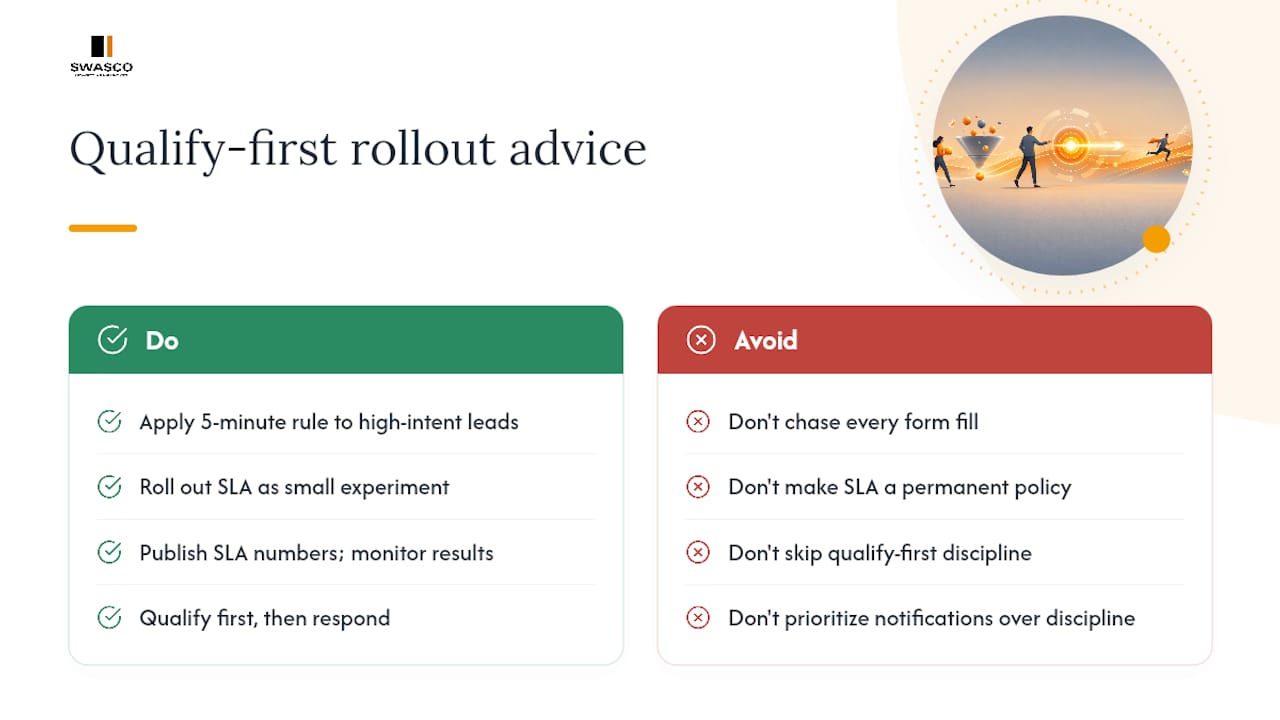
Chasing five minutes for every single lead is how teams burn out their best reps on people who were never going to buy. The 5-minute rule works because it's applied selectively, to leads that have already shown real intent, not as a blanket panic response to every form fill. That distinction gets lost in a lot of the advice circulating on this topic.
Treat your first SLA rollout as a small, published experiment rather than a permanent policy. Publish the numbers, watch what breaks, and adjust. Qualify-first discipline is what makes fast response sustainable rather than exhausting, and it's the part of this playbook most teams skip because it's less exciting than a shiny new notification tool. Getting the sequence right, qualify then respond, not respond then qualify, is what separates teams that sustain their gains from teams that burn out within a quarter.
— James Paul
A faster way to put this playbook into practice
Building every piece of this playbook in-house, routing rules, notification systems, qualification logic, calendar sync, unified inbox, takes real engineering time most service businesses don't have spare. A guided system with setup, AI training, and ongoing technical support helps ensure you are not left configuring workflows alone after a software demo ends.

The platform's conversational AI answers calls, texts, website chat, and social messages the moment they arrive, qualifies the enquiry, and books it straight into your calendar, covering the exact gap between lead capture and human follow-up that this article has walked through. It replaces the patchwork of routing tools, notification apps, and manual triage most teams cobble together, with one system trained specifically for your business. If missed calls and slow follow-up are costing you booked appointments, take a look at the Talk2Aiva plans and see which suite fits your call volume and team size.
Sources
- Speed to Lead: The B2B Guide to Faster Response — LeanData
- Lead response time — EmailAnalytics
- What is speed to lead and how to do it in 2026 - Guideflow Blog
- Monday
FAQ
What is the 5-minute rule for leads?
The 5-minute rule states that contacting a high-intent lead within five minutes of their enquiry dramatically increases the odds of qualifying them, with some research citing odds up to 21 times higher than a 30-minute delay. It applies best to leads that have already shown strong buying intent, such as demo requests, rather than every single form fill.
How much does speed to lead improvement cost?
Costs vary depending on whether you build routing and notification systems yourself or use a guided platform. Talk2Aiva's suites start from £970 per year for the Software Suite, rising to £2970 and £4970 per year for the higher-tier suites, each including setup and ongoing support, details are available on the Talk2Aiva site.
How important is speed to lead really?
It's one of the most direct levers available for improving conversion, since research shows the average B2B response time sits around 42 hours while top performers respond in minutes. That gap between average and fast response is where a meaningful share of lost pipeline actually sits.
How quickly should you respond to leads?
Aim for under five minutes for high-intent leads like demo requests and pricing enquiries, under one hour for medium-intent leads, and under 24 hours for low-intent enquiries such as newsletter signups. Tiering your response speed by intent, rather than applying one blanket target, avoids wasting rep time on leads unlikely to convert.