
The right approach treats every appointment as unfinished until three things happen: the client hears from you once with a single clear purpose, the outcome gets logged, and anyone who says stop gets left alone. Follow-up isn't a marketing campaign bolted onto your calendar; it's a short, conditional sequence that closes the loops your appointment opened. Talk2Aiva builds this logic into automated workflows so nothing falls through, but the principles below work whether you run them by hand or through software.
TL;DR:
- Rebooking and follow-up messages should be triggered specifically by appointment status changes, such as completion or cancellation, to prevent unnecessary repeats.
- Messages must be single-purpose, with clear actions, and sent through channels suited to their content, such as SMS for quick reminders and email for detailed instructions.
- Automations should include exit conditions like rebooking, cancellation, or complaints to avoid redundant outreach and ensure accurate client status logging.
- In the UK, consent is required for promotional follow-up messages, but appointment summaries and care instructions do not need explicit consent under PECR.
- Tracking the actual outcomes of follow-up sequences, including rebooking rates and revenue impacts, provides a clearer picture of their effectiveness than open rates or message impressions.
Table of Contents
- What to send after an appointment and when to send it
- SMS, email or phone: matching the channel to the message
- Building automation that knows when to stop
- UK compliance basics for follow-up messages
- How to measure whether your follow-up is actually working
- Copy-and-paste templates and a 14-day example sequence
- What guided automation gets right that manual follow-up misses
- When a client goes quiet or reacts badly
- Follow-up by appointment type: medical, sales and consultations
- Why most follow-up advice misses the actual problem
- A guided way to put this into practice without building it yourself
- Sources
- FAQ
What to send after an appointment and when to send it
Post-appointment follow-up works best as a five-stage sequence, each stage triggered by time and by what actually happened at the last touchpoint, not a fixed calendar date. SchedulingKit's research on client follow-up automation backs this staged approach over one-size-fits-all blasts, and it maps cleanly onto how service businesses actually operate.
Here's the cadence that holds up across most service types:
- Same day, within 1 to 2 hours — a thank-you and summary. Confirm what was done, note any home care instructions, and close the visit properly.
- 24 to 48 hours later — a satisfaction check. This is a conditional gate: happy clients move toward a review request, unhappy ones get routed to a recovery conversation instead.
- 3 to 7 days out — aftercare content, resource links, or a small relevant add-on offer. This is where you add value without asking for anything.
- 2 to 4 weeks later — the rebooking nudge, timed to the natural interval for that service (a six-week haircut cycle looks nothing like a quarterly boiler service).
- 60 to 90 days with no rebooking — a win-back message or light nurture touch, treating the client as dormant rather than lost.
Each message carries exactly one action. Asking for a review and a rebooking in the same text confuses the client and depresses response rates on both asks. Build in branching logic so a booked client skips the rebooking nudge entirely, and a five-star review triggers a public request while a low score routes privately to your team first.
SMS, email or phone: matching the channel to the message
Channel choice isn't a preference question, it's a fit question. Each medium does one job better than the others, and mixing them up is the fastest way to get ignored.
- SMS works for anything short and time-sensitive: booking confirmations, one-tap rebooking links, quick satisfaction checks. Keep the message under 160 characters where you can, because longer texts split into multiple messages and cost more to send.
- Email is the right home for aftercare instructions, photos, attachments, or anything that needs more than a sentence. It's also better for review requests, since most review platforms link out cleanly from an email button.
- Phone calls earn their place for high-value services, complex rebooking (multiple providers, room bookings, package deals), or when a client has gone quiet after a poor experience. A human voice de-escalates in a way no text ever will.
Every template, regardless of channel, needs the same five parts: an opener that names the business and appointment, one line of context, a single call to action, a clear sender identity, and an opt-out or reply instruction. Cliniko's support documentation shows this pattern repeated across appointment types because it works regardless of what the appointment was for.
Pro Tip: Test personalisation tokens one at a time. Swap the client's first name in, measure response rates for two weeks, then test the service name or provider name next. Changing three variables at once tells you nothing about which one moved the number.
Building automation that knows when to stop
The mechanics of automated follow-up matter less than the exit conditions. A sequence that keeps texting a client who already rebooked isn't efficient, it's annoying, and it tells the client your systems don't talk to each other.
Set your triggers on genuine appointment events, specifically a status change to "completed," combined with service-specific fields like treatment type or provider. Timely's help documentation and Semble's guidance on automated patient messages both walk through this same setup pattern: create the template, link it to an appointment type, set the follow-up period and time of day, and layer in suppressions such as skipping weekends.
Before you switch anything live, run through this exit-condition checklist:
- Rebooked — suppress remaining sequence, move to standard reminder flow.
- Cancelled or no-show — stop follow-up, route to a rebooking offer instead.
- Refunded or complaint logged — stop automated messages, create a task for a human.
- Replied — pause automation, route the reply to the right person or team.
- Opted out — remove permanently from that sequence and flag account-wide.
- Resolved with no action needed — close the loop and log it, even if nothing further gets sent.
Pro Tip: Build a weekly report of anyone who exited the sequence without a rebooking or a resolved status. That list is your highest-value follow-up target, not the people already in an automated flow.
Every outcome, whichever branch it takes, needs to land back in your CRM. A follow-up system that doesn't log outcomes just creates a second, invisible version of your client list.
UK compliance basics for follow-up messages
Electronic follow-up in the UK sits under PECR, and the rules split on one question: is this message marketing, or is it purely about the service the client already booked? The ICO's guide to electronic mail marketing confirms that appointment summaries and aftercare notes aren't marketing, but the moment you add a promotional offer, they are, and that triggers consent requirements. The ICO's wider PECR detail draws this line clearly.
For genuine marketing content, such as an offer, discount, or promotional review incentive, you generally need explicit consent, unless the existing-customer soft opt-in applies, meaning the client bought a similar service from you recently and had a clear chance to opt out.
Run through this before launching any sequence:
- Record how and when consent was given for every contact.
- Maintain a do-not-contact list that every channel checks before sending.
- Include a visible sender name, business identity, and unsubscribe or reply-to-stop instruction on every message.
- Check any subcontractor or third-party sender's contract, since the ICO holds your business responsible for marketing sent on your behalf.
Our guide to GDPR SMS consent for UK SMEs walks through the consent capture process step by step.
How to measure whether your follow-up is actually working
Message open rates tell you almost nothing about whether follow-up is paying for itself. The metrics that matter are operational: did the loop close, and did it make money?
Track these weekly rather than glancing at them monthly:
- Rebooking rate attributed to follow-up — the share of rebookings that happened after (and because of) a nudge message, not organically.
- Workflow closure rate — the percentage of sequences that end in a deliberate outcome (rebooked, resolved, opted-out) rather than just running out.
- Review conversion — reviews generated per hundred completed appointments.
- Opt-out rate — a rising number here signals fatigue or a mistimed cadence before it shows up anywhere else.
- Time-to-human-response — how fast an escalated reply gets a real person, not a bot loop.
- Revenue attributed to follow-up — booked value traced back to a follow-up touchpoint.
Keystone's playbook on post-visit revenue recommends running a 14 to 90 day test window before changing a sequence, segmenting results by service type and client cohort so you're not averaging away useful differences. A haircut client and a boiler service client respond to entirely different cadences, and blending their data hides that.
Copy-and-paste templates and a 14-day example sequence
Adapt these rather than sending them verbatim, but the structure behind each one is what does the work.
- Thank-you (SMS, same day): "Thanks for visiting [Business] today. Let us know if you need anything before your next appointment. Reply STOP to opt out."
- Satisfaction check (SMS or email, 24 to 48 hours): "How did your visit go? Reply 1 to 5, or tell us more. We read every response."
- Conditional review request (email, triggered only on a positive score): "Glad it went well. Would you mind sharing that on [review platform]? One tap: [link]."
- Rebook nudge (SMS, timed to service interval): "Time for your next [service]? Book in two taps: [link]."
- Win-back (email, 60 to 90 days, no rebooking): "It's been a while. Here's 10% off your next visit if you book this month: [link]."
A compact 14-day flow: Day 0 thank-you by SMS, Day 1 satisfaction check by SMS, Day 2 conditional review request by email if the score was positive, Day 7 aftercare content by email, Day 21 rebooking nudge by SMS. SchedulingKit's automation research supports keeping each touchpoint to a single channel and a single ask.
- Run 3 to 4 wording variations per message type.
- Rotate winning variants in every quarter and retire the weakest.
What guided automation gets right that manual follow-up misses
The gap between businesses that do follow-up well and those that don't rarely comes down to effort. It comes down to whether the workflow itself remembers what happened last time. A guided AI receptionist like Talk2Aiva handles onboarding, builds the workflow logic, routes replies to the right person, and syncs with your calendar so a rebooking automatically suppresses the next nudge in the sequence.
That matters because manual follow-up almost always fails at the exit conditions, not the first message. Someone remembers to send the thank-you text. Fewer people remember to check whether the client already rebooked before the automated nudge goes out three weeks later.
Before choosing any automation vendor, check that it can do four things: log every outcome to a central record, route human replies without delay, suppress messages when a condition changes, and hand you a plain view of what's pending versus resolved.
When a client goes quiet or reacts badly
Silence is the most common response you'll get, and it isn't automatically bad news. Most clients who don't reply within 48 hours simply weren't going to respond to any message, regardless of wording. Don't escalate cadence or channel just because the first attempt got nothing back; that reads as pressure, not care.
A genuinely negative response is different and needs a different path entirely. The moment a satisfaction check comes back low, or a reply contains a complaint, pull that client out of the automated sequence immediately and route it to a person. Sending a review request to someone who just told you they were unhappy is one of the fastest ways to generate a public one-star review instead of a private fix. Separating internal satisfaction checks from public review requests, rather than running them as one step, avoids this trap and lets you triage before anything goes public.
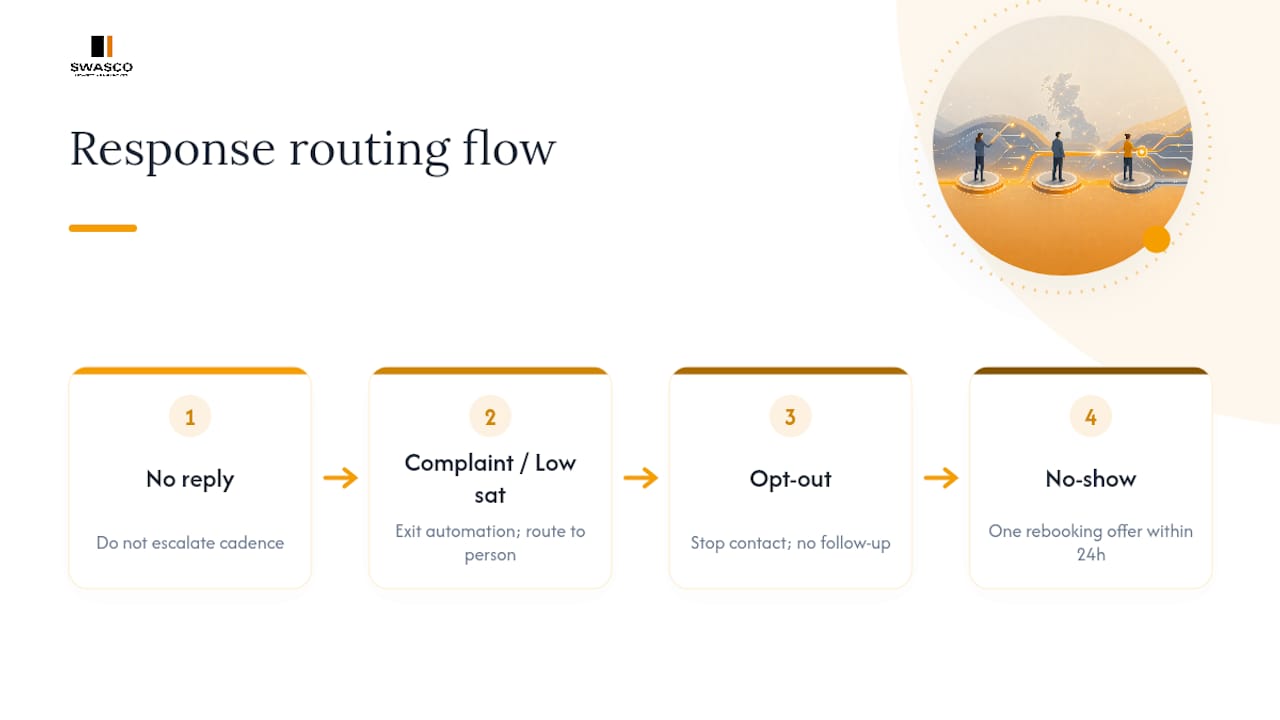
For clients who opt out entirely, respect it without a follow-up question asking why. A "why did you unsubscribe" message defeats the purpose of the opt-out and often triggers a formal complaint. For no-shows, a single rebooking offer within 24 hours performs better than a guilt-based reminder about the missed slot; frame it as convenience, not failure.
Track how many sequences end in silence versus escalation versus resolution. If silence dominates a particular message type, the issue is usually timing or relevance, not the client.
Follow-up by appointment type: medical, sales and consultations
A single template rarely fits every kind of appointment, because the stakes and expectations differ sharply.
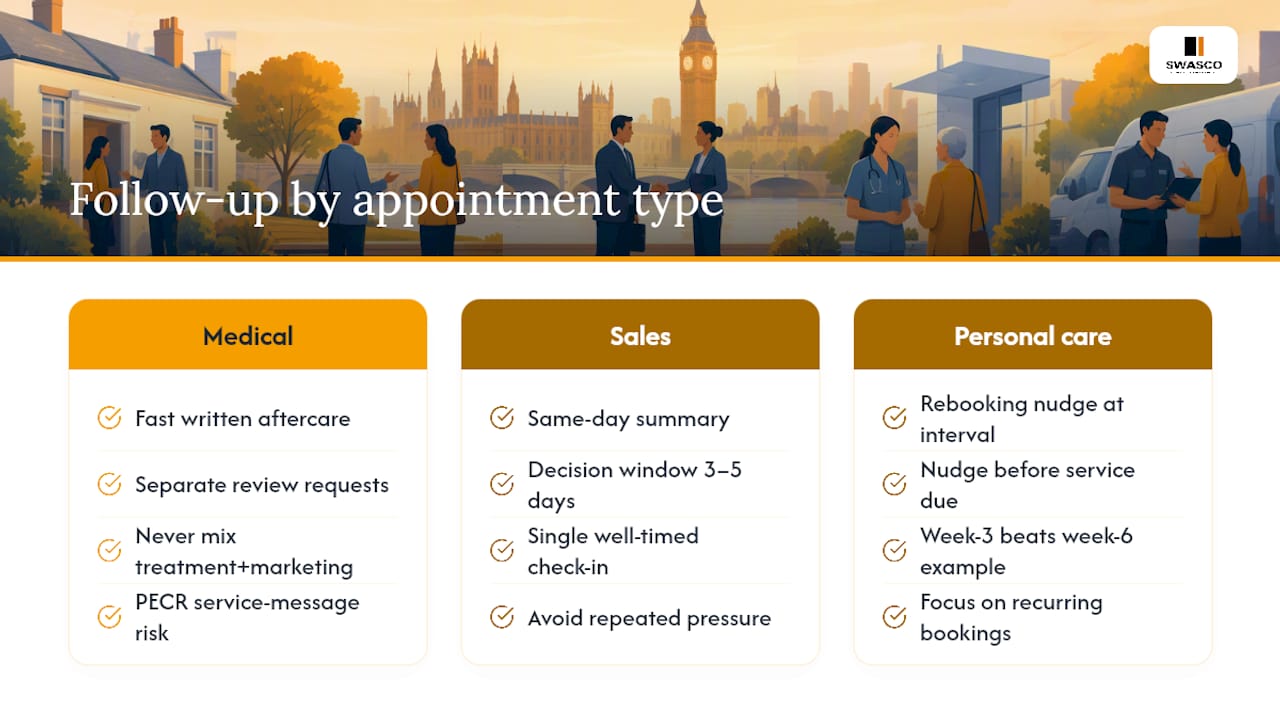
Medical and healthcare appointments need aftercare instructions to arrive fast and in writing, since verbal advice gets forgotten within hours. Keep review requests entirely separate from clinical follow-up messages, and never combine a treatment reminder with a marketing offer, which risks breaching the service-message distinction under PECR. Semble's guidance for automated patient messages shows this separation built directly into practice software.
Sales appointments and consultations run on a tighter clock. A same-day summary reinforcing the value discussed, followed by a decision-window nudge (typically 3 to 5 days, not weeks), converts better than a slow drip. Silence here often means the prospect is comparing options, so a single well-timed check-in beats repeated pressure.
Personal care and recurring services (salons, gyms, home services) benefit most from the rebooking nudge timed precisely to the service interval. A four-week haircut client nudged at week three converts noticeably better than one nudged at week six, once the habit has already broken.
Whatever the appointment type, the one-action-per-message rule holds. Mixing aftercare with an upsell, or a decision nudge with a review request, dilutes both asks.
Why most follow-up advice misses the actual problem
Most guidance on this topic treats follow-up as a messaging exercise: write better copy, send more touchpoints, personalise harder. That's not where businesses actually lose money. They lose it in the gap between "message sent" and "outcome recorded," where a rebooked client keeps getting nudged, or a complaint sits unread for four days because nobody built an exit condition for it.
The conventional advice also over-indexes on volume. Five well-timed, single-purpose messages with clean branching logic outperform a longer sequence stuffed with reminders, offers, and review asks. If your workflow can't tell the difference between a resolved appointment and an open one, more messages just mean more noise.
What I'd prioritise first, before templates or timing, is the exit-condition checklist. Get that wrong and every other improvement is cosmetic. Get it right, and even a basic three-message sequence will outperform a sophisticated one that keeps talking to clients who've already moved on.
— James Paul
A guided way to put this into practice without building it yourself
Talk2Aiva is a tool designed for service businesses that want this exact sequence running without building it message by message. Plans include onboarding and workflow building to help set up appointment triggers, exit conditions, and channel logic properly from the start.

That matters most for the two things this article keeps returning to: suppression and logging. Talk2Aiva syncs with your calendar so a rebooking automatically stops the next nudge, routes replies to a real person instead of leaving them stranded, and logs every outcome centrally so you can see what's pending versus resolved at a glance. The Software Suite, Ultimate AI Suite and Elite AI Suite each bundle this setup and ongoing technical support, so you're not left maintaining workflow logic alone once it's live. If you want to see the full feature set behind calendar sync and routing before deciding, the features overview covers it in detail. Book a look at the platform and get your sequence built properly from the outset, rather than patched together across five different tools.
Sources
- Electronic mail marketing (ICO guide to PECR)
- How to automate client follow-ups (SchedulingKit)
- The post-visit revenue engine: a practical playbook (Keystone)
- A quick overview of follow-up messages (Cliniko support)
- Automated follow-up messages (Semble help centre)
FAQ
What does a follow-up appointment actually mean?
A follow-up appointment or message is any planned contact after a visit that checks on the outcome, offers aftercare, or moves the client toward rebooking. It's distinct from a marketing blast because it's tied directly to that specific appointment and its outcome.
How do I politely remind someone about a follow-up visit?
Keep the reminder short, name the original appointment or service, and give one clear action, usually a booking link. A message like "Time for your next check-in? Book in two taps" works better than a lengthy explanation of why they should return.
How do I professionally say I will follow up?
State a specific timeframe rather than a vague promise, such as "I'll follow up within 48 hours with your results" instead of "I'll be in touch soon." Specificity signals reliability and sets an expectation the client can hold you to.
What typically happens at a follow-up appointment?
A follow-up appointment usually reviews progress since the last visit, addresses any issues that came up, and confirms next steps, whether that's another booking, a treatment adjustment, or closing the matter entirely. The exact content depends heavily on appointment type, from clinical review in healthcare to decision discussion in sales.
What's the right cadence for post-appointment follow up?
A five-stage cadence works for most service businesses: a same-day thank-you, a satisfaction check at 24 to 48 hours, aftercare content within a week, a rebooking nudge at 2 to 4 weeks, and a win-back message at 60 to 90 days if there's no rebooking. Timing shifts depending on the natural interval of the service itself, as SchedulingKit's research on automated sequences confirms.