
MOT booking automation is worth doing for almost any garage running steady or seasonal test volumes: it replaces phone-tag with 24/7 online booking, locks your diary automatically, sends confirmations and reminders without staff lifting a finger, and pre-fills job cards from the vehicle registration. The immediate wins are fewer no-shows and less admin time. The bigger payoff, covered below, comes from how well you sequence the rollout.
TL;DR:
- Real-time slot availability and two-way calendar locking are essential to prevent double bookings across online and in-shop channels.
- Automated reminders should follow a strategic cadence, like a confirmation plus a 48-hour and same-day reminder, to effectively reduce no-shows.
- Job cards must populate automatically with vehicle and customer details, linked to parts, invoicing, and scheduling to streamline workshop workflows.
- The rollout should be staged, starting with digitizing the diary and reminders, then adding online booking, to ensure staff trust and system stability.
- Successful implementation depends on integrating automation into daily operations, respecting existing scheduling rules, and providing guided onboarding support.
Table of Contents
- What does MOT booking automation actually do?
- Which features actually matter when choosing a system?
- How does booking automation fit the workshop day?
- What ROI can garages realistically expect?
- How should garages stage the rollout?
- Why treat this as an operations change, not a plug-in?
- How Talk2Aiva supports garages moving to automated booking
- Sources
- FAQ
What does MOT booking automation actually do?
At its core, MOT booking automation replaces manual phone bookings with a system that captures, confirms, and schedules appointments without a receptionist typing into a paper diary. It handles the repetitive parts of intake so your service advisors focus on customers who need a real conversation, not a slot check.
A typical setup includes:
- An online booking widget or customer portal, live around the clock, so bookings land even after closing time.
- Automated intake from email, phone, or chat that converts into a job card, with the vehicle registration mark (VRM) auto-filling make, model, and MOT due date.
- Calendar and diary sync that allocates the right bay and technician the moment a slot is confirmed.
- Automated confirmations and reminders sent by SMS, email, or WhatsApp where the platform supports it.
- DVSA and DVLA vehicle lookup that pulls test history and flags the correct test class before the customer arrives.
None of this replaces the legal requirement to book through an approved MOT test centre. Automation just makes the booking route faster and less error-prone for both sides.
Which features actually matter when choosing a system?
Plenty of MOT booking software claims to "do it all." Fewer actually solve the problems that cost garages money: double-bookings, missed reminders, and job cards riddled with typos. Focus your evaluation on five things.
- Real-time slot availability with two-way calendar lock. If a slot is taken online, it must vanish from every other channel instantly, or you will double-book a ramp.
- Reminder scheduling with repeat-message rules. A single reminder rarely stops a no-show. Systems that send an initial confirmation, a 48-hour nudge, and a same-day text perform far better.
- Job-card auto-population. VRM, contact details, and test class should populate automatically, the same fields customers already provide when booking through official channels like nidirect's online MOT service.
- Automated cancellation and rebooking flows. A cancelled slot should reopen for booking within minutes, not sit empty until someone notices.
- Reporting on appointment history. You need visibility on repeat customers, no-show patterns, and technician load to make sensible staffing decisions.
Pro Tip: Ask any vendor to show you what happens end-to-end when a customer cancels ten minutes before their slot. If the answer involves a staff member manually updating three separate systems, keep looking.
How does booking automation fit the workshop day?
Booking software only earns its keep when it understands your actual workshop, not just an abstract calendar grid. Slot lengths need to map to ramp availability and technician skill sets, not a generic 30 minute default that ignores whether a car needs a four-post lift.
Good systems handle this by:
- Matching MOT slot duration to specific bays and qualified testers, rather than treating every ramp as interchangeable.
- Creating a job card the moment a booking confirms, then linking it to parts ordering and invoicing so nothing gets re-keyed later.
- Allowing staff to edit or cancel bookings directly, with the freed slot released back into online availability automatically.
- Coping with peak demand, such as combining a service and MOT in one visit, without creating two conflicting diary entries.
- Storing customer contact details in line with UK data protection rules, since names, phone numbers, and vehicle data all count as personal information under GDPR.
Platforms like Autowork Online's booking module build the diary link directly into the booking step, which avoids the classic problem of a website taking a booking the workshop diary never sees.
What ROI can garages realistically expect?
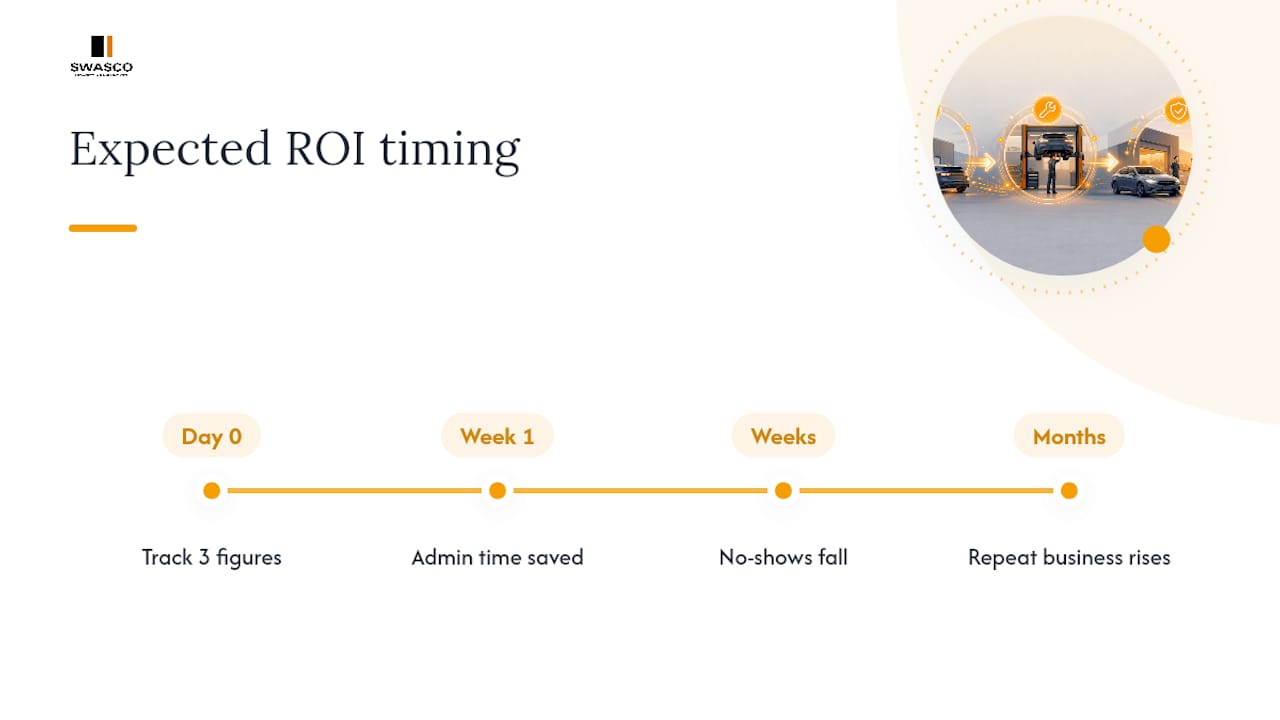
The honest answer: some gains show up in week one, others take a few months of tuning. Admin time saved from not manually answering the phone for every booking request is close to immediate. Reduced no-shows follow within a few weeks, once reminder timing settles. Repeat-business growth from a smoother customer experience takes longer to show in the numbers.
Track three figures from day one: no-show rate, hours of admin time per week spent on booking-related tasks, and the conversion rate from enquiry to confirmed slot. Vendors in the garage-management space, including MOT Manager, routinely position automated reminders and diary population as the two levers with the fastest measurable effect on no-shows.
Reminder cadence matters more than reminder count. A single SMS the night before typically outperforms three generic emails spread across a week, because it lands when the customer is actually thinking about tomorrow's schedule.
How should garages stage the rollout?
Flipping every feature on at once is the fastest way to confuse both staff and customers. A staged approach gives your team time to trust the system before it takes on more responsibility.
- Stage 1: Digitise the diary and switch on automated reminders. This alone often cuts no-shows without touching how customers book.
- Stage 2: Add an online booking widget and test slot locking under real conditions, ideally during a quieter fortnight so any conflicts surface early.
- Stage 3: Enable phone and chat intake with automatic job-card creation, once the diary and reminders are proven.
Measure baseline figures (no-shows, admin hours, booking conversion) before each stage and again four weeks after, so you know whether the change actually worked rather than assuming it did. Practitioners who take this phased route consistently report smoother staff adoption than garages that switch everything on in a single weekend.
Pro Tip: Run your first two weeks of online booking on off-peak slots only. It surfaces workflow quirks, like parts lead times or technician assignment rules, before you expose the system to full demand.
Guided onboarding from a support team, rather than a DIY install, tends to shorten this whole process considerably, since someone experienced can tune message timing and cancellation rules based on patterns they've already seen elsewhere. For garages weighing up the switch from phone bookings to AI-assisted intake, the staged approach used in tyre shop booking automation follows much the same logic.
Why treat this as an operations change, not a plug-in?
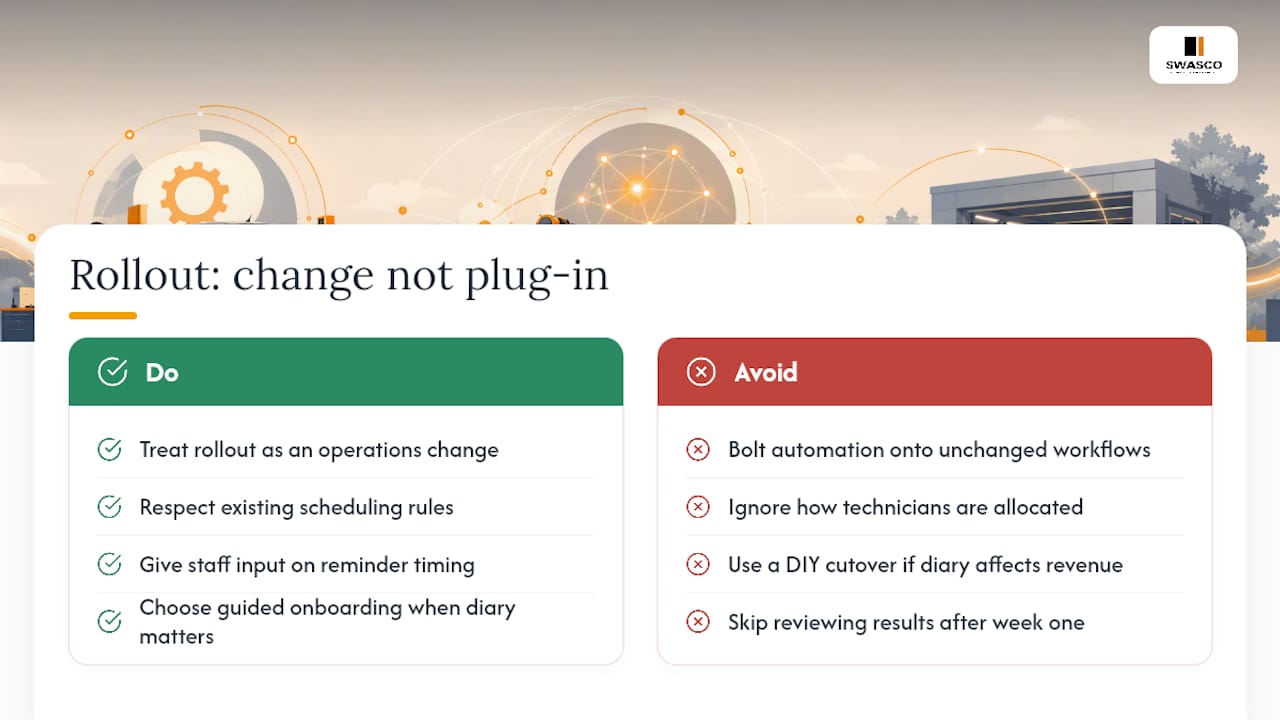
Automation fails most often not because the software is weak, but because it gets bolted onto workflows nobody adjusted. A booking widget that ignores how your technicians actually get allocated will generate conflicts within days, not months.
The garages that get this right treat rollout as a change to how the workshop runs, not a new gadget layered on top. That means respecting existing scheduling rules, giving staff a say in reminder timing, and choosing guided onboarding over a DIY cutover when the diary genuinely matters to daily revenue. Measure what changes, then adjust. Automation that isn't reviewed after week one is just guesswork with better branding.
— James Paul
How Talk2Aiva supports garages moving to automated booking
Some platforms offer a practical route for garages that would rather not build the diary logic, reminder cadence, and intake workflow from scratch themselves. Such systems may run conversational AI across phone calls, website chat, and SMS, so a customer enquiring about an MOT slot outside business hours can get a response and a booked appointment, not a voicemail.

Subscriptions may include guided onboarding, workflow building, and ongoing optimisation, so the staged rollout described above can happen with support rather than trial and error. Calendar sync can help keep the diary accurate as bookings land, and follow-up messages may handle confirmations and reminders automatically. Plans run from the Software Suite through to the Elite AI Suite, each adding more of the automation and support layers a growing garage needs. If you want to see how the intake and calendar sync work in practice, request a guided setup through the Talk2Aiva features page.
Sources
For the legal basics on booking, changing, or cancelling an MOT, see GOV.UK's booking guidance and nidirect's online MOT service. For a broader automation rollout checklist, see this marketing automation guide for SMBs.
FAQ
What is MOT booking automation?
MOT booking automation is software that handles online intake, calendar scheduling, and reminder messages for MOT appointments without manual phone handling for every booking. It typically pulls vehicle details from the registration number and creates a job card automatically once a slot is confirmed.
Does automated booking replace the need for an approved test centre?
No. Every MOT must still take place at an approved MOT test centre, and automation only changes how the appointment gets booked, not who can legally carry out the test.
How long does it take to go live with automation?
A staged rollout, digitising the diary first, then adding reminders, then online booking, typically takes a few weeks per stage rather than a single weekend switch. Garages using guided onboarding through some platforms often move through these stages faster because setup and message tuning are handled alongside their own team.
How much does Talk2Aiva cost for a garage?
Talk2Aiva offers three plans: the Software Suite, the Ultimate AI Suite, and the Elite AI Suite, each with different annual pricing tiers as listed on the Talk2Aiva site. Many tiers include guided setup and ongoing support rather than a DIY installation.
What data privacy considerations apply to MOT booking automation?
Customer names, phone numbers, and vehicle registration details all count as personal data under UK GDPR, so any booking platform handling them needs proper storage and access controls. Ask vendors directly how long they retain booking data and who can access it before signing up.