
Lead routing automation assigns every inbound enquiry to the right person or team the moment it arrives, using rules based on territory, product, capacity, or intent, instead of leaving leads to sit in a shared inbox. The payoff is speed: leads contacted within minutes convert at far higher rates than leads left for hours. If you're juggling multiple channels, growing inbound volume, or watching leads go cold before anyone calls them back, this is the moment to build it.
TL;DR:
- Automated lead routing should prioritize speed, assigning leads within seconds based on territory, product interest, language, or intent signals, to maximize conversion chances.
- Proper rule sequencing, capacity checks, and regular audits are vital to prevent leads from being orphaned or misrouted, especially under complex or high-volume conditions.
- Starting with a pilot on one channel and segment, with clear KPIs and a manual rollback option, significantly reduces the risk of silently dropping leads during rollout.
- Enriching lead data through conversational AI at contact improves routing accuracy and reduces the likelihood of orphaned or unqualified leads.
- Organizational factors like inadequate fallback rules, incomplete data, or misaligned incentives often cause routing failures more than technical flaws.
Table of Contents
- What is lead routing automation and how does it work?
- How does automated lead routing work day to day?
- What routing criteria and best practices actually improve conversion?
- How do you roll out lead routing automation without breaking your pipeline?
- Why do leads get orphaned, and how do you fix it fast?
- Where does conversational AI fit into a routing workflow?
- What operations teams get wrong about routing rollouts
- Try a guided AI receptionist alongside your routing rules
- Where to go for CRM-specific routing documentation
- Sources
What is lead routing automation and how does it work?
Lead routing sits in the middle of the lead lifecycle: a prospect fills in a form, starts a chat, or calls in, gets qualified against some basic criteria, then gets handed to a rep or queue for follow-up. Automate that handover and you remove the manual sorting that causes delay. That's the whole premise of lead routing automation: a set of rules decides who gets the lead before a human even looks at it.
Three main approaches dominate, and which one you need depends on team size and complexity.
- Simple if/then rules work for small teams: "if region equals North, assign to Rep A." Easy to build in almost any CRM, but they break down once you have more than a handful of conditions.
- Multi-step flow or logic engines chain conditions together, checking product interest, then language, then rep availability, before landing on an assignment. Mid-market teams with several product lines or regions tend to need this layer.
- CRM-native assignment rules and territory management (built into platforms like Microsoft Dynamics 365 or Salesforce) handle enterprise-scale routing, letting administrators define territory hierarchies, precedence order, and load distribution centrally.
Routing gets triggered from wherever leads arrive: website forms, live chat widgets, inbound calls, paid ad forms, and increasingly, social channels. Each entry point should feed the same routing logic. Route the same lead differently depending on whether it came through a form or a phone call, and you'll end up with two disconnected pipelines instead of one.
How does automated lead routing work day to day?
Once rules are live, three mechanics do the heavy lifting: condition matching, sequencing, and capacity checks.
- Condition builders and segments. Most platforms let you group leads into segments by attribute, region, deal size, product, then apply a rule set to each segment rather than writing one giant rule for everyone.
- First-match versus fall-through logic. CRM assignment rules typically run in a defined order and stop at the first one that matches, rather than evaluating every rule against every lead. That makes rule order critical. Put a broad catch-all rule above a narrow, high-value one, and the specific rule never fires.
- Capacity and availability checks. Routing engines can cross-reference a rep's calendar, current open-lead count, or shift status before assigning, so leads don't land on someone who's on holiday or already overloaded.
Rule sequencing deserves more attention than most teams give it. Two rules can both technically apply to a lead, but only the first match wins, so a rule sitting third in the queue might never trigger even though it's correctly configured. Reviewing rule order after every change is not optional housekeeping. It's the difference between rules that work as designed and rules that quietly do nothing.
Load balancing comes in a few flavours: pure round-robin (equal turns for everyone), weighted assignment (reps with better close rates or seniority get more volume), and capacity-capped distribution (nobody gets a new lead once they hit a threshold, regardless of whose turn it is). Assignment rules in platforms like Dynamics 365 also let you set a time limit for how long a record counts as "up for assignment," so stale, unclaimed leads get flagged automatically rather than quietly disappearing.
Pro Tip: Audit your rule order every time you add a new segment or product line. A new rule inserted at the bottom of the list will almost never fire if broader rules above it already catch the same leads.
What routing criteria and best practices actually improve conversion?
Speed-to-contact is the single most important metric in lead routing, and it should shape every rule you write. The goal isn't fairness between reps. It's getting a qualified human in front of the lead before a competitor does.
Build service-level agreements around assignment, not just first contact: a lead should be assigned within seconds of arrival, and the assigned rep should have a short, enforced window depending on your volume before the lead escalates to a backup. Push assignment notifications through whatever channel gets seen fastest for your team, mobile push, SMS, or a dedicated Slack channel, rather than relying on email alerts that sit unread in a crowded inbox.
Beyond speed, the attributes you route on determine whether the right rep gets the right lead:
- Territory — geography still matters for field sales and compliance-bound sectors.
- Product interest — route by the specific product or service line a lead has shown intent for, not just by generic "sales enquiry."
- Language — critical for multi-region teams; a mismatched language assignment adds friction before the conversation even starts.
- Lead score or intent signal — higher-intent leads should reach your strongest closers, not whoever's next in the queue.
- Rep skill and current load — factor in both what a rep is good at and how much they're already carrying.
Blind round-robin distribution treats every lead as interchangeable, which is rarely true. Dynamic routing that weighs capacity, language, and product expertise against each other consistently outperforms simple round-robin assignment, particularly for complex or high-value leads where the wrong rep can lose the deal outright. Capping logic protects against the opposite failure mode: a strong closer getting flooded with leads simply because they convert well, until service quality drops under the volume.
Why speed matters more than most teams assume: Lead distribution platforms built specifically around capping logic and multi-attribute matching exist precisely because generic, unweighted assignment consistently under-serves both high-value leads and the reps best placed to close them.
Use weighted routing for anything above a certain deal-size threshold, and reserve pure round-robin for lower-stakes, high-volume leads where speed matters more than precision matching.
How do you roll out lead routing automation without breaking your pipeline?
Rolling out routing badly is worse than not automating at all. A broken rule set can silently drop leads for weeks before anyone notices. Follow a staged rollout and you avoid that risk entirely.
- Clean the data first. Deduplicate existing records, make key contact fields mandatory at capture, and match leads to existing accounts before routing touches them. Skipping this step means your new rules will faithfully route garbage data straight to your best reps.
- Enrich before you route. Fill in missing firmographic or intent data (company size, source channel, product interest) so rules have something meaningful to key off. Lead-to-account matching and enrichment at the point of capture measurably reduce duplicate records and time-to-contact compared with routing raw, unverified form submissions.
- Pick one channel and one segment for the pilot. Don't rebuild your entire routing logic at once. Choose your highest-volume channel, form leads or inbound calls, and run the new rules against one segment while everything else stays on the old process.
- Define your KPIs before you launch. Time-to-assign, contact rate within the first hour, and conversion rate against your existing baseline. Without a baseline, you can't tell if the pilot actually improved anything.
- Set operational guardrails during the pilot. Backup queues for unclaimed leads, a clear escalation path, and a simple dashboard someone checks daily, not weekly.
- Iterate weekly for the first month, then freeze the rule set once results stabilise. Schedule a monthly audit after that, rather than leaving rules untouched indefinitely.
Pro Tip: Keep a manual rollback switch during the pilot. If the new routing logic misfires on a Friday afternoon, you want to flip leads back to the old process in minutes, not spend a weekend debugging live rules.
Practitioners running early-stage rollouts consistently recommend pairing automation with light human oversight, weekly reviews and a fast rollback option, rather than trusting a new rule set to run unsupervised from day one.
Why do leads get orphaned, and how do you fix it fast?
Orphaned leads, the ones that get assigned to nobody or to someone who never sees them, are the most common failure mode in automated routing, and nearly always preventable.
- Rep absence with no fallback. A rule assigns to a specific person with no backup, and that person is off sick or on leave. Fix it with an overflow queue that catches anything unclaimed past your assignment window.
- Assignment timeouts nobody monitors. Fallback and overflow logic that reassigns leads once a time limit passes prevents them from sitting untouched, but only if that overflow rule actually exists in your configuration.
- Missing default rules. Every rule set needs a catch-all at the bottom for leads that don't match any specific condition. Without one, unmatched leads simply vanish from view.
- Duplicate and incomplete records. Missing phone numbers or duplicate entries confuse matching logic. Mandatory field validation at the capture stage stops most of this before it reaches routing.
- Round-robin overload on top performers. Weighted and skill-based routing, combined with capacity capping, spreads volume more sensibly than pure equal rotation.
Keep an audit log of every assignment and run a weekly report on unclaimed or reassigned leads. It's the fastest way to catch a broken rule before it costs you a quarter's worth of pipeline.
Where does conversational AI fit into a routing workflow?
Routing rules only work as well as the data feeding them. Conversational AI sits upstream of routing, capturing and pre-qualifying a lead the moment they make contact, so the record that hits your routing engine already has clean contact details, an interest category, and basic intent signals attached, rather than a bare name and email address.

Conversational AI solutions can work this way for service businesses: engaging calls, SMS, website chat, and social messages around the clock, asking qualifying questions a rep would normally ask first, and booking directly into a synced calendar before handing off. That reduces the orphan-lead problem at the source, because a lead that's already been captured, qualified, and time-stamped is far less likely to sit unrouted.
In practice, this looks like:
- 24/7 multi-channel capture across calls, text, chat, and social, so nothing arrives at 9pm and waits until morning.
- Guided onboarding and workflow building, so routing logic gets configured around how the business actually operates, not a generic template.
- Ongoing optimisation and technical support, rather than a one-off setup left to drift out of date.
- Sector use-cases, including estate agents capturing viewing enquiries outside office hours, and commercial finance brokers qualifying applicants before a human ever picks up the phone.
What operations teams get wrong about routing rollouts
Most routing failures aren't technical. They're organisational. Teams build a sophisticated rule set, launch it across every channel at once, and only discover the gaps once leads have already gone cold for a month.
Start narrower than feels comfortable. One channel, one segment, a two-week window, measuring time-to-assign and contact rate against whatever you were doing before. If that pilot doesn't beat your baseline, broader rollout won't fix it either; the rules need rework first.
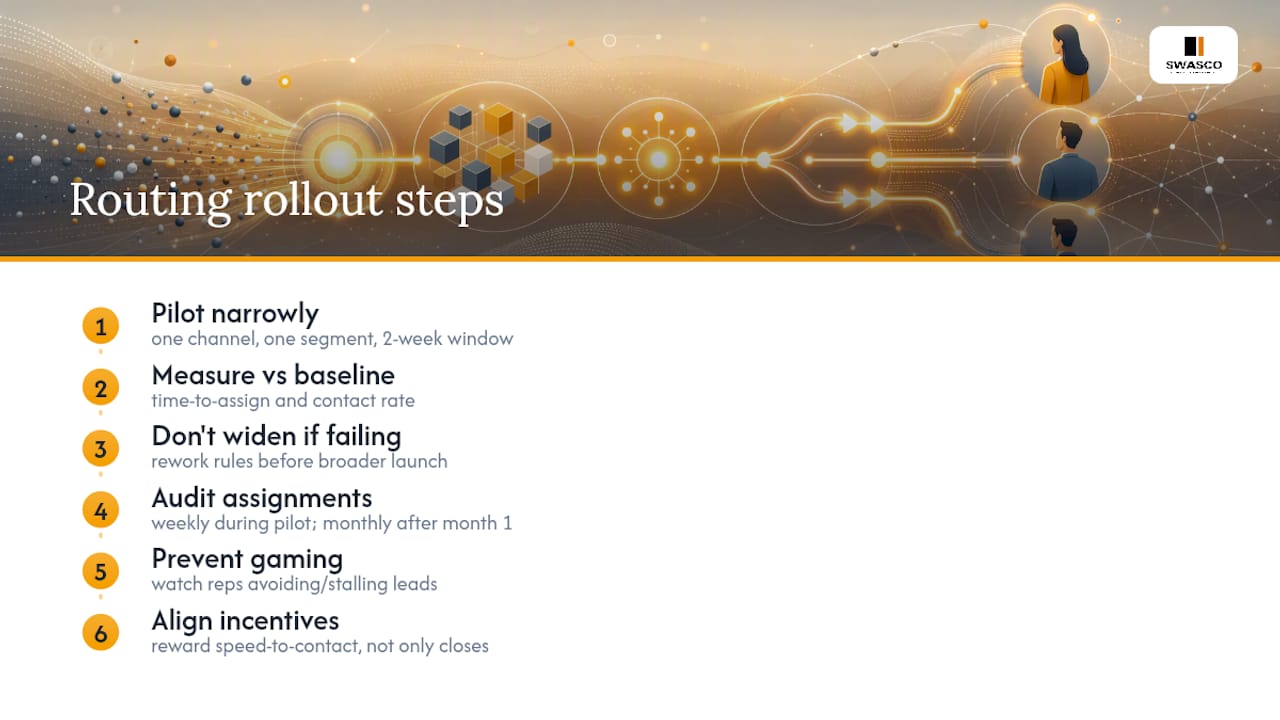
Watch for rule gaming once reps understand how assignment works. Some will find ways to avoid harder leads or stall on ones that don't help their numbers, particularly under weighted or performance-based routing. A weekly review during the pilot catches this early. After the first month, monthly is usually enough, provided someone actually owns the audit rather than assuming the dashboard will flag problems on its own.
Align incentives with the behaviour you want. If speed-to-contact is your headline KPI, make sure rep compensation or recognition reflects it, not just final close rate.
— James Paul
Try a guided AI receptionist alongside your routing rules
Routing rules only ever work on the leads that actually reach your CRM cleanly, which is exactly where most teams lose ground before automation even gets a chance. Talk2Aiva closes that gap by capturing and qualifying every enquiry the moment it arrives, across calls, SMS, website chat, and social messages, then handing your routing rules a complete, ready-to-assign record instead of a half-filled form.

A typical pilot connects an AI receptionist to your existing calendar and CRM, so bookings sync automatically and qualified leads flow straight into your routing logic, with setup, workflow configuration, and ongoing support included to assist during integration. If you're already tightening up routing rules, pairing them with reliable capture at the front end is the next logical step. Book a demo with Talk2Aiva to see how it fits your current CRM before you scale your routing rollout further.
Where to go for CRM-specific routing documentation
For platform-level configuration detail, Microsoft's Dynamics 365 documentation on assignment rules covers rule precedence and time-limited assignment directly. LeadSquared's guide to lead distribution explains capping logic and multi-attribute matching in more depth. Pega Academy's lead routing module is worth a look for condition-based routing at enterprise scale, and the marketing automation checklist from Baby Love Growth offers a practical pilot-planning framework for smaller teams.
Sources
- Lead routing automation (HubSpot blog)
- Create and activate assignment rule (Microsoft Dynamics 365 docs)
- Lead Distribution Software - Automated Lead Routing | LeadSquared
- Automate lead assignment with lead routing | Pega Academy