
A follow-up sequence is an automated, multi-channel workflow that triggers on a lead event and drives toward one of two outcomes: a booked appointment or a disqualified lead moved into long-term nurture. That binary design is what separates a sequence that recovers revenue from one that just sends emails into the void. Talk2Aiva by SWASCO builds exactly this kind of system for UK property and service businesses, combining AI voice, SMS, website chat, and email into a single orchestrated workflow.
Table of Contents
- How do follow-up sequences work in property?
- What components does every effective sequence need?
- Why do exit criteria matter so much?
- Which channels and CRM integrations do you need?
- What cadence templates work for property leads?
- How do you design and deploy a sequence step by step?
- Which KPIs tell you whether the sequence is working?
- What are the UK legal requirements for automated follow-up?
- What mistakes do property teams make most often?
- Which implementation path is right for your business?
- Talk2Aiva handles the setup so you can focus on closing
- Key takeaways
- Why disciplined follow-up changes everything
- Useful sources
How do follow-up sequences work in property?
A follow-up sequence starts the moment a lead takes a defined action: submitting a valuation request, enquiring via a property portal, signing in at a viewing, or triggering a missed-call recovery. The system reads that trigger, selects the right message template, sends it on the right channel, and logs the result back to your CRM. That loop repeats across multiple touches until the lead replies, books, or exits into a nurture track.
When to run a sequence:
- New inbound enquiry (website form, portal lead, phone call): start immediately, within minutes
- Missed-call recovery: trigger an SMS and email within 5 minutes of the missed call
- Valuation request: immediate text confirmation plus a follow-up email with comparable data
- Saved-search alert match: automated listing notification with a soft call to book a viewing
- Long-horizon prospect: monthly nurture drip after initial qualification
Speed matters more than most property teams realise. Responding within 5 minutes of a lead's first contact dramatically increases the chance of a conversation. A minimum speed-to-lead rule of just a few minutes, applied consistently, is the single biggest lever you can pull before optimising anything else. For a deeper look at where agents lose time, the guide on lead response time mistakes covers the most common errors and how to fix them.

What components does every effective sequence need?
A well-built sequence has six modular parts that work together. Get one wrong and the whole system leaks leads.
- Triggers: the event that starts the sequence (form fill, missed call, portal enquiry, saved-search match). Each trigger maps to a specific sequence variant.
- Message templates: pre-written, personalised messages for each channel and phase. One clear call to action per message, short subject lines, and merge fields for name, property address, and area.
- Channel orchestration: the logic that decides whether to send an email, SMS, AI voice call, or website chat message at each step, based on the lead's preferred channel and prior engagement.
- Lead scoring: a numeric or categorical score updated after each interaction (opened email, clicked link, replied, booked) that determines when to escalate to a human.
- Task routing: automated alerts that assign a manual follow-up task to a human rep when a lead hits a score threshold or sends a high-intent signal.
- Exit rules: the conditions that stop the sequence and move the lead to a defined state (booked, disqualified, nurture).
Phases and information flow:
- Engage (0–48 hours): read trigger data, send first touch, log channel and timestamp
- Qualify (48 hours–14 days): read replies and engagement signals, send qualifying questions, update lead score
- Convert (14–90 days): read lead score and property preferences, send listing alerts and market updates, route high-scorers to human rep
- Exit/nurture (90 days+): move to monthly drip; read opt-in flags before every send
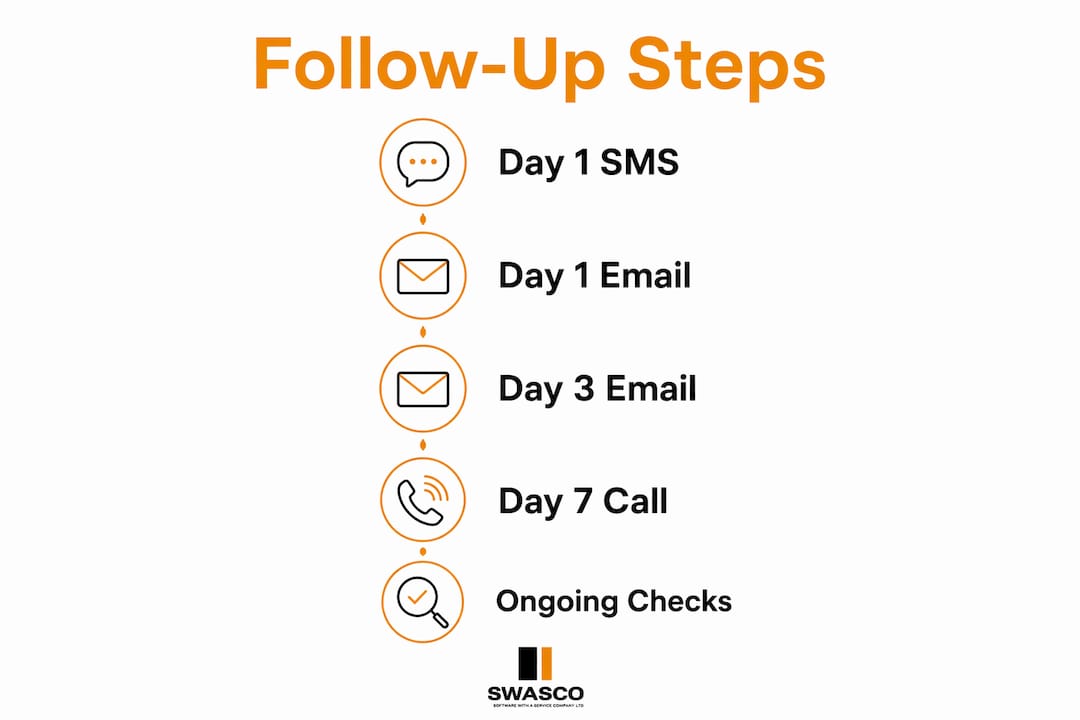
A simple skeleton for a property team: Day 1 SMS acknowledgement → Day 1 email with property details → Day 3 email with similar listings → Day 7 market update → Day 14 check-in → monthly nurture from Day 30.
Why do exit criteria matter so much?
Leaving leads active indefinitely creates operational clutter and causes teams to miss the manual interventions that close deals. Every lead in your system should sit in exactly one of these states at any moment:
- New: trigger fired, no contact made yet
- Contacted: first touch sent, no reply
- Engaged: replied or clicked, not yet qualified
- Qualified: confirmed intent, timeline, and budget
- Booked: appointment confirmed in calendar
- Disqualified: outside criteria or explicitly not interested
- Nurture: long-horizon; monthly drip only
Concrete exit criteria and automated actions:
- Lead replies → pause sequence instantly, create human task, move to Engaged
- Booking confirmed → stop all sequences, send confirmation, move to Booked
- Negative qualifier ("not looking for 12+ months, budget too low") → move to Nurture, reduce cadence to monthly
- No engagement after full sequence → move to Disqualified, add to reactivation list
Pro Tip: Set a single automation rule: if a contact record moves to Booked or Disqualified, all active sequences for that contact pause within 60 seconds. This one rule prevents the most damaging mistake in property follow-up: sending a "last chance" message to someone who signed a contract yesterday.
Which channels and CRM integrations do you need?
Integrating CRM data with all communication channels lets your team see a lead's full interaction history the moment they pick up the phone. Without that, every handoff is a cold start.
Channels to coordinate and when each works best:
- Email: nurture content, listing alerts, market updates; best for longer-form value
- SMS: first touch, booking confirmations, urgent alerts; SMS achieves a very high open rate compared to email
- AI voice call: initial outreach, qualification calls, missed-call recovery; scales phone coverage without added headcount
- Website chat: immediate response to on-site enquiries; captures intent signals in real time
- Social messaging: re-engagement for dormant leads; useful for long-horizon nurture
Integration checklist:
- CRM contact fields synced bidirectionally (last contact date, lead score, preferred channel, opt-in flags)
- Calendar sync for instant booking confirmation
- Activity logging for every send, open, click, reply, and call
- Two-way messaging sync so inbound replies pause sequences automatically
- Web tracking to capture property views and search behaviour
Pro Tip: Your CRM must write a "sequence paused" flag the instant a reply arrives on any channel. If your SMS platform and email platform operate in separate silos, a lead can reply by text and still receive an email follow-up 20 minutes later. That erodes trust fast. For a full breakdown of field mappings, the guide on CRM integration for agents is worth reading before you configure anything.
What cadence templates work for property leads?
Multi-channel sequences front-loaded in the first 10–14 days then tapering to weekly and monthly touches consistently outperform email-only approaches for property leads. A practical starting point is to respond quickly and run several touches in the first two weeks, then revisit regularly on a monthly basis.
| Cadence | Channel | Timing | Goal |
|---|---|---|---|
| Hot inbound — Touch 1 | SMS | Within 5 min | Acknowledge, offer to book |
| Hot inbound — Touch 2 | Day 1 | Property details + calendar link | |
| Hot inbound — Touch 3 | AI voice | Day 2 | Qualify timeline and budget |
| Hot inbound — Touch 4 | Day 5 | Similar listings + market data | |
| Hot inbound — Touch 5 | SMS | Day 10 | Direct booking prompt |
| Warm nurture | Weekly (Days 14–90) | Market updates, new listings | |
| Long-horizon | Email/SMS | Monthly (Day 90+) | Market snapshot, reactivation |
Branch the cadence based on behaviour: a lead who opens every email and clicks a listing link should trigger an escalation task to a human rep. A lead who has not opened anything by Day 7 should receive an SMS instead of another email. Automated sequences running for 60–90+ days recover a substantial share of late-converting leads that most property teams abandon after the second attempt.
Pro Tip: Never apply a hot-lead cadence to a 12-month horizon prospect. High-frequency outreach on long-timeline leads raises opt-outs and damages your sender reputation. Taper to monthly after Day 90 and let engagement signals pull them back into a higher-frequency track.
How do you design and deploy a sequence step by step?
- Map your use case: pick one lead type (e.g. missed-call recovery) and define the trigger, the desired outcome, and the exit criteria before writing a single message.
- Select templates: write one message per touch, one CTA per message, personalised merge fields for name and property.
- Configure triggers: connect your lead source (portal, website form, phone system) to your CRM and set the trigger condition.
- Set exit rules: add the pause-on-reply rule, the booking-confirmation stop, and the disqualification condition.
- Route tasks: define the lead score threshold that creates a human task and assign it to the right team member.
- Train AI voice agents: provide call scripts, qualifying questions, and objection responses before go-live.
- Test: run trigger tests, reply-handling tests, booking-flow tests, and opt-out tests. Success criteria: sequence pauses within 60 seconds of a reply; booking confirmation fires within 2 minutes of calendar event creation.
- Launch and review: go live, then A/B test subject lines and message spacing every 30 days.
A small property team can typically configure and test a single-use-case sequence in one to two weeks. Keep a rollback plan: if reply rates drop sharply in the first 72 hours, pause the sequence, check trigger conditions and field mappings, and relaunch with corrected logic. The step-by-step guide to following up property leads systematically covers the operational detail if you want to go deeper.
Which KPIs tell you whether the sequence is working?
Track six metrics. Nothing more to start.
| KPI | Formula | What to watch |
|---|---|---|
| Time-to-first-contact | Time from trigger to first send | Should be under 5 minutes |
| Reply rate | Replies ÷ leads entered | Rising = good messaging; falling = review channel mix |
| Appointment booking rate | Booked appointments ÷ leads entered | Core conversion metric |
| Conversion by touch number | Bookings at each touch ÷ total bookings | Shows where the sequence earns its keep |
| Sequence completion rate | Leads completing all touches ÷ leads entered | Low = exits are working; very high = no replies at all |
| Opt-out rate | Opt-outs ÷ messages sent | Rising opt-outs signal cadence is too aggressive |
Benchmark to aim for: industry guidance for property follow-up sequences points to front-loading effort in the first 14 days as the highest-leverage period. If your booking rate is not improving month-on-month after the first 30 days, the problem is almost always cadence timing or message personalisation, not the channel.
Tie every booked appointment back to the sequence touch that triggered it. That attribution data tells you which message is doing the work and where to invest in optimisation.
What are the UK legal requirements for automated follow-up?
Automated follow-up is permitted in the UK provided you hold a lawful basis under UK GDPR and comply with PECR for marketing texts and automated calls. Get this right before you go live.
The ICO publishes authoritative guidance on direct marketing and PECR at ico.org.uk. For any question about lawful basis or consent wording, treat the ICO's published guidance as the primary source and take qualified legal advice for your specific situation. This article is general information, not legal advice.
What mistakes do property teams make most often?
- No exit criteria: leads stay "active" for months, sequences keep firing, and the team loses track of who needs a human call
- Poor CRM sync: reply arrives by SMS, email sequence fires 10 minutes later, trust damaged
- Sending after booking: a signed customer receives a "still looking?" message because the booking did not pause the sequence
- Too-high cadence for long-horizon leads: daily messages to a 12-month prospect drive opt-outs and blacklist risk
- Ignoring multi-channel signals: a lead who clicked three listings but never replied is a high-intent prospect; treating them the same as a cold contact wastes the signal
Remediation steps:
- Add the instant-pause rule (see exit criteria section) before launch
- Audit CRM field mappings monthly; check that "last reply date" updates from every channel
- Add a human alert rule: if a lead score crosses a threshold and no human task exists, create one automatically
- Review opt-out rates weekly; a rising rate is the first signal that cadence needs adjusting
Pro Tip: The single fastest fix for most broken sequences is a "reply received" webhook that writes to the CRM and pauses all active sequences for that contact. If your current setup cannot do this in real time, that is the first integration to build, not the last.
The cost of manual follow-up is higher than most teams calculate once you factor in the leads that go cold between attempts.
Which implementation path is right for your business?
Three routes exist, each with different trade-offs.
Build inside your existing CRM: full control, but requires internal technical resource and ongoing maintenance. Expect 4–8 weeks to configure a reliable multi-channel sequence from scratch.
Plug-in automation tools with integrations: faster to launch, but you own the integration logic between tools. Field mapping errors are common and often go unnoticed until leads start complaining.
Managed AI receptionist and workflow service: the fastest route to a live, tested sequence with the least internal resource. AI voice agents handle initial calls, qualify leads, and hand off booked appointments without added headcount. For service-based businesses evaluating how AI memory and personalisation work in practice, the resource on AI for coaches offers a useful perspective on private data layers.
Talk2Aiva by SWASCO takes the managed route. A property team using Talk2Aiva gets AI voice, SMS, website chat, and email orchestrated from a single system, with guided setup, AI training, workflow building, and ongoing optimisation included. The typical path from onboarding to live sequence is designed to get a property business operational quickly, without the team needing to manage the technical configuration themselves.
Pro Tip: Whichever route you choose, run a 14-day live test on one lead type before scaling. A single use case tested properly reveals more than a full system built in theory.
Talk2Aiva handles the setup so you can focus on closing
Missed calls and slow responses are where property businesses lose the most revenue. Talk2Aiva by SWASCO is built to stop that. You get a fully managed AI receptionist that engages every lead within minutes, qualifies them across calls, SMS, website chat, and social media, and books appointments directly into your calendar, 24/7.

The entire setup is done for you: onboarding, AI training, workflow configuration, live launch, and ongoing technical support. No long-term contract negotiations, no internal developer needed, no guessing whether the triggers are firing correctly. If you want to see how it works for a property business like yours, book a discovery call and Talk2Aiva's team will walk you through what a live sequence looks like for your specific lead types.
Key takeaways
A follow-up sequence only recovers revenue when it has clear exit criteria, bidirectional CRM sync, and a front-loaded cadence that matches the property decision timeline.
| Point | Details |
|---|---|
| Design for binary outcomes | Every lead must reach Booked or Disqualified; indefinite "active" states cause missed revenue. |
| Front-load your cadence | Run 5 touches in the first two weeks, then revisit every 30 days according to the 5-5-30 operational rule. |
| Pause on reply, always | A bidirectional CRM sync that pauses sequences on inbound reply is non-negotiable. |
| Track six core KPIs | Time-to-first-contact, reply rate, booking rate, conversion by touch, completion rate, opt-out rate. |
| Stay compliant under UK GDPR and PECR | Record lawful basis, include opt-outs in every message, and hold a DPA with every vendor. |
| Talk2Aiva | Provides a fully managed AI receptionist and follow-up system for UK property businesses, with setup and ongoing support included. |
Why disciplined follow-up changes everything
Most property businesses do not have a lead generation problem. They have a follow-up problem. Leads arrive, get one or two messages, and then go cold because no one has the time or the system to keep going. The data is consistent: 8–12 touches across 60–180 days recover the highest conversion on property leads, yet most teams stop at two. That gap is where revenue disappears.
The teams that close more are not necessarily better at sales. They are better at staying present. A disciplined sequence with clear exit criteria, proper CRM sync, and a cadence matched to the lead's timeline does not just recover missed appointments. It changes how the team operates. Reps stop chasing and start responding to qualified signals. The pipeline becomes readable. Managers can see exactly where leads are stalling and fix the specific message or timing that is causing it.
The cultural shift matters too. When the system handles the repetitive outreach, the human team focuses on the conversations that actually need a human. That is a better use of everyone's time, and leads notice the difference.
Useful sources
- ICO — Direct marketing guidance and PECR: primary UK authority on consent, lawful basis, and automated marketing compliance
- Serif.ai — Real estate lead follow-up system: exit criteria and binary disposition rules
- Automation Atlas — Automated lead follow-up for small business: speed-to-lead rules, AI voice, and the 5-5-30 operational framework
- Yesware — Automated email follow-up guide: reply detection, sequence pausing, and A/B testing cadence
- rAIn Automation — 8-step follow-up sequence: 60–90+ day nurture windows for property leads
- Luxury Presence — Real estate lead follow-up guide: multi-channel cadence, SMS open rates, and CRM routing
- Talk2Aiva by SWASCO: managed AI receptionist and follow-up system for UK service-based businesses
- Property valuation lead nurturing steps: nurture tactics specific to valuation enquiries
- Letting agent follow-up best practices: cadence and messaging guidance for letting agents