
Set Facebook auto replies through Meta Business Suite → Inbox → Automations, where you can switch on instant reply, an away message, or FAQs in a few clicks. These three native options cover most small business needs at no cost, though they cap out on complexity. If your enquiry volume has outgrown a simple toggle, a managed AI receptionist can take routing, booking, and follow-up further.
TL;DR:
- Native Facebook automations like instant reply, away message, and FAQs are suitable for basic small business needs but cannot handle complex multi-step conversations or routing.
- Setting up these automations requires selecting appropriate channels, customizing messages with personalisation tokens, and testing from mobile devices to ensure proper formatting and functionality.
- Proper configuration involves setting correct time zones, avoiding overlapping triggers, and regularly updating or pausing automations to prevent silent failures.
- Native tools cannot automatically assign inquiries, qualify leads, or sync bookings with calendars, making them insufficient for workflows requiring dynamic responses or appointment scheduling.
- Managed AI receptionists are recommended for businesses needing advanced automation capabilities like multi-channel integration, qualification, and automatic booking, with setup support included.
Table of Contents
- Facebook auto reply setup: finding the automations panel
- How do you set up an away message and business hours?
- Building FAQs and keyword-triggered replies
- How do you edit or turn off an automation that isn't working?
- Facebook instant reply examples and away-message templates
- Where native Facebook automations run out of road
- When native automations are enough, and when they're not
- Ready for more than a toggle switch?
- Sources
Facebook auto reply setup: finding the automations panel
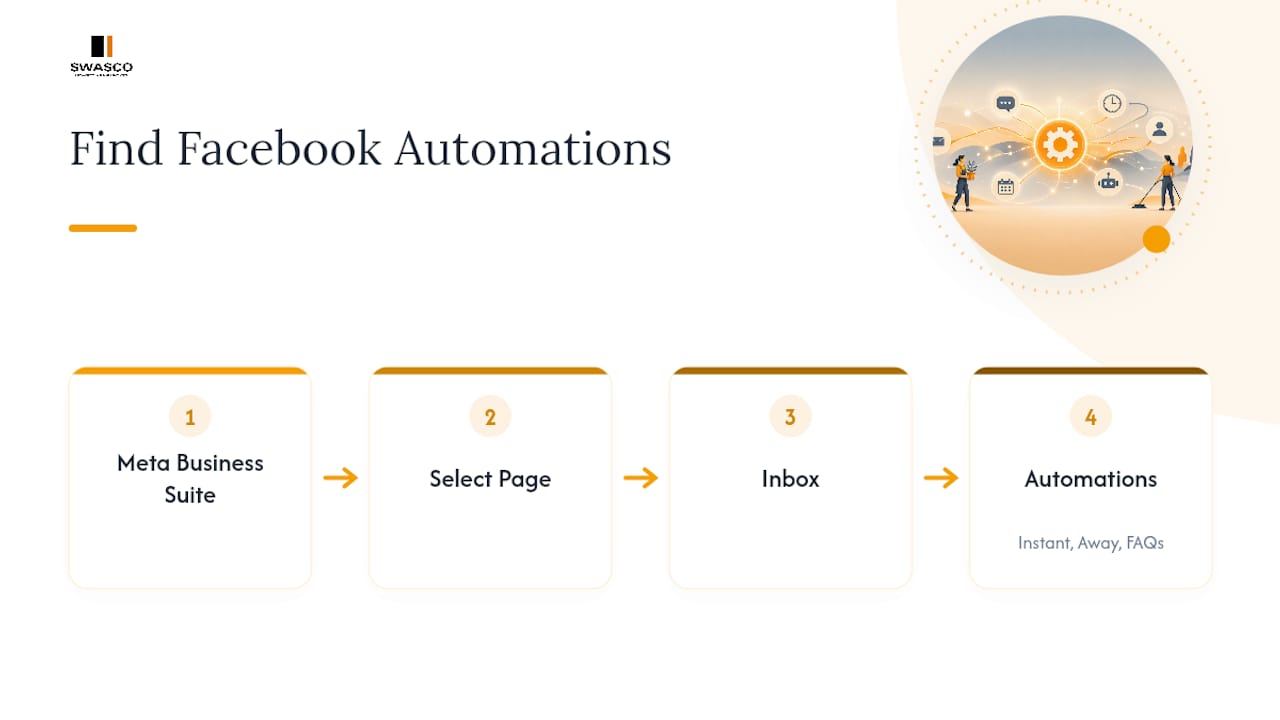
Every native automation on your Facebook Page lives in one place, and it's worth bookmarking. Open Meta Business Suite, select your Page, then click Inbox in the left-hand menu. From there, click Automations. This is where instant reply, away message, and FAQs all sit side by side, each with its own toggle and edit screen.
Setting up your instant reply
Instant reply fires the moment someone messages your Page, so it's usually the first automation worth switching on.
- In Automations, find Instant reply and click Create or Edit.
- Choose which channels the reply applies to. You can select Messenger, Instagram, or both. Facebook's own guidance on turning instant replies on or off confirms this channel split is handled at the automation level, not the Page level.
- Write your message in the text box. You can insert personalisation tokens, most commonly the customer's first name, to make the reply feel less robotic.
- Click Save.
- Test it by messaging your Page from a personal account, or ask a colleague to send a test message. The reply should land within seconds.
Facebook enforces a character limit on these messages, so keep the wording tight. Long paragraphs get cut off or, worse, look cluttered on a phone screen. If you manage an Instagram business account too, check the toggle for Instagram DMs separately. It's a common oversight, and it's why some businesses assume auto reply is Instagram DM automation ready when actually only Messenger was switched on.
Pro Tip: Send your test message from a phone, not a desktop browser. Mobile is where most customers will actually receive the reply, and it's the best way to catch formatting issues before a real customer does.
How do you set up an away message and business hours?
An away message covers the gap instant reply leaves: what happens once someone knows you've seen their message but you're not actively at your desk. It sits directly beneath Instant reply in the same Automations menu, and the setup follows a similar pattern.
- Click Away message, then Create or Edit.
- Set your business hours and time zone inside the automation, not just in your Page's general settings, since the two don't always sync automatically.
- Write copy that gives a realistic response window, for example confirming you reply within one business day.
- Save the automation, then test it by messaging outside your set hours to confirm it triggers correctly.
The two mistakes that trip up most Pages are avoidable. First, setting the wrong time zone, which sends away messages during working hours because the automation still thinks it's midnight somewhere else. Second, leaving both instant reply and away message active with overlapping triggers, so customers receive two messages back to back that contradict each other. Check both automations together before you consider the job done, not one at a time.
Building FAQs and keyword-triggered replies
FAQs give customers tappable buttons with pre-written answers, which cuts down on repetitive questions about opening hours, pricing, or booking links.
- In Automations, select FAQs, then Add question.
- Type the question as a customer would ask it, then write a clear, short answer underneath.
- Reorder your FAQs so the most common question sits at the top; Meta Business Suite lets you drag and drop the list.
- Save and preview how the buttons appear in Messenger before publishing.
Native keyword triggers exist, but they're limited. You can typically only map a handful of keywords to specific responses, and each has a strict character cap on both the trigger word and the reply. This works fine for something simple, like a keyword that fires a price list link. It breaks down quickly if you want to run branching logic, such as different follow-ups depending on what service someone asks about. That's the point where most businesses looking at facebook dm automation more seriously start comparing native tools against a dedicated chatbot platform, because keyword rules alone can't hold a multi-step conversation.
How do you edit or turn off an automation that isn't working?
Automations rarely need rebuilding from scratch. Usually they just need a tweak, and Meta has made the edit path fairly consistent across instant reply, away message, and FAQs.
- Go back to Inbox → Automations and select the automation you want to change.
- Click Edit, adjust the wording, channels, or schedule, then hit Save. Changes apply instantly, according to Meta's own how-to documentation on updating replies.
- To pause an automation without deleting it, use the toggle switch next to its name rather than removing the whole setup.
- Confirm your account has admin or editor permissions on the Page. Automations often fail silently for staff accounts with restricted roles.
- If a reply isn't firing, check that the correct channel checkbox (Messenger or Instagram) is still ticked. This is the most common reason automate facebook messages setups quietly stop working after a Page update.
- Send a fresh test message from a different account each time you make a change, rather than trusting the preview screen alone.
Facebook instant reply examples and away-message templates
Generic auto replies read as generic, and customers notice. Service businesses get better results from short, specific copy that names the business and gives a next step.
Instant reply templates:
- "Hi {{first_name}}, thanks for messaging [Business Name]. We reply within a few hours during business hours. Need to book now? Tap here: [link]."
- "Thanks for reaching out! We've received your message and someone from our team will respond shortly. In the meantime, here's our price list: [link]."
- "Hello, and thanks for getting in touch. We usually answer within 30 minutes on weekdays. For urgent enquiries, call us on [number]."
Away-message templates:
- "We're currently closed. Our team replies within one business day, usually by 10am the next morning. Browse our services here: [link]."
- "Thanks for your message. We're out of office until Monday and will get back to you as soon as we're back."
Personalisation tokens work best when used once, not stacked into every sentence, and links should point somewhere genuinely useful, like a booking page or FAQ, rather than your homepage. The SendPulse guidance on auto-reply best practice is blunt on one point worth repeating: never fire more than one automatic message at a customer in quick succession, since it reads as spam rather than service.
Pro Tip: Swap your away message's response time every few months to match reality. A promise of "within an hour" that quietly becomes three hours is the fastest way to lose trust with a first-time enquirer.
Where native Facebook automations run out of road
Instant reply, away message, and FAQs solve the acknowledgement problem well. They don't solve the conversation problem, which is where most service businesses actually lose leads.
Native tools can't route an enquiry to the right team member, ask qualifying questions, or check calendar availability. A customer asking about a specific service still has to type back and forth manually until someone free picks up the thread, and that's exactly the gap facebook messenger automation platforms built for business use are designed to close.
- Routing and qualification: deciding which enquiries are booking-ready versus which need a human, automatically, based on what the customer types.
- Multi-step workflows: following up an initial reply with the right question sequence rather than a single static message.
- Booking sync: connecting a Messenger conversation directly to calendar availability instead of pointing to an external link and hoping.
- Cross-channel consistency: treating Messenger, Instagram DMs, website chat, and SMS as one enquiry stream rather than four separate inboxes.
Some managed AI receptionist solutions pair conversational AI with guided onboarding, so the qualification logic and booking flow are tailored around how a business operates, rather than relying on generic keyword rules. Setup, training, and workflow building happen with support included, and the system keeps running and improving after launch rather than sitting static like a one-off automation.
When native automations are enough, and when they're not
Start with the free tools. Switch on instant reply and an away message, run them for a fortnight, and count how many enquiries went unanswered for more than an hour. That number tells you more than any guide can. If it's low, native automations are doing their job. If leads are quietly slipping through because nobody could get to them fast enough, that's the signal to test a managed option before you lose another month of bookings to silence.
— James Paul
Ready for more than a toggle switch?
Instant replies and away messages buy you time. They don't book the appointment, chase the follow-up, or answer the third question a customer asks after the first automatic reply. Some AI receptionists unify communications from Messenger, Instagram, SMS, and website chat into one system that qualifies enquiries, checks calendar availability, and books appointments automatically.

Onboarding covers the workflow building, training, and live launch, with technical support included, so you're not left configuring keyword triggers on your own. For businesses that found their answer to facebook auto reply setup wasn't enough on its own, a Talk2Aiva AI receptionist picks up where instant reply leaves off. If you'd like to see how it would handle your actual enquiry flow, book a discovery call with Talk2Aiva and bring your busiest week's worth of messages to the conversation.
Sources
For the exact mechanics of native tools, Meta's own Inbox Automations walkthrough and its instant reply toggle guide are the most reliable references, and they're updated whenever the interface changes. For broader context on why automation matters across marketing more generally, the automated marketing overview from MySearchHero is a useful companion read, alongside enquiry management guidance for handling the human side of the funnel.
- Set up Inbox Automations in Meta Business Suite on Desktop
- Facebook Messenger Auto-Reply: Samples and Best Practices | SendPulse