
Conversational intake forms raise completion rates and improve lead qualification because they ask one question at a time and adapt to each answer, unlike static forms that show every field at once and lose people halfway through. Vendors report meaningful completion gains from this shift, and service businesses see faster booking and fewer clarifying phone calls as a result. If you run an estate agency, clinic, salon, or home services business, the case for switching is straightforward: read on for the build checklist, or skip to a managed launch if speed matters more than DIY tinkering.
TL;DR:
- Conversational intake forms increase completion rates by asking one question at a time and adapting questions based on previous answers.
- They improve lead quality through richer, follow-up prompts that catch vague responses and route qualified leads directly to booking or CRM systems.
- Building effective forms involves mapping required information, designing short prompts, setting the tone, and integrating with calendars and CRMs, starting with a small pilot.
- Deployment channels like website chat and SMS influence design choices, with web offering more space and SMS requiring brief prompts, while voice and social channels have specific considerations.
- Testing should include skip logic, multi-answer inputs, file uploads, and resume functionality to ensure smooth operation before launch.
Table of Contents
- What conversational intake forms are and how they work
- Does the evidence back up conversational intake forms?
- How do you build a conversational intake form step by step?
- Which channels and integrations should you plan for?
- What should you test before launch?
- How does guided implementation reduce launch risk?
- Should you build in-house or choose a managed provider?
- How Talk2Aiva helps you launch conversational intake without the guesswork
- Sources
- FAQ
What conversational intake forms are and how they work
A conversational intake form replaces a static list of fields with a guided back-and-forth: the system asks one question, waits for an answer, then decides the next question based on what you just said. A dental clinic might start with "What brings you in today?" then branch into insurance questions only if the answer suggests a procedure needing prior authorisation, skipping that section entirely for a routine cleaning.
That branching is the whole point. Good conversational forms are built around a handful of adaptive behaviours:
- Skip logic that removes irrelevant sections once earlier answers rule them out
- Clarifying follow-ups triggered when an answer is vague or incomplete
- Inline validation that catches a malformed phone number or missing postcode before submission, not after
The output isn't just a filled-in form. You get structured fields ready for your CRM, a full transcript of the exchange for context, and routing triggers that flag urgent enquiries or hand a qualified lead straight to a booking calendar. Complex intakes are often organised as linked sub-forms rather than one long flow. A tested patient-intake workflow, for instance, splits demographics, insurance, and medical history into separate forms joined into a five-step sequence, ending with a review-and-confirm step. That structure makes each section easier to build, test, and reuse across services.
Does the evidence back up conversational intake forms?
Vendor data consistently points the same direction: replacing a static, all-fields-visible form with a one-question-at-a-time flow tends to lift completion and improve the quality of what gets submitted. Product research on conversational forms attributes this to reduced cognitive load and adaptive follow-ups that keep respondents engaged rather than confronting them with a wall of fields.
The pattern to watch: it's not just about finishing the form, it's about what you get once someone does.
Beyond completion, the qualitative gains matter more for a service business's bottom line:
- Richer, more specific answers because follow-up prompts catch vague responses before submission
- Faster booking, since qualified leads route straight to a calendar instead of sitting in an inbox
- Fewer post-submission phone calls to clarify missing or ambiguous details
Conversational forms aren't automatically better everywhere. A single-field newsletter signup or a low-value lead magnet doesn't need adaptive branching, and adding conversational overhead to a two-second task just slows people down. The format earns its keep when the intake is genuinely multi-step and the lead is worth qualifying properly, which describes most service-business onboarding.
How do you build a conversational intake form step by step?
Start with the template, not the tool. A well-organised intake groups fields into contact details, service specifics, availability, qualifying questions, and file uploads where relevant. OnboardMap's client intake template recommends 10 to 15 initial questions as the sweet spot, enough to qualify a lead properly without triggering fatigue.
Follow this sequence when building your own:
- Map the tasks. List every piece of information you actually need before a booking or quote can happen, then group related items into sections.
- Draft short prompts. Each question should be a single sentence, with an optional example if the answer format could be ambiguous ("What's your budget range? e.g. £500-£1,000").
- Set the persona and tone. Decide whether the agent sounds formal or conversational early, since that choice shapes every prompt you write afterwards. Design guidance from Unity Connect treats persona as a core design decision, not an afterthought.
- Attach routing and calendar sync. Qualified answers should trigger a specific workflow, whether that's a calendar booking, a notification to a team member, or a CRM entry.
- Add consent and privacy lines. Place a short data-use statement before you ask for anything sensitive (health details, financial information, ID uploads), not buried in a footer nobody reads.
- Build a review step. Show a summary before final submission so respondents can correct mistakes themselves rather than emailing you afterwards.
Pro Tip: Pilot your first conversational intake on a single channel with a 5 to 10 minute flow before rolling it out everywhere. Measuring qualified-lead conversion on one channel first, as recommended in this guide to conversational lead capture, tells you far more than a wide launch with no baseline to compare against.
Which channels and integrations should you plan for?
Where you deploy your intake form changes what design choices make sense. Website chat gives you the most screen space for multi-step questions and file uploads, while SMS forces shorter prompts and works well for quick qualifying questions or appointment confirmations, as covered in this look at text-based property lead capture. Voice handoffs need a clear point where the conversation escalates to a human, and social inbox messages tend to suit simple, low-friction first contact rather than a full intake.
Before launch, confirm these integration points:
- CRM connection so structured answers land in the right record automatically
- Calendar sync for direct booking once a lead is qualified
- Notification routing to alert the right team member for urgent enquiries
- Document storage for uploaded files (ID, photos, insurance documents)
- Automation connectors for follow-up sequences and review requests
Watch character limits on SMS, voice-to-text accuracy on phone handoffs, and accessibility for respondents using screen readers. Structured CRM integration is what turns a good conversation into usable business data rather than a transcript nobody revisits.
What should you test before launch?
Test the edge cases, not just the happy path. Confirm skip logic actually skips the right sections, check that multi-answer inputs (someone listing three services in one message) get captured correctly, verify file uploads work mid-conversation, and make sure a respondent can leave and resume without losing progress. Resonate's build guide lists these exact scenarios as common failure points that only surface under real testing.
Once live, track:
- Completion rate by question, to spot where people drop off
- Time spent per question, flagging any prompt that's confusing people
- Qualified-lead rate, not just raw submissions
- Downstream booking rate, the number that actually matters to revenue
Pro Tip: If your completion rate dips at a specific question, shorten it or add a one-line example rather than rewriting the whole flow. Small nudges on the first three questions usually fix more drop-off than a full redesign.
How does guided implementation reduce launch risk?
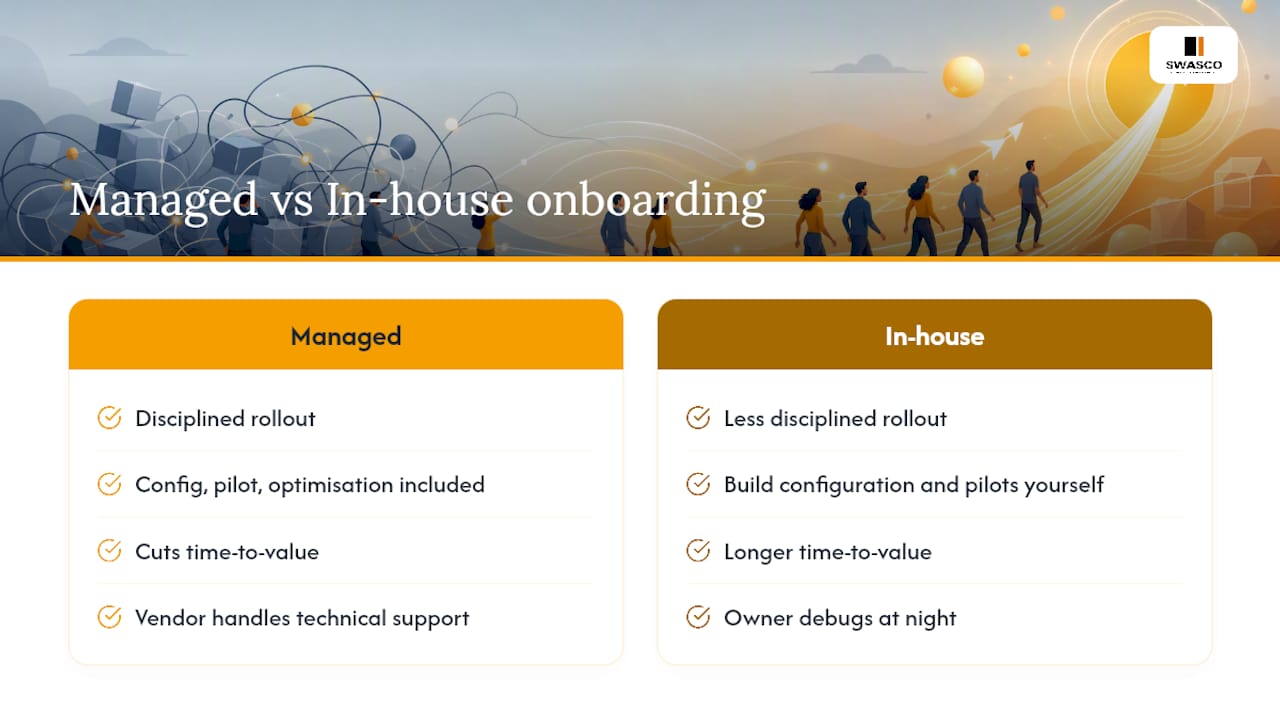
James Paul has spent years documenting how service businesses adopt automation, and one pattern holds consistently: the businesses that see the fastest return aren't the ones with the cleverest flow logic, they're the ones with the most disciplined rollout. A managed onboarding process that includes configuration, small-sample pilot testing, and ongoing optimisation cuts time-to-value considerably compared with building everything in-house from scratch, according to SWASCO's own onboarding research. The onboarding, workflow building, and ongoing technical support are bundled into the subscription itself, so the business owner isn't the one debugging skip logic at 11pm.
Should you build in-house or choose a managed provider?
Building in-house gives you full customisation but demands ongoing maintenance and a slower path to live. A managed provider gets you running faster with support included, which suits businesses losing revenue to missed calls right now. If your missed-lead loss is already high, skip the prototype and book a demo instead.
— James Paul
How Talk2Aiva helps you launch conversational intake without the guesswork
There's a real difference between building a conversational flow from scratch and having someone configure it, test it, and keep it running. Onboarding, workflow building, live launch, and ongoing optimisation are handled as part of the subscription, rather than leaving you to troubleshoot skip logic and integrations alone.

That matters most for the businesses this article is written for: estate agents, clinics, salons, and home services teams who need calls, SMS, website chat, and social enquiries captured and qualified around the clock, not just during office hours. If you're evaluating providers, ask about channel coverage, calendar sync, data export options, and what happens after launch when you want to adjust a question or add a new service line. Replacing a missed-call bottleneck with a conversational flow that answers, qualifies, and books can lift containment substantially, based on SWASCO's own IVR replacement data. Visit the Talk2Aiva product page to see how a guided setup compares with building your own, and request a demo to walk through your specific intake needs.
Sources
- Create a Conversational Form — Patient Intake | Gravity Rail Documentation
- Client Intake Form Template for Service Businesses | OnboardMap
- Client intake AI agent (design guidance) | Unity Connect
FAQ
What is an example of a conversational intake form?
A dental clinic's intake might start with "What brings you in today?", then branch into insurance questions only if the answer suggests a procedure requiring prior authorisation, skipping that section for routine visits. A tested patient-intake workflow shows this exact structure across five linked steps.
How can I create my own conversational intake form?
Map the information you need, group it into short sections (contact, service details, availability, qualifiers), then write one question per step with skip logic between sections. Most service businesses land on 10 to 15 questions as the right balance between qualification depth and completion.
Where can I find a free intake form template?
Several vendor sites publish free templates organised by field type, and OnboardMap's client intake template is a solid starting point for service businesses adapting fields to their own offering. The onboarding process can include building a tailored flow rather than starting from a generic template.
What are common mistakes on intake forms?
The most common errors are asking too many questions upfront, showing every field at once instead of one at a time, and skipping a review step so respondents can't correct mistakes before submitting. Failing to test edge cases like multi-answer input or resumed sessions before launch also causes data quality problems that surface only after go-live.