
Capturing leads from your salon website chat is defined as the process of using live chat tools or AI chatbots to engage website visitors, collect their contact details, and guide them towards booking an appointment. Done correctly, this approach transforms passive browsers into confirmed clients without any manual effort from your team. Tools like Oscar Chat and Olark give salons the ability to respond instantly, qualify enquiries, and feed contact data directly into CRM systems. AI chatbots can save 5–10 staff hours per week by handling routine questions and bookings automatically. That time saving alone makes website chat one of the highest-return investments available to salon owners in 2026.
How to capture leads from salon website chat
The right technology is the foundation of any effective salon website lead generation strategy. Without it, chat becomes a support tool rather than a revenue driver.
Live chat and AI chatbot options for salons
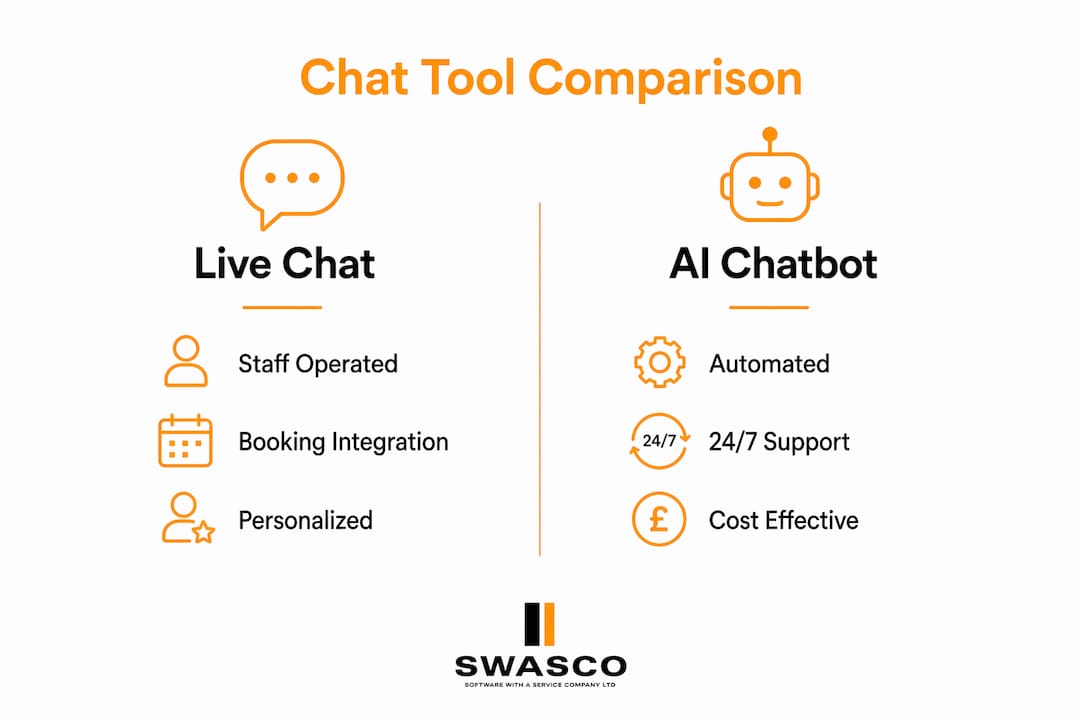
Salons have two primary options: live chat software operated by staff, and AI chatbots that respond automatically. Live chat tools like Olark allow your team to engage visitors in real time, which works well during business hours. AI chatbots like Oscar Chat handle enquiries around the clock, collecting names, phone numbers, and service preferences even when your salon is closed. The practical advantage of AI is availability. A visitor browsing your site at 10pm on a Sunday will not wait until Monday morning for a reply.
Booking system integration
Connecting your chat tool to a booking system is what turns a conversation into a confirmed appointment. Platforms like Acuity Scheduling, Booksy, and Calendly all support integration via APIs or tools like Zapier. Chatbots integrated through Zapier can automatically push appointment details into your calendar software, removing the need for manual entry. This means no lead falls through the gap between enquiry and booking.
Comparison of top salon chat tools
| Tool | Best For | Booking Integration | AI Capability | GDPR Ready |
|---|---|---|---|---|
| Oscar Chat | AI-led salon bookings | Zapier, API | Yes | Yes |
| Olark | Live staff chat | Limited | No | Yes |
| Booksy Chat | In-platform messaging | Native | Partial | Yes |
| Tidio | Mixed AI and live chat | Zapier | Yes | Yes |
Key technical requirements
Before deploying any chat tool, confirm it meets these baseline requirements:
- Mobile optimisation: The majority of salon clients browse on mobile. A chat widget that covers content or loads slowly will cost you leads.
- GDPR compliance: Any tool collecting names, emails, or phone numbers must include clear consent mechanisms. Failing to do so creates legal exposure.
- CRM integration: Leads captured in chat must flow into a CRM automatically. Manual data entry introduces errors and delays.
- Data encryption: Client contact details must be stored and transmitted securely.
How do you set up salon chat to collect leads effectively?
Configuration determines whether your chat widget generates leads or simply sits unused in the corner of your screen. These steps cover the best practices for salon chat setup.
-
Set a clear bot identity. Name your virtual assistant and make it obvious it is an AI. Transparency about chatbot identity builds client trust more effectively than pretending it is human. A name like "Aiva from [Salon Name]" signals professionalism and honesty from the first message.
-
Write a specific welcome message. Avoid generic openers. Instead, try: "Hi, I'm Aiva. I can book your next appointment, answer questions about our services, or check availability right now. What would you like to do?" This gives the visitor a clear path forward.
-
Configure your lead capture form. Collect the minimum information needed: name, phone number or email, preferred service, and preferred date. Asking for too much upfront reduces completion rates. You can gather additional preferences during the booking flow.
-
Automate appointment routing. Set the chatbot to offer available slots directly from your booking system. If a visitor selects a time, the appointment should confirm automatically. For complex requests, route the lead to a staff member via SMS notification.
-
Test on mobile before going live. Mobile UX failures cause friction and increase bounce rates. Open your website on at least two different mobile devices and confirm the chat widget does not obscure navigation or slow page loading.
-
Set escalation keywords. Programme your chatbot to hand over to a human immediately when it detects words like "complaint," "unhappy," or "allergic reaction." Escalation keywords ensure clients receive empathy and resolution when they need it most, rather than an automated response that misses the point.
Pro Tip: Run an A/B test on your welcome message every 30 days. A single word change, such as swapping "Can I help?" for "Ready to book?", can meaningfully shift your lead capture rate. Regularly analyse chat transcripts to spot where visitors drop off and adjust accordingly.
What are the best follow-up strategies after capturing a chat lead?
Capturing a lead is only the first step. Converting it into a confirmed booking, and then a loyal client, requires a structured follow-up process. This is where follow-up automation pays for itself many times over.
Automated reminders that reduce no-shows
Automated reminders reduce no-show rates from a typical 15–20% down to 8–10%. That reduction represents real revenue recovered on every working day. The most effective sequence is a 24-hour reminder followed by a 2-hour reminder before the appointment. Both should include a direct link to reschedule, which reduces last-minute cancellations without requiring any staff involvement.
Segmenting leads by temperature
Not every lead captured through chat is ready to book immediately. Segmenting leads as hot, warm, or cold enables targeted follow-up that matches the client's level of interest. A hot lead who asked for a specific appointment slot gets an immediate booking confirmation and reminder sequence. A warm lead who browsed services but did not commit gets a follow-up message 24 hours later with a gentle prompt. A cold lead who left contact details but showed little intent gets added to a longer nurture sequence, such as a monthly newsletter or seasonal promotion.
Linking chat leads to your CRM
Every lead captured via chat should land in your CRM automatically. This allows you to track enquiry sources, measure conversion rates, and build marketing segments. Salons using CRM-connected chat report clearer visibility into which services generate the most enquiries, which informs both staffing and promotional decisions. For AI-driven client retention, this data is the starting point.
- Send a post-appointment follow-up message asking for a review on Google or Treatwell.
- Offer a rebooking prompt 4–6 weeks after the appointment, timed to the typical service cycle.
- Use CRM tags to personalise future messages based on the services each client has booked.
Pro Tip: Combine AI automation with a personal touch for high-value clients. Let the chatbot handle reminders and routine follow-ups, then have a staff member send a personal message after a first appointment. This combination, covered in depth in the guide to AI in salon retention, consistently outperforms either approach used alone.
What challenges should salon owners expect with chat lead capture?
Knowing the pitfalls before you launch saves time, money, and client relationships. These are the most common problems salons encounter when using website chat for lead capture.
"The biggest mistake salons make is deploying a chatbot and assuming it will manage itself. Chat tools require ongoing attention, regular transcript reviews, and clear escalation rules to deliver consistent results." — James Paul, Talk2Aiva
- Chatbot impersonation: A bot that pretends to be a human staff member will eventually be caught out. Clients feel deceived, and trust is difficult to rebuild. Always name your bot and make its AI nature clear from the first message.
- Inaccurate responses: Chatbots that guess at answers they do not know create misinformation. Configure your bot to respond only from a verified knowledge base and trigger an immediate handover when a query falls outside its scope. AI chat needs human handover for complex or sensitive issues, and your setup should make that transition automatic.
- Poor mobile experience: A chat widget that covers your booking button or triggers a pop-up on page load will drive visitors away. Test on multiple devices and screen sizes before going live.
- GDPR and data privacy failures: Neglecting data privacy in chat lead capture creates legal risk and damages your reputation. Every lead capture form must include a clear consent checkbox and a link to your privacy policy.
- No escalation plan: If your chatbot cannot resolve a query and there is no human available, the client leaves. Set up SMS or email notifications so staff can step in quickly when escalation keywords are triggered.
Monitoring chat transcripts weekly is the single most effective way to catch these problems early. Look for conversations where the bot gave an incorrect answer, where a client expressed frustration, or where a lead dropped off without booking.
Key takeaways
Capturing leads from salon website chat converts passive website visitors into booked clients through a combination of the right tools, clear configuration, and structured follow-up.
| Point | Details |
|---|---|
| Choose the right chat tool | AI chatbots like Oscar Chat handle out-of-hours enquiries; live tools like Olark suit staffed hours. |
| Integrate with your booking system | Connect chat to Acuity, Booksy, or Calendly via Zapier to confirm appointments automatically. |
| Be transparent about AI | Name your chatbot and declare it is AI; honesty builds trust and reduces complaints. |
| Automate follow-up sequences | Use 24-hour and 2-hour reminders to cut no-show rates from 15–20% down to 8–10%. |
| Segment and nurture leads | Classify leads as hot, warm, or cold and tailor follow-up intensity to match their readiness to book. |
Why most salons are getting chat wrong
I have reviewed dozens of salon chat setups over the years, and the pattern is almost always the same. The owner installs a chat widget, writes a generic welcome message, and then checks back six months later wondering why it has not generated any bookings. The tool is not the problem. The configuration is.
The salons that genuinely increase leads through chat treat it as a system, not a feature. They write welcome messages that reflect their actual services. They test on mobile before going live. They review transcripts monthly and adjust responses based on what they find. They connect chat to their CRM so every lead is tracked, not just the ones that convert immediately.
The transparency point is one I feel strongly about. Clients in the beauty industry are trusting you with their appearance. That relationship starts the moment they land on your website. A chatbot that pretends to be a human receptionist starts that relationship with a small deception. It is not worth it. Name your bot, be clear about what it can and cannot do, and let it hand over to a human when the situation calls for it. That combination, AI handling the routine and humans handling the relationship, is what actually works.
Mobile experience is the other factor most guides underplay. The majority of your clients are browsing on a phone, often while commuting or waiting for something. If your chat widget covers your menu or takes three seconds to load, they will not wait. They will leave. Test your chat on an iPhone and an Android device before you consider it live.
— James Paul
Let Talk2Aiva handle your salon's chat lead capture
Your salon website should be working for you around the clock, not just during opening hours. Talk2Aiva by SWASCO automates the entire lead capture process, from the first chat message to the confirmed booking and follow-up reminder, so you never lose a lead to a missed response again.
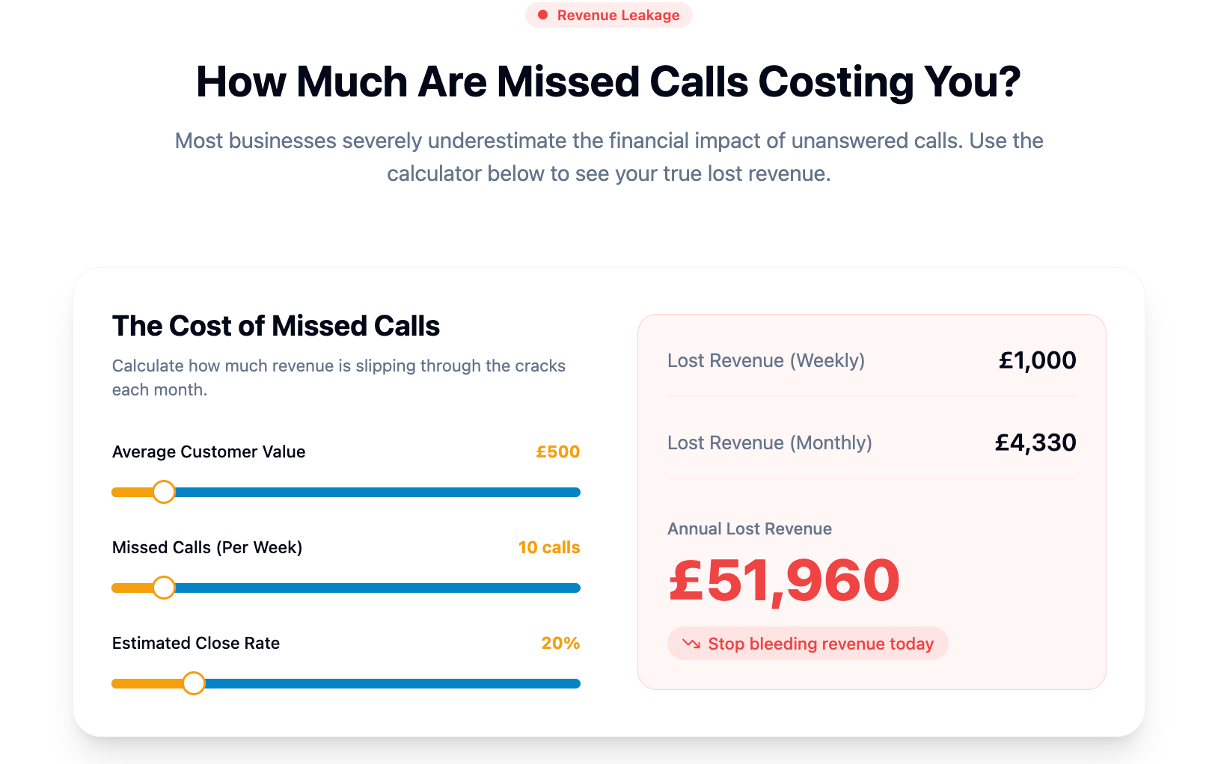
Talk2Aiva connects to your existing booking system, captures client details automatically, and sends reminders that cut no-shows significantly. Setup, AI training, and ongoing support are all included, so you do not need technical expertise to get started. If you want a done-for-you system that captures, qualifies, and books leads while you focus on your clients, explore how Talk2Aiva works and see what it can do for your salon.
FAQ
What is lead capture in salon website chat?
Lead capture in salon website chat is the process of collecting a visitor's contact details and service preferences through a chat widget, then using that information to guide them towards booking an appointment.
Which chat tools work best for salon lead capture?
AI chatbots like Oscar Chat and mixed tools like Tidio work well for salons because they handle out-of-hours enquiries and integrate with booking platforms like Acuity and Booksy via Zapier.
How do i reduce no-shows from chat-captured leads?
Send automated reminders at 24 hours and 2 hours before the appointment. This sequence reduces no-show rates from 15–20% down to 8–10%, recovering significant revenue across the working week.
Do i need to comply with GDPR when using salon website chat?
Yes. Any chat tool that collects names, emails, or phone numbers must include a clear consent mechanism and a link to your privacy policy. Failing to do so creates legal risk and can damage your salon's reputation.
Should my salon chatbot pretend to be a human?
No. Naming your chatbot and being clear it is AI builds more trust than impersonation. Clients who discover they have been misled are far less likely to book, and far more likely to leave a negative review.