
An automated phone number is a virtual telephone number connected to software that places or receives calls without manual dialling, delivering pre-recorded messages, text-to-speech prompts, or AI-driven conversations to your contact list automatically. UK service businesses use these systems to send appointment reminders, chase payments, qualify inbound leads, and push urgent alerts at scale. If you want to stop losing revenue to missed calls and slow follow-ups, the clearest next step is a guided pilot with a provider that handles setup for you.
What this guide covers:
- What automated calling systems are and the terms you will encounter
- How the technology works under the hood (in plain English)
- Which features matter most for UK SMEs
- Step-by-step setup from contact list to live campaign
- UK pricing guidance and a worked example
- PECR, TPS, ICO, and Ofcom compliance obligations
- How to measure ROI and integrate call data with your existing tools
Key takeaways
Automated phone numbers give UK SMEs a practical way to handle high-volume outreach, reduce missed leads, and cut manual calling time, provided compliance and human escalation are built in from the start.
| Point | Details |
|---|---|
| Definition | An automated phone number is a virtual number connected to software that places or handles calls without manual dialling. |
| UK compliance | Screen every list against TPS, obtain explicit PECR consent, and display a valid caller ID on every campaign. |
| Pricing reality | A typical monthly campaign typically costs an estimated total monthly cost in a typical range all-in at entry level; onboarding support adds value faster than it adds cost. |
| ROI measurement | Calculate time saved per agent multiplied by hourly labour cost to quantify monthly savings immediately after launch. |
| Talk2Aiva | Talk2Aiva by SWASCO offers guided onboarding, 24/7 AI call handling, and live agent handover for UK service SMEs. |
Table of Contents
- What is an automated phone number, and why do SMEs use one?
- How does an automated calling system actually work?
- Which features should UK SMEs prioritise?
- How to set up an automated calling campaign: from list to live
- What does an automated calling system cost in the UK?
- UK compliance: what you must do before your first call
- How to measure ROI and connect call data to your existing tools
- Why Talk2Aiva is built for UK service SMEs
- When automation wins and when humans still need to lead
- What a Talk2Aiva demo shows you in the first session
- Sources
What is an automated phone number, and why do SMEs use one?
An automated phone number is a cloud-hosted virtual number that acts as the caller ID and routing point for an automated calling system. The industry also uses terms such as auto dialler, IVR system (Interactive Voice Response), voice broadcast, and virtual number interchangeably, though each describes a slightly different layer of the same stack.
Common SME use cases include:
- Appointment reminders sent the day before a booking to cut no-shows
- Payment follow-ups triggered automatically when an invoice passes its due date
- Lead qualification calls that ask a short set of questions and route hot leads to a live agent
- Emergency alerts pushed to staff or customers when a service is disrupted
- Review requests sent after a job is completed to build your Google rating
Quick glossary:
- Virtual number (DID): A phone number hosted in the cloud, not tied to a physical line. DID stands for Direct Inward Dialling.
- SIP trunking: The protocol that carries voice calls over the internet instead of traditional copper lines.
- IVR: A menu system that lets callers press keys or speak to navigate options ("Press 1 for sales, 2 for support").
- TTS (Text-to-Speech): Software that converts written scripts into spoken audio in real time.
- Ringless voicemail: A message delivered directly to a voicemail inbox without the recipient's phone ringing.
How does an automated calling system actually work?
At its core, the call flow follows five stages. Your contact list feeds into a dialling engine, which uses a virtual SIP number to place the call. When the call connects, the system plays a pre-recorded message or a TTS script, or hands off to a conversational AI agent. Depending on the outcome, the call either ends, transfers to a live agent, or drops a voicemail.
Cloud telephony handles all of this without on-premises hardware. SIP trunking and virtual number architectures replace the physical PBX box in the server room with a software layer that scales up or down in minutes. That shift is what makes automated calling affordable for a ten-person business, not just a call centre.
| Stage | What happens | Technology involved |
|---|---|---|
| Contact import | CSV or CRM data loaded into the platform | API sync or file upload |
| Dialling | System dials numbers per schedule and retry rules | Auto dialler / predictive dialler |
| Call handling | Message plays or AI agent converses | TTS, pre-recorded audio, NLP |
| Outcome routing | Transfer to agent, voicemail drop, or end call | IVR, call transfer, voicemail detection |
| Reporting | Call result logged against contact record | CRM integration, analytics dashboard |
Conversational AI adds a layer on top of this flow. Instead of a static recorded message, a natural language processing engine interprets what the caller says and responds dynamically, extracting structured data such as a preferred appointment time or a payment intent. For AI-powered call handling in service businesses, this means a caller can book, reschedule, or ask a question without ever reaching a human.
Which features should UK SMEs prioritise?
Not every feature on a vendor's pricing page earns its monthly cost. Here is how to separate what you genuinely need from what sounds impressive in a demo.
Must-have features:
- Contact import (CSV and CRM sync): Without clean data in, no campaign runs cleanly out.
- Call scheduling and retry rules: Set calls to go out at the right time and retry unanswered numbers automatically.
- Consent handling and opt-out: A hard requirement under PECR. The system must honour opt-outs instantly.
- Caller ID control: Display a recognisable number so recipients answer rather than ignore.
- Call transfer to live agents: High-value leads should reach a human without friction.
- Reporting and call logs: Answer rates, completion rates, and outcomes per campaign.
- CRM and calendar integration: Call results should update your CRM record automatically.
Nice-to-have features:
- Conversational AI / natural language understanding: Useful when you want two-way dialogue, not just one-way broadcasts.
- Call summarisation: AI-generated notes after each call save agent review time.
- Local number rental: Calls from a local area code tend to get answered more often. Custom and local number strategies can meaningfully lift answer rates for outbound campaigns.
- Voicemail-to-email transcription: Converts missed-call voicemails into readable text in your inbox.
The transfer-to-agent feature is the one most SMEs underestimate. A campaign that qualifies leads but cannot hand them off in real time loses the value it just created.
How to set up an automated calling campaign: from list to live
Setting up your first campaign takes less time than most business owners expect, provided the preparation is done properly.
- Choose your provider and virtual number. Select a cloud platform that covers UK numbers and complies with Ofcom regulations. Rent a local or national number that your contacts will recognise.
- Prepare your contact list. Export from your CRM or compile a clean CSV. Remove duplicates, check for TPS-registered numbers (see the compliance section below), and confirm you hold valid consent for each contact.
- Write and record your script or TTS content. Keep it under 30 seconds for outbound broadcasts. State who is calling, why, and what the recipient should do next. Include a clear opt-out instruction.
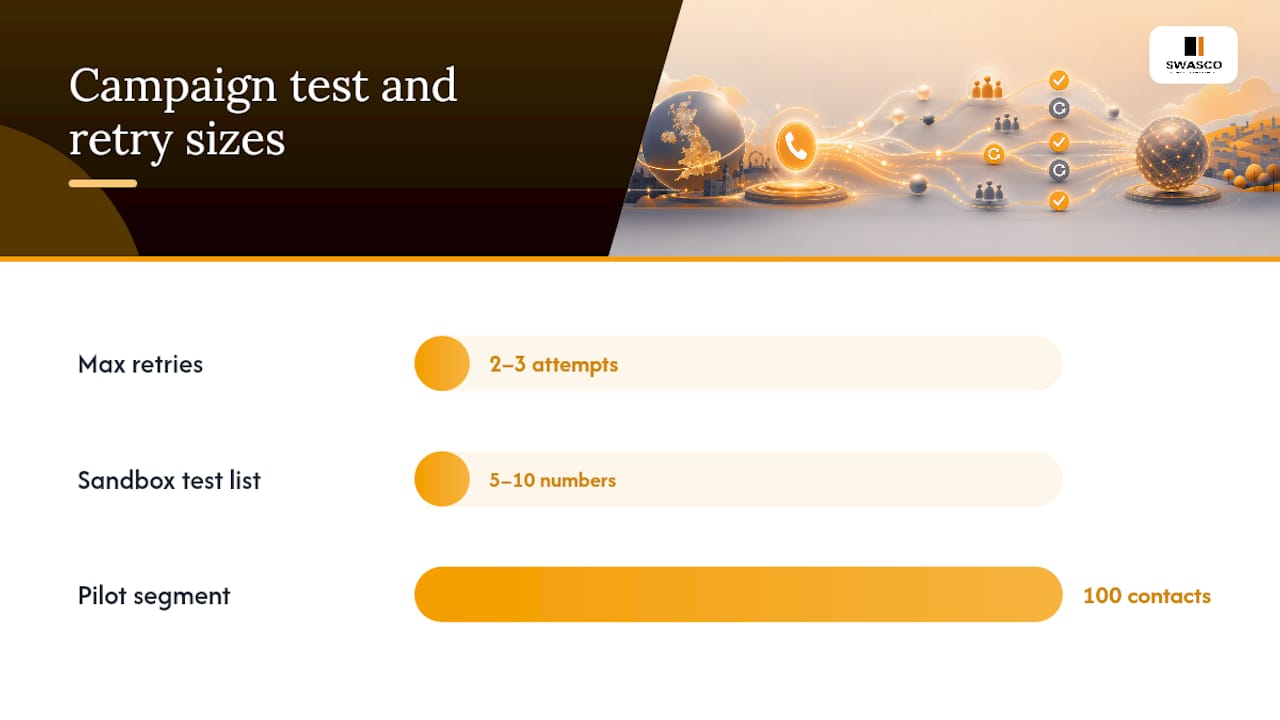
- Configure scheduling and retry rules. Set calls to go out during business hours (during typical business hours is the safest window). Set a maximum of two or three retry attempts for unanswered calls.
- Set up call transfer routing. Decide which key press or spoken phrase triggers a live transfer, and confirm your agents are available during the campaign window.
- Run a sandbox test. Call a small internal list of five to ten numbers. Check audio quality, voicemail detection accuracy, and that opt-outs are logged correctly.
- Pilot with a small segment. Send to a small pilot before the full list. Review answer rates and completion rates before scaling.
- Full launch and monitor. Go live, watch the dashboard in real time, and be ready to pause if call quality drops or opt-out rates spike.
Pro Tip: Test your campaign from a mobile number on a different network to the one your business uses. Network-specific audio degradation is the most common quality issue that internal tests miss.
Academic research on automation implementation consistently recommends small pilots and iterative testing before full rollout. The same principle applies here: a 100-contact pilot costs almost nothing and tells you everything you need to know before committing to a full campaign.
What does an automated calling system cost in the UK?
UK pricing for automated calling platforms typically combines several components. There is no single flat fee.
Common pricing components:
- Monthly platform subscription: Covers access to the dialling engine, dashboard, and core features.
- Outbound minutes: Charged per minute of connected call time, often billed in six-second increments.
- Virtual number rental: A monthly fee per number, typically lower for national (03xx) numbers than for geographic (01/02) numbers.
- Setup or onboarding fee: Some providers charge a one-off fee for account configuration and integration work.
- Support tier: Ongoing technical support and optimisation may be bundled into higher subscription tiers or charged separately.
Worked example: a typical monthly campaign
Assumptions: average call duration, answer rates typical for campaigns, one virtual number, no CRM integration in month one.
These figures are illustrative ranges based on publicly listed UK cloud telephony pricing structures. Your actual cost depends on the provider, call duration, and whether you need CRM integration or dedicated support. Providers that bundle onboarding and ongoing optimisation into a subscription typically cost more per month but deliver faster time-to-value and fewer hidden costs.
UK compliance: what you must do before your first call
Automated calling in the UK is governed by the Privacy and Electronic Communications Regulations (PECR), enforced by the Information Commissioner's Office (ICO), with additional guidance from Ofcom on nuisance calls and caller ID. Getting this wrong carries real financial and reputational risk.
Your compliance checklist:
- Obtain valid consent. For automated marketing calls, you need explicit, freely given consent from each recipient. Soft opt-ins (pre-ticked boxes, implied consent) do not meet the PECR standard.
- Screen against the TPS. The Telephone Preference Service (TPS) is the UK's official opt-out register. You must screen your list against TPS before every campaign, not just at the point of data collection.
- Display a valid caller ID. Ofcom rules prohibit withholding your number on automated marketing calls. Your virtual number must be a real, reachable UK number.
- Provide a clear opt-out mechanism. Every call must include a way for the recipient to opt out immediately, and that opt-out must be honoured within 28 days (though best practice is instant).
- Document your consent records. Store when, how, and from whom consent was obtained. The ICO can request this evidence during an investigation.
- Handle data under UK GDPR. Contact data used for automated calls is personal data. Apply standard data minimisation, retention, and security obligations.
- Call recording compliance. If your system records calls, inform recipients at the start of the call and store recordings securely.
European policy analysis on nuisance call regulation634452_EN.pdf) shows that consent and TPS-scrubbing procedures are the two most commonly cited failure points in enforcement actions across comparable jurisdictions. The UK's own ICO enforcement record reflects the same pattern.
Pro Tip: Check the ICO's direct marketing guidance and the TPS website before every campaign. Regulations update periodically, and relying on last year's checklist is a common compliance gap.
UNESCO's AI ethics recommendation also stresses transparency and human oversight when deploying automated systems. In practice, that means your call script should identify the caller clearly, state the purpose of the call, and never mislead the recipient about whether they are speaking to a human or an automated system. Protecting your business phone number from misuse is equally important; basic phone number security practices reduce the risk of your caller ID being spoofed or flagged as spam.
How to measure ROI and connect call data to your existing tools
The simplest ROI calculation for an automated calling campaign is: time saved per agent × hourly labour cost = monthly labour saving. If your team previously spent several hours a day spent making reminder calls at an average hourly labour cost, resulting in substantial monthly labour expenses. A platform costing £100 per month pays back in under a week.
Key metrics to track:
- Answer rate: The percentage of dialled numbers that connect. Below 40% usually signals a list quality or caller ID problem.
- Completion rate: The percentage of connected calls where the recipient heard the full message or completed the IVR flow.
- Conversion rate: The percentage of calls that resulted in the desired outcome (booking confirmed, payment made, lead transferred).
- Cost per contact: Total campaign cost divided by the number of contacts reached.
- Opt-out rate: A spike here signals a script or targeting problem, not a technology failure.
Common integration points:
- CRM (e.g., HubSpot, Salesforce, Zoho): Call outcomes update contact records automatically, triggering follow-up tasks or moving leads through your pipeline.
- Calendar and booking tools: Confirmed appointments from IVR responses write directly into your diary.
- Helpdesk and billing systems: Payment confirmation calls can trigger invoice status updates without manual entry.
Business research on hybrid work and automation integration highlights that automation delivers the most measurable value when call data feeds directly into the workflows your team already uses, rather than sitting in a separate reporting silo.
Why Talk2Aiva is built for UK service SMEs
Talk2Aiva by SWASCO is an AI receptionist and revenue recovery system designed specifically for service-based businesses. It handles inbound and outbound calls, SMS, website chat, and social media enquiries from a single platform, 24 hours a day.
The Talk2Aiva onboarding process follows a structured path:
- Discovery: SWASCO maps your current call flows, missed-lead patterns, and booking processes.
- Setup and AI training: Your virtual number is configured, scripts are built, and the AI is trained on your business context.
- Workflow building: Appointment booking, lead qualification, and follow-up sequences are connected to your calendar and CRM.
- Live launch: Your system goes live with SWASCO's team monitoring the initial period.
- Ongoing optimisation: Regular reviews of call performance, script updates, and technical support are included.
What this means for your business:
- Missed calls are answered instantly, day or night, with no additional headcount
- Leads are qualified and booked before a competitor picks up
- Every call outcome is logged in your unified inbox and CRM
- Live handover to your agents is built into the flow for high-value conversations
- Mobile app notifications keep you across every enquiry in real time
Most service SMEs are live within two to four weeks of starting the onboarding process. The voice AI capabilities cover both inbound answering and outbound follow-up, so you are not paying for two separate platforms.
When automation wins and when humans still need to lead
The strongest case for automating calls is volume and repetition. Appointment reminders, payment nudges, satisfaction surveys, and broadcast alerts are tasks where consistency matters more than nuance. A human making 200 reminder calls a day will inevitably vary in tone, forget to log outcomes, and burn out. An automated system does not.

But there are clear limits. Complex negotiations, sensitive complaints, and high-value relationship conversations should not be handed to a script. A client disputing a large invoice, a patient asking about a diagnosis, or a prospect weighing a significant purchase all need a human who can read the room, adapt in real time, and take responsibility for the outcome. Research on human factors in automated systems is clear that poorly designed automation creates friction and erodes trust when it is applied to tasks that require genuine judgement.
The practical answer for most SMEs is a hybrid flow: automation handles the first contact and qualification, then transfers to a human the moment the conversation requires it. Build your escalation rules before you go live. Decide which keywords or caller responses trigger an immediate live transfer, and make sure an agent is available to take it. Automation without a human backstop is not a system; it is a dead end for your best leads.
What a Talk2Aiva demo shows you in the first session
Stop losing leads to unanswered calls and slow follow-ups. Talk2Aiva by SWASCO gives UK service businesses a fully managed AI receptionist that qualifies, books, and follows up with every enquiry, around the clock, without adding headcount.

During a guided demo, you will see a live call flow built around your business type, sample scripts for appointment booking and lead qualification, and a walkthrough of the onboarding timeline from day one to live launch. In the first 30–60 days, SWASCO's team handles AI training, workflow configuration, and performance reviews so your system improves from week one.
Book a demo with Talk2Aiva and see exactly what your business would look like with 24/7 automated call handling in place.
Sources
- PMC article on human factors and automation
- MIT technical thesis on telephony and automated systems
- UNESCO recommendation on the ethics of artificial intelligence