
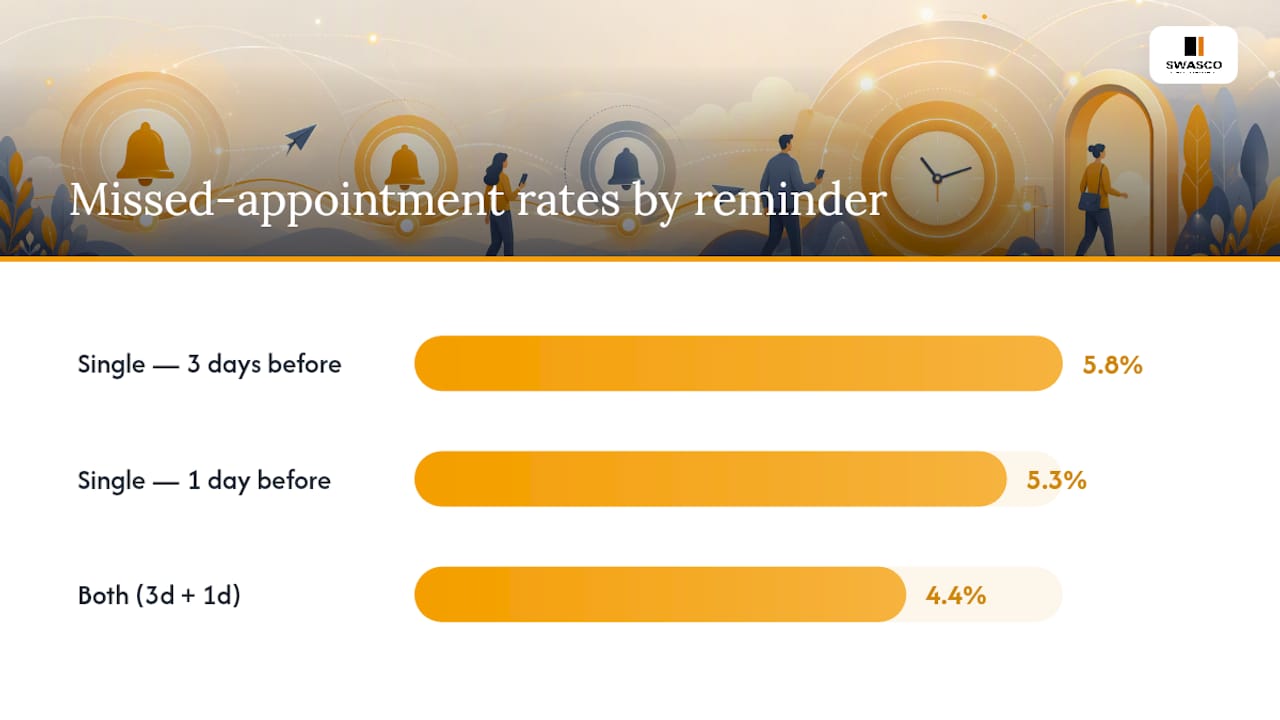
For most appointments, send a reminder 48 to 72 hours out, then a short nudge 2 to 4 hours before the visit. New patients or prep-required appointments do better with an earlier heads-up at 4 to 5 days, followed by the same closer touches. This is not a guess. A randomised trial of 54,066 patients found that two reminders (one 3 days out, one 1 day out) cut missed appointments to 4.4%, against 5.8% for a single 3-day reminder and 5.3% for a single 1-day reminder.
That gap looks small until you scale it. The trial's number needed to treat was 76, meaning for every 76 patients moved from a single reminder to two, one extra missed appointment gets prevented. Run that across a busy clinic or salon booking hundreds of appointments a week, and the maths starts to matter.
Channel matters too, but less than sequence. Match the channel to what the patient actually reads: SMS and phone calls performed similarly well in the trial, while email needs to go out earlier because open rates lag. The core rule holds regardless of channel: one reminder beats none, two beats one, and timing them right beats sending more.
- Default sequence: 48–72 hours before, plus 2–4 hours day-of
- New/prep visits: add a 4–5 day initial touch
- Two reminders reduced no-shows to 4.4% vs 5.3–5.8% for single reminders (source)
- Match channel to patient habit and appointment complexity, not convenience
Key Takeaways
Two reminders timed at 48 to 72 hours and 2 to 4 hours before an appointment reduce no-shows more reliably than any single reminder, regardless of channel.
| Point | Details |
|---|---|
| Default sequence | Send a primary reminder 48–72 hours out and a day-of nudge 2–4 hours before, or evening-before for morning slots. |
| Two beats one | Trial data shows two reminders cut missed appointments to 4.4%, against 5.3–5.8% for a single reminder. |
| New patients need more lead time | Add an earlier 96–120 hour touch for new patients, procedures, and prep-required visits. |
| Channel follows behaviour, not habit | Use SMS or phone for same-day nudges; email needs more lead time due to slower open rates. |
| Test before rolling out | Run a 4 to 6 week A/B test on one variable (timing or reminder count) before changing your default sequence practice-wide. |
Table of Contents
- Choosing channels: SMS, phone, and email timing
- What timing schedule actually works: windows and sequences
- What the research actually shows about reminder timing
- Adjusting timing by appointment type and patient risk
- Best times of day and days of the week to send reminders
- How many reminders to send without causing fatigue
- Running an A/B test to prove your timing changes work
- Message templates for reminders that actually get answered
- Tracking the right numbers to prove timing changes work
- How automated systems put this timing into practice
- Key research and practitioner resources
- Why practitioners overcomplicate reminder timing
- Sources
Choosing channels: SMS, phone, and email timing
The channel you pick changes how early you need to send, not just how the message looks. SMS gets read fast, usually within minutes, which makes it the right tool for same-day nudges as well as advance reminders. Phone calls, particularly automated IVR calls, carry a similar weight. In the same trial that established the two-reminder rule, text and call recipients showed comparable missed-appointment rates: call recipients who got both reminders and text recipients showed similarly improved missed-appointment rates compared with single reminders.
Email behaves differently. It sits in an inbox rather than a pocket, and open rates depend heavily on subject lines and time of day, so email reminders need more lead time to land before the moment passes. If email is your only channel, send earlier than you would with SMS, and treat it as the awareness layer rather than the confirmation layer.
Here's how the three channels typically stack up in practice:
- SMS: fast reads, high open rates, ideal for day-of nudges and two-way confirmation replies (YES/NO/RESCHEDULE)
- Phone/IVR: effective for high-risk patients, unconfirmed reminders, and anyone with lower digital literacy
- Email: slower engagement, better for early heads-up messages 4 to 7 days out, less reliable alone for same-day timing
Appointment complexity should guide channel choice as much as patient preference. A routine 15-minute follow-up rarely needs a phone call. A pre-op consultation, a new-patient intake, or a specialist referral often does, especially if the earlier SMS or email reminder went unconfirmed. Practices with older or less tech-comfortable client bases tend to see phone reminders outperform text for exactly that reason. The sensible approach blends channels: SMS or email for the early touch, SMS for the day-of nudge, and phone reserved for patients who haven't responded.
What timing schedule actually works: windows and sequences
Evidence and practitioner data point to a handful of concrete windows that cover almost every appointment type. Building your reminder settings around these, rather than a single fixed rule, is what separates a system that reduces no-shows from one that just adds noise.
The default: 48 to 72 hours before. This is the primary reminder window for routine visits, follow-ups, and anything the patient booked more than a week in advance. It gives enough runway to reschedule without the message feeling premature. The trial behind the two-reminder rule used exactly this window (3 days) as the first touch, pairing it with a second reminder 1 day out.
New patients and prep-required visits: 96 to 120 hours, then closer follow-ups. Anyone booking a first appointment, a procedure, or a visit requiring preparation (fasting, paperwork, bringing documents) benefits from an earlier nudge. Practitioner data on new-patient scheduling suggests a 96 to 120-hour first touch, followed by a 48-hour reminder and a day-of confirmation if the earlier ones went unanswered, pushes confirmation rates above 80% when paired with two-way reply automation.
Day-of: 2 to 4 hours before, or evening-before for early slots. A morning appointment at 8am doesn't benefit from a reminder sent at 6am, when most people are asleep or already out the door. Send the day-of nudge the evening before instead. Afternoon and evening appointments work well with the standard 2 to 4-hour window.
Three sequences to copy directly into your reminder settings:
- Standard two-touch (routine visits): 72 hours before via SMS or email, then 2 to 4 hours before via SMS.
- New-patient three-touch: 96 to 120 hours before via email or SMS, 48 hours before via SMS, then 2 to 4 hours before (or evening-before for morning slots) via SMS.
- High-risk two-touch with voice fallback: 72 hours before via SMS, then a phone call at 24 hours if unconfirmed, replacing the standard day-of text.
Pro Tip: Build your evening-before fallback into the automation logic itself, not as a manual override. If an appointment starts before 10am, the system should automatically shift the day-of send to the previous evening rather than relying on staff to remember.
Most scheduling software and AI receptionist platforms let you configure exact-time sends or rolling windows tied to the appointment time, and sync those reminders with the calendar so a rescheduled booking automatically updates its reminder sequence. That single feature removes most of the manual error that creeps into spreadsheet-based reminder systems.
What the research actually shows about reminder timing
The strongest evidence on this topic comes from a single large randomised trial, and it's worth being precise about what it found rather than repeating the rounded-off version that circulates in marketing copy. Researchers randomised 54,066 patients across reminder combinations and tracked missed-appointment rates directly.
| Reminder condition | Missed-appointment rate |
|---|---|
| Single reminder, 3 days before | 5.8% |
| Single reminder, 1 day before | 5.3% |
| Both reminders (3 days + 1 day) | 4.4% |
The number needed to treat was moderate, meaning a measurable benefit in missed appointments when adding a second reminder compared with a single reminder, according to the trial's own analysis. The effect was stronger among patients flagged as higher-risk for non-attendance, which matters for how you segment your own reminder logic later.
A separate systematic review and evidence synthesis looked across the wider body of reminder research and reached a more cautious conclusion: reminders reduce no-shows overall, but the timing effect isn't uniform across settings. Single reminders sent anywhere from 1 to 7 days before an appointment showed comparable effectiveness in several studies, which tells you the exact day matters less than simply having a reminder land with enough lead time to allow a reschedule.
Put those two findings together and a sensible reading emerges. The single trial gives you a precise, replicable finding: two reminders beat one, and the specific 3-day-plus-1-day combination has hard numbers behind it. The review tells you not to over-engineer the exact hour or day for a single reminder, because the literature doesn't support one magic timestamp. What is well supported is the principle of a first reminder early enough to reschedule and a second reminder close enough to prompt action.
Generalisability deserves a caveat. The main trial ran in a specific clinical setting with a specific patient population, and channel mixes (text versus call) varied within that trial rather than being tested as a clean single variable. Practitioner-level data backs this up in a more applied way: one analytics case study found that shifting Friday-afternoon reminders to a 72-hour window, rather than the shorter windows used for other weekdays, improved confirmation rates within 90 days, precisely because Friday appointments were losing their day-of nudge to the weekend gap.
Adjusting timing by appointment type and patient risk
Not every appointment carries the same risk of a no-show, and treating them identically wastes reminder capacity where it's needed least while under-serving where it's needed most.
New patients, procedures, and specialist referrals sit at the top of the risk list. These appointments often involve unfamiliarity with the practice, more preparation steps, and longer lead times between booking and the visit itself, all of which give more opportunities for the appointment to slip a patient's mind. Add an earlier touch (the 96 to 120-hour window covered above) and don't rely on a single channel; if the first reminder goes unconfirmed, escalate rather than repeat.
Patients with a history of missed appointments deserve a different treatment entirely. Simple flag-based segmentation, built from nothing more sophisticated than a patient's own attendance history, identifies who benefits most from extra touches and voice follow-up rather than another text. You don't need predictive modelling for this. A basic rule like "two or more missed appointments in the last 12 months triggers a phone call at the 24-hour mark instead of SMS" captures most of the benefit.
Segmentation rules worth building into your reminder settings:
- New patients: earliest touch at 96 to 120 hours, minimum three total reminders
- Routine follow-ups: standard 72-hour plus day-of sequence, two touches
- Procedures or prep-required visits: earliest touch at 96 to 120 hours, include explicit prep instructions in the message itself
- Patients with 2+ prior no-shows: add a phone call fallback if SMS or email goes unconfirmed within 24 hours
- Specialist or high-cost slots: treat as high-risk by default given the revenue impact of an empty slot
Pro Tip: Don't build risk segmentation around demographics or assumptions about who "seems likely" to miss an appointment. Use actual attendance history. It's more accurate and avoids reinforcing bias in who gets the extra follow-up.
The trial evidence backs this differentiated approach directly: the two-reminder effect was stronger in patients already flagged as higher-risk for non-attendance, which means the extra reminder budget you spend on your highest-risk patients returns more than spreading the same effort evenly across everyone on the schedule.
Best times of day and days of the week to send reminders
Timing within the day matters almost as much as timing within the week. A perfectly sequenced reminder that lands at 5am gets ignored, deleted, or read too late to prompt a reschedule.
Data on read and engagement behaviour points to two strong windows: 8 to 10am and 5 to 7pm. These correspond to when people check phones after waking and after finishing work, and reminders sent inside them show higher read rates than pre-dawn or late-night sends. A midday window, roughly 12 to 2pm, works reasonably well too, though it competes more with lunch-hour distraction than the morning and evening slots.
Day-of-week adjustments matter more than most reminder settings account for. Appointments booked for Monday morning need their "day-of" nudge to land on Sunday evening or very early Monday, not at 6am when the message can't realistically prompt a reschedule if something's gone wrong. Friday and weekend appointments carry a related risk: a reminder timed for "24 hours before" a Monday visit falls on a Sunday, when people are less likely to be checking work-related messages or thinking about the week ahead.
Rules worth building into your send schedule:
- Send primary reminders inside 8–10am or 5–7pm windows for the best read rates
- Avoid sends before 7am or after 9pm regardless of the calculated window
- Shift Monday-appointment day-of reminders to Sunday evening
- For Friday appointments, extend the primary reminder to a full 72 hours to avoid the message landing over the weekend when response rates drop
- Adjust the day-of nudge based on appointment start time: evening-before for anything starting before 10am, same-day morning for afternoon and evening slots
That last point is worth dwelling on briefly. A single fixed "send 3 hours before" rule breaks down completely for early-morning appointments, since 3 hours before an 8am slot is 5am. Building the evening-before logic into your default settings, rather than treating it as an exception, avoids this failure mode automatically.
How many reminders to send without causing fatigue
Two reminders is the right default for most appointments, backed directly by the trial data showing the 3-day-plus-1-day combination outperforming either reminder alone. Three reminders make sense for new patients, high-value procedures, or prep-required visits where the cost of a no-show is higher and the extra touch has more to offer. Beyond three, the returns diminish and the risk of annoying the patient starts to outweigh the benefit.
Reminder fatigue is real but measurable, and you don't need to guess at it. Watch for:
- Opt-out rates on SMS or email reminders climbing month over month
- Direct complaints about message volume, either verbal or through review platforms
- Satisfaction survey feedback mentioning communication frequency specifically
- Declining response rates to later reminders in a sequence, which often signals the earlier ones already did their job or already caused disengagement
Capturing consent and channel preference at the point of booking is the simplest defence against fatigue complaints. A patient who's told you they prefer SMS over phone calls, or who's opted into a maximum of two reminders, is far less likely to flag your system as intrusive, even if the underlying sequence is identical to what everyone else receives. This also protects the practice operationally: preference data lets you route the highest-risk patients into more intensive follow-up without over-reminding everyone else.
Running an A/B test to prove your timing changes work
Before changing a single reminder window, capture a baseline. Pull no-show rates, confirmation rates, and cancellation-fill rates from the last three to six months, broken down by appointment type (routine, new patient, procedure) rather than lumped together. Averages hide the segments where the real problem lives.
- Set your baseline metrics. Record confirmation rate, no-show rate, and average lead time between reminder send and appointment for each appointment type.
- Pick one variable to test. Test either the timing window (72 hours vs 48 hours as the primary reminder) or the reminder count (single vs two reminders), never both simultaneously, or you won't know which change drove the result.
- Split appointments randomly within each segment. Alternate by booking ID or day of week rather than by patient choice, to avoid selection bias skewing the comparison.
- Run the test for at least four to six weeks. Shorter windows rarely generate enough completed appointments per arm to see a reliable difference, particularly in smaller practices.
- Compare confirmation and no-show rates between arms. A meaningful shift is usually a full percentage point or more given typical appointment volumes, mirroring the scale of difference found in the large-scale randomised trial.
- Roll out the winning variant practice-wide, but keep monitoring for at least another month to confirm the effect holds outside the test conditions.
| Test design | What it isolates | Minimum practical run time |
|---|---|---|
| Timing window test (72hr vs 48hr primary reminder) | Optimal lead time for your patient population | 4–6 weeks |
| Reminder count test (single vs two reminders) | Value of adding a second touch | 4–6 weeks |
Pro Tip: Smaller practices worried about sample size should test at the appointment-type level rather than practice-wide. Testing your new-patient sequence against 40 to 50 bookings a month still produces a usable signal faster than waiting for enough volume across every appointment type combined.
Iterating matters more than getting the first test perfect. If the 72-hour window doesn't move the needle for routine visits, try 96 hours next rather than abandoning the practice of testing altogether. The practitioner data on Friday-appointment timing came out of exactly this kind of iterative adjustment, not a single perfect test.
Message templates for reminders that actually get answered
Copy for reminders works best short, specific, and built around a single clear action. A booking confirmation sent immediately after scheduling sets expectations early: "Your appointment is confirmed for [date] at [time]. Reply YES to confirm, RESCHEDULE to change." That single message, sent at the point of booking, does double duty as a receipt and an early confirmation opportunity.
For the 72-hour and 48-hour reminders, keep the message to one line plus a call to action: "Reminder: your appointment is in 3 days ([date], [time]). Reply YES to confirm or RESCHEDULE if you need a new time." The day-of or 2 to 4-hour message can be even shorter: "See you today at [time]! Reply if anything's changed."
Phone scripts for unconfirmed patients should stay brief and give an easy out: introduce yourself, state the appointment time, and offer to reschedule on the spot rather than just leaving a voicemail asking them to call back.
Practical rules for every template:
- Lead with the date and time, not the practice name
- Give exactly one clear reply option per message (confirm, cancel, or reschedule), not all three competing for attention
- Keep SMS under 160 characters where possible to avoid multi-part message splitting
- Avoid all-caps and excessive punctuation, which read as more aggressive than intended
- State the cancellation policy once at booking, not in every reminder
Accessibility matters here too. Plain language, no jargon, and a consistent structure across every touch make it easier for patients with lower digital literacy or non-native speakers to understand exactly what's being asked of them. For salon and beauty businesses specifically, SMS reminder templates tuned to shorter, less clinical appointments tend to perform better with a slightly more conversational tone than a medical practice would use.
Tracking the right numbers to prove timing changes work
Four numbers matter more than any others: confirmation rate (percentage of reminders that get a YES or equivalent response), no-show rate (appointments missed without cancellation), cancellation-fill rate (how many cancelled slots get rebooked before the appointment time), and revenue per available slot, which ties the whole exercise back to the business outcome that justifies the effort.
The number needed to treat concept translates directly into a business calculation: if your two-reminder sequence has an NNT of 76, and your average appointment value is known, you can calculate roughly how many additional reminders it takes to protect one appointment's worth of revenue. That's a far more useful number to bring to a practice manager meeting than "no-shows went down."
- Report confirmation rate and no-show rate weekly, broken down by appointment type
- Report cancellation-fill rate monthly alongside rebooking turnaround time
- Bring revenue-per-slot figures to quarterly reviews, tied to any timing changes made in that period
- Flag any segment (day of week, appointment type, channel) that deviates more than a couple of percentage points from the practice average
How automated systems put this timing into practice
Manually managing a three-touch sequence, segmented by patient risk and appointment type, across multiple channels, is realistic for a handful of bookings a week and unworkable at scale. This is where an automated receptionist workflow earns its place: it applies the segmentation rules, channel logic, and timing windows covered above consistently, every time, without a staff member remembering to check who's unconfirmed.
Talk2Aiva handles this by building the reminder sequence directly into the booking and calendar sync workflow from setup. When an appointment is booked through calls, SMS, website chat, or social media, the system schedules the appropriate reminder sequence automatically, adjusts timing based on appointment type and start time, and escalates to a phone follow-up if an SMS reminder goes unanswered within your chosen window. Confirmation replies feed straight back into the calendar, so a rescheduled or cancelled slot doesn't sit there generating a wasted reminder.
Getting a system like this running well involves a handful of concrete steps:
- Setup and onboarding that maps your existing appointment types to the right reminder sequence
- Workflow templates for new-patient, routine, and high-risk segments, built once and applied automatically
- Ongoing training so the AI handles confirmation replies, rescheduling requests, and escalations correctly
- Continued technical support and optimisation as your own confirmation-rate data reveals which windows work best for your specific patient base
The advantage over a manual spreadsheet-and-reminder-app approach isn't just time saved. It's consistency: every patient gets the sequence they should, based on their risk profile and appointment type, without depending on a receptionist remembering the rule on a busy Friday.
Key research and practitioner resources
The randomised trial on reminder timing provides the core evidence for the two-reminder sequence. The systematic review of reminder systems offers wider context on timing variability. For patient engagement platform background, see this provider's guide to patient engagement technology.
Why practitioners overcomplicate reminder timing
Most practices treat reminder timing as a settings problem rather than a segmentation problem. They pick one window, apply it to every patient, and wonder why confirmation rates plateau. The trial evidence is clear that two touches beat one, but the more overlooked point is that the same two touches don't suit a first-time patient and a five-year regular equally well.
The conventional advice, "send a reminder a day or two before," isn't wrong, it's just incomplete. It ignores appointment type, patient history, and the mundane reality that a 6am text before an 8am appointment gets seen too late to matter. What the evidence actually supports is a tiered system: standard sequences for routine visits, longer lead times for anything unfamiliar or preparation-heavy, and voice escalation for patients who've already shown a pattern of missing appointments.
If you take one thing from this and implement it first, make it the evening-before adjustment for morning appointments. It costs nothing to build, and it fixes the single most common timing mistake practices make without realising it.
Sources
- Optimizing number and timing of appointment reminders: a randomized trial
- Appointment reminder systems are effective but not optimal: results of a systematic review and evidence synthesis