
For a deployed AI receptionist, AI chatbot training means configuring intents, scripts, booking workflows and lead-qualification rules so the system can capture, qualify and book leads 24/7 — it has nothing to do with building machine-learning models. The single best next step: map your highest-volume customer journey (the calls or website chats that typically end in a booking) and schedule a one-location soft launch. The ICO's GDPR guidance governs how you capture and store that conversation data, and Talk2Aiva by SWASCO handles the entire process — from onboarding to ongoing optimisation — for UK service businesses that want results without the technical heavy lifting.
Key takeaways
Configuring a deployed AI receptionist correctly — with live calendar and CRM integrations, a structured qualification flow and weekly transcript audits — is what separates a system that books appointments from one that merely takes messages.
| Point | Details |
|---|---|
| Define "training" correctly | AI chatbot training here means configuring intents, scripts and workflows — not building ML models. |
| Integrations drive value | Calendar and CRM connections let the AI book appointments in real time, not just collect messages. |
| Qualify in under 3 minutes | Use 5–8 structured questions; start with timing and problem before asking about budget or authority. |
| Pilot before you scale | Run a two-to-four-week soft launch at one location and audit transcripts weekly before expanding. |
| Talk2Aiva handles it all | Talk2Aiva by SWASCO delivers onboarding, training, integrations, a managed pilot and ongoing support. |
Table of Contents
- What does a trained AI receptionist actually do for your business?
- How to configure, train and launch your AI receptionist step by step
- What qualification questions should your AI ask?
- Which integrations do you need, and what does UK compliance require?
- How do you test, launch and keep improving your AI receptionist?
- What does a done-for-you rollout typically cost and how long does it take?
- Should you hire a done-for-you provider or build this in-house?
- What actually matters most when you go live
- Talk2Aiva covers every step so you can focus on your business
- Sources
What does a trained AI receptionist actually do for your business?
A properly configured AI receptionist does far more than answer the phone. Here is what you can expect once it is set up and running:
- 24/7 lead capture across calls, website chat, SMS and social channels
- Automatic qualification using branching questions to sort hot leads from tyre-kickers
- Appointment booking with real-time calendar sync, so slots are confirmed instantly
- CRM logging of every conversation, contact detail and qualification score
- SMS confirmations and follow-ups sent automatically after booking or enquiry
- Reduced admin time as routine queries are handled without staff involvement
As Salesforce's lead generation chatbot guide confirms, these systems engage visitors, gather contact and qualification data, and pass it directly to CRM and marketing automation tools.
There are limits worth knowing. The AI will not handle complex negotiations, give clinical or legal advice, or manage emotionally sensitive conversations. Build clear handoff rules so those interactions reach a human quickly. AI engagement for service businesses explains where the boundary sits for appointment-driven SMEs.
How to configure, train and launch your AI receptionist step by step
Follow this checklist in order. Each step builds on the last.
- Define scope and KPIs. Decide which channels (calls, webchat, SMS) you are activating first and set measurable targets: answer rate, booking conversion, transfer rate.
- Map your highest-volume customer journey. Identify the single path that generates the most bookings and document every question a caller or visitor typically asks. Conversational lead capture frameworks are a useful starting point.
- Build scripts and intents. Write the opening greeting, discovery questions, objection responses and closing confirmation. Keep language natural and consistent with your brand.
- Set qualification logic. Define the scoring thresholds that route a lead to "book now", "send resources" or "graceful exit" (more on this in the next section).
- Configure integrations. Connect your calendar, CRM, phone/VoIP line and SMS gateway before testing begins. Without these, the AI can only take messages — a fraction of the value.
- Set handoff rules. Specify the exact triggers (sentiment, topic, failed-understanding count) that transfer a conversation to a human.
- Run a privacy and consent check. Confirm you have a lawful basis for processing call and chat data, that consent language is visible, and that your data-retention policy is documented.
- Test thoroughly. Use the test cases in the optimisation section below.
- Soft launch at one location. Run for two to four weeks before expanding.
- Audit and iterate. Review transcripts weekly during the pilot, then monthly thereafter.
Pro Tip: Sequence your questions so timing and problem come first — "When are you looking to get started?" before "What's your budget?" Low-commitment questions early reduce drop-off and make the harder questions land with far less friction.
Privacy checklist before go-live:
- Lawful basis documented (legitimate interest or consent)
- Consent capture wording visible on webchat widget
- Call recording notice played at the start of every call
- Data stored on UK or EEA servers
- ICO registration confirmed or reviewed
What qualification questions should your AI ask?
Best practice for automated qualification is a structured flow of several questions completed quickly. Start with timing and problem, then move to budget and authority.
Sample opening questions (calls and webchat):
- "Are you looking to get something booked in the next week or two, or are you still exploring options?"
- "What's the main thing you're hoping we can help with today?"
- "Have you had this type of service done before, or would this be your first time?"
Discovery and qualification questions:
- "Do you have a rough budget in mind, or would it help to hear about our options first?"
- "Is it just yourself making this decision, or are there others involved?"
- "Are you based locally, or would you need us to travel to you?"
Scoring template:
| Question | Strong signal (2 pts) | Moderate signal (1 pt) | Weak signal (0 pts) |
|---|---|---|---|
| Timing | Within 2 weeks | Within a month | No timeframe given |
| Problem clarity | Specific need stated | Vague interest | Browsing only |
| Budget | Confirmed or aligned | Open to options | No budget mentioned |
| Authority | Decision-maker | Influencer | Third-party enquiry |
| Location | Local / in-area | Nearby | Out of area |
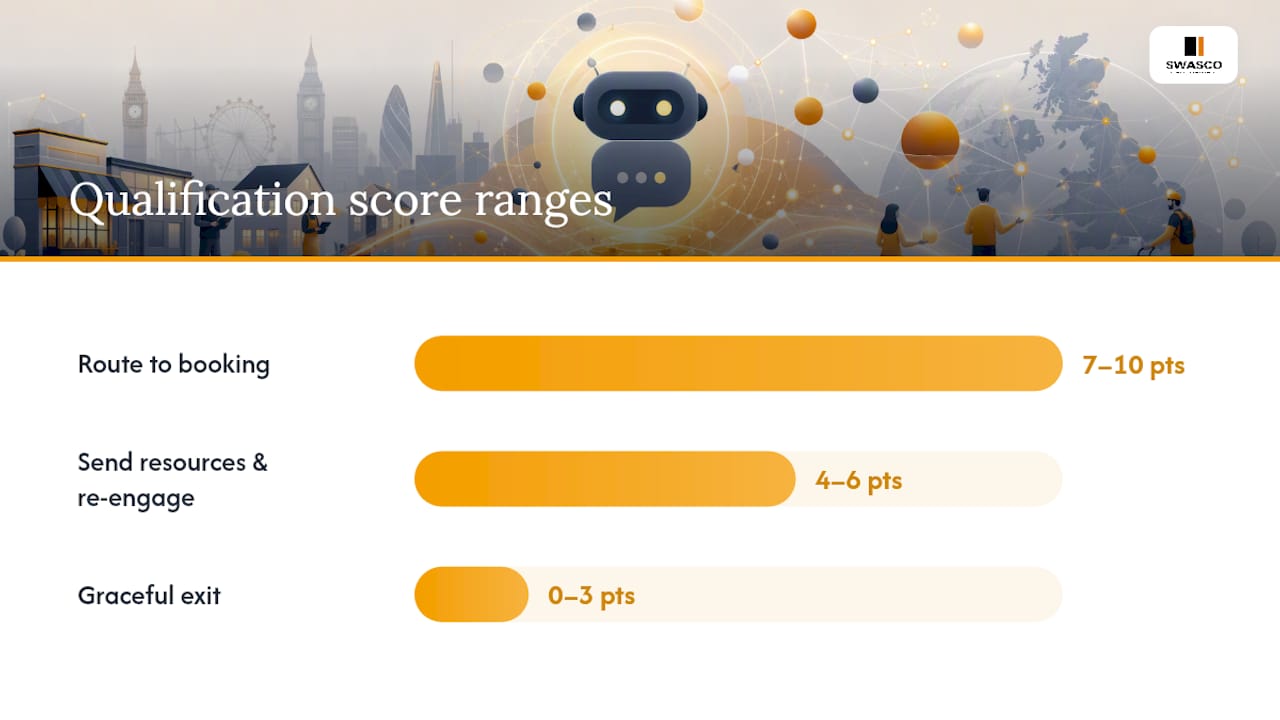
Scoring thresholds: 7–10 points = route to booking; 4–6 = send resources and re-engage in 48 hours; 0–3 = graceful exit with a follow-up sequence.
Conditional logic example 1 (fast route to booking): Caller states they want an appointment within two weeks and confirms budget. Score hits 8. The AI offers two available slots, confirms the booking and sends an SMS confirmation.
Conditional logic example 2 (escalate to human): Caller mentions a complaint or uses negative sentiment language. Regardless of score, the AI triggers an immediate transfer with a warm handoff message.
For lead scoring logic and thresholds tailored to specific service sectors, the SWASCO blog has sector-specific examples.
Which integrations do you need, and what does UK compliance require?
Integration checklist:
- Phone/VoIP line (direct number or call-forwarding)
- Calendar system (Google Calendar, Microsoft Outlook, or practice management software)
- CRM (HubSpot, Salesforce, or sector-specific tools)
- SMS gateway for confirmations and follow-ups
- Website chat widget (embedded on your contact and service pages)
- Social channels (Facebook Messenger, Instagram DMs where relevant)
- Webhooks or API connections to pass data between systems
Integration capability determines commercial value. As the SemLocal AI receptionist guide states, a system with live calendar and CRM connections can take real action; without those, it can only take messages.
Data flow: The AI captures name, contact details, enquiry type and qualification score. That data pushes to your CRM in real time. Call transcripts and chat logs are stored separately and should be retained only as long as your documented policy requires.
UK GDPR basics: You need a lawful basis (consent or legitimate interest) for processing enquiry data. For calls, play a brief recording notice at the start. For webchat, display consent language in the widget. Review your ICO registration annually and document your data-retention schedule.
How do you test, launch and keep improving your AI receptionist?
Test cases to run before go-live:
- Standard booking request (happy path)
- Out-of-hours enquiry with next-day follow-up
- Caller with a strong regional accent or non-standard phrasing
- Booking conflict (double-booked slot)
- Failed-to-understand path (three consecutive mismatches)
- Complaint or sensitive topic triggering human handoff
- Webchat abandonment mid-flow
Metrics to track in the first 30 days: answer rate, booking conversion rate, human transfer rate, and lead-to-book conversion. Add caller satisfaction (NPS or a post-call SMS rating) once the basics are stable.
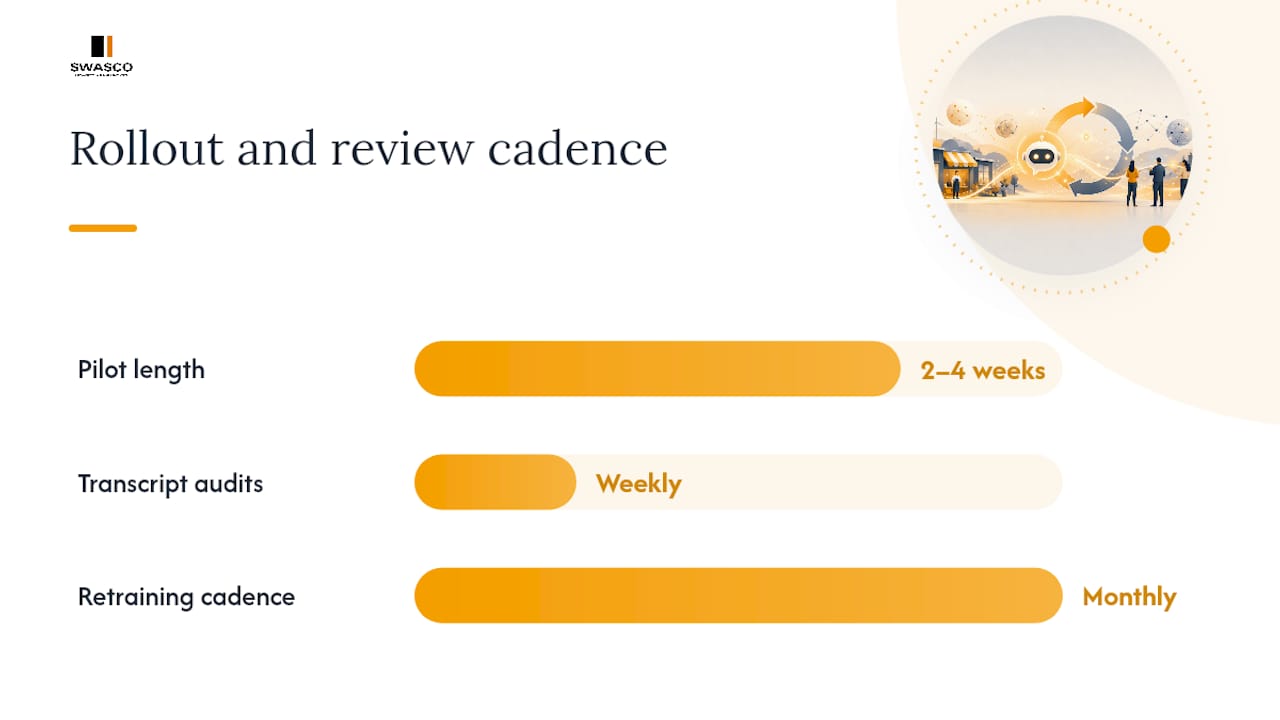
Phased rollout with weekly transcript audits separates a functioning AI receptionist from one that quietly damages your brand. Run a two-to-four-week pilot at one location, audit transcripts every week, and expand only after accuracy and booking targets are met. After the pilot, move to a monthly retraining cadence: update scripts for new services, adjust qualification thresholds based on conversion data, and add intents for any questions the AI repeatedly failed to handle.
What does a done-for-you rollout typically cost and how long does it take?
| Phase | Typical duration | What happens |
|---|---|---|
| Discovery and scoping | 1–2 weeks | Goals, journeys, integrations and compliance mapped |
| Build and configuration | 2–3 weeks | Scripts, intents, qualification logic and integrations built |
| Pilot (soft launch) | 2–4 weeks | One location live, weekly transcript audits, adjustments made |
| Full rollout and optimisation | Ongoing | Expand channels, monthly retraining, support included |
Cost drivers include call volume, number of integrations, custom training requirements and whether a human overflow tier is included. Done-for-you providers bundle these into a monthly subscription, which removes the need for in-house technical resource. For appointment-driven businesses, payback tends to be fast: recovering even a handful of missed bookings per week at average service values covers the monthly cost quickly.
For AI-driven lead generation ROI context, the broader marketing data supports the case for automation in service businesses.
Should you hire a done-for-you provider or build this in-house?
Hire a provider if:
- You need results within weeks, not months
- You have no in-house technical resource
- Your integrations are complex (multiple locations, multiple CRMs)
- You operate in a regulated sector (healthcare, legal, financial services) and need compliance support
- You want local accent tuning and human-handoff rules configured for you
- Ongoing optimisation and support need to be included, not bolted on later
Build in-house if:
- You have a dedicated technical team and time to spare
- Your use case is simple (single channel, no CRM integration)
- You are comfortable managing GDPR compliance and retraining cadence yourself
Questions to ask any provider:
- Which CRM and calendar systems do you integrate with natively?
- Who owns the training data and conversation transcripts?
- What triggers a human handoff, and how is it managed?
- What is your SLA for response and resolution?
- Is ongoing optimisation and retraining included, or charged separately?
- Can you show examples from my sector (dentistry, estate agency, salons, trades)?
Talk2Aiva by SWASCO is the recommended done-for-you option for UK service SMEs. It covers onboarding, AI training, workflow building, CRM and calendar integration, accent tuning, handoff configuration and a managed pilot — with ongoing optimisation and support included.
What actually matters most when you go live
The businesses that get the most from their AI receptionist are not the ones with the most sophisticated scripts. They are the ones that audited their transcripts religiously in the first four weeks and fixed the three or four intents that were causing repeated handoffs.
Start small. Pick one channel, one journey, one location. Get the qualification logic right before you add complexity. The integration that unlocks real value is the calendar connection — without it, you are collecting leads, not booking them. For lead nurturing after the initial capture, a simple re-engagement sequence for unqualified leads recovers revenue that most businesses do not even know they are losing.
The SWASCO blog's salon website chat guide shows exactly how this plays out in a real service context: mapping the conversation to a booking outcome, then automating the follow-up.
Talk2Aiva covers every step so you can focus on your business
Stop losing revenue to missed calls and slow responses. Talk2Aiva by SWASCO gives you a fully configured AI receptionist — handling calls, webchat, SMS and social — with every step done for you: onboarding, script writing, qualification logic, calendar and CRM integration, a managed soft launch, and ongoing optimisation included in your subscription.

Most clients are live within four to six weeks. The pilot phase includes weekly transcript reviews and script adjustments, so you go into full rollout with a system that already performs. Book a discovery call with SWASCO to see how Talk2Aiva fits your business and get a clear timeline and cost estimate.
Sources
- Guide to Lead Generation Chatbot | Salesforce
- AI receptionist explained: the UK small business guide – SemLocal
- Qualify Leads Automatically: The 2026 Chatbot Playbook — BotHero